
LLMfit: Stop Guessing Which LLM Your Hardware Can Actually Run
LLMfit is a Rust-based terminal tool that scans your hardware and scores 157 LLMs across 30 providers for compatibility, speed, and quality. Here is why it matters.
 Updated
7 min read
Updated
7 min read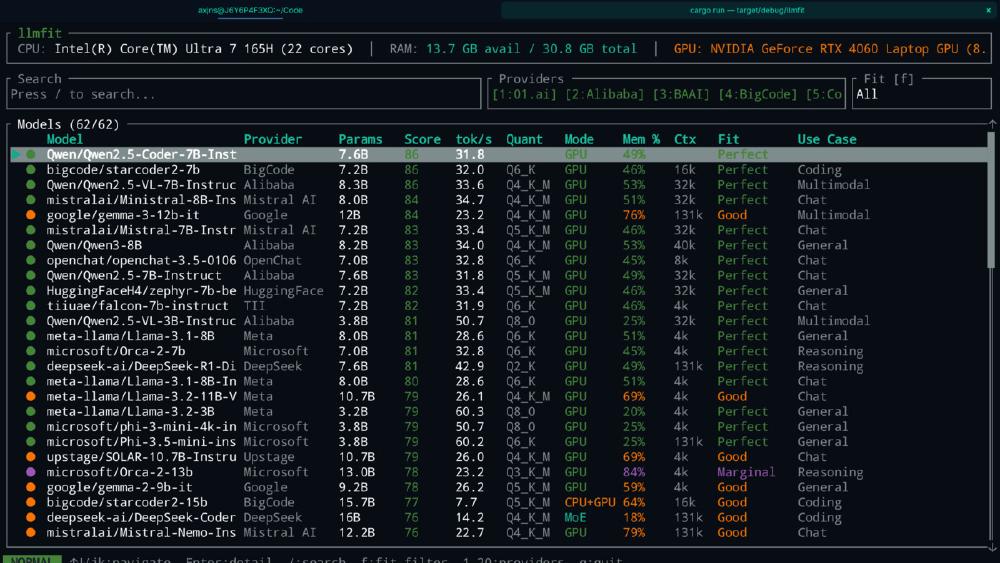
Everyone running local models has done the dance. You hear about a new LLM, download it, wait twenty minutes, launch it, and discover it either doesn't fit in VRAM or runs at three tokens per second. Then you try a smaller quantization, then a different model completely, and before you know it you have burned an afternoon on trial and error.
LLMfit kills that loop. It is a Rust-based terminal utility that detects your hardware, scans a database of 157 models across 30 providers, and tells you exactly which ones will run well on your machine - before you download a single byte.
What It Actually Does
LLMfit works in three steps:
Scans your hardware. Multi-GPU VRAM (aggregated across cards), CPU cores, RAM, and backend detection - CUDA, Metal, ROCm, SYCL, or CPU-only with ARM/x86 distinction. It identifies your vendor (NVIDIA, AMD, Intel Arc, Apple Silicon) and adapts its calculations accordingly.
Assesses every model in its database. For each of the 157 models, it calculates ideal quantization level, estimates tokens-per-second performance, determines whether the model fits completely in VRAM or needs CPU offloading, and classifies the fit as Perfect, Good, Marginal, or Too Tight.
Scores and ranks. Each model gets four scores from 0 to 100 - Quality, Speed, Fit, and Context - weighted differently depending on your use case. A coding task weights Speed higher. A reasoning task weights Quality.
The result is a ranked list of models that will actually work on your specific machine, with enough detail to make an informed choice.
Installation
Four options, all straightforward:
# Homebrew (macOS/Linux)
brew tap AlexsJones/llmfit
brew install llmfit

# Cargo (cross-platform, requires Rust toolchain)
cargo install llmfit

# Quick install script
curl -fsSL https://raw.githubusercontent.com/AlexsJones/llmfit/main/install.sh | bash

# From source
git clone https://github.com/AlexsJones/llmfit.git
cd llmfit && cargo build --release
The Scoring System
This is where LLMfit earns its keep. Rather than giving you a binary "fits / doesn't fit" answer, it assesses models across four dimensions:
| Dimension | What It Measures | Weight (Coding) | Weight (Reasoning) |
|---|---|---|---|
| Quality | Parameter count, model reputation | Medium | High |
| Speed | Estimated tokens/sec on your hardware | High | Medium |
| Fit | Memory use efficiency | High | High |
| Context | Window size vs. use-case needs | Medium | Medium |
The speed estimates are not hand-waved. LLMfit uses empirically derived baseline constants for each backend:
| Backend | Baseline (tokens/sec) |
|---|---|
| CUDA (NVIDIA) | 220 |
| ROCm (AMD) | 180 |
| Metal (Apple Silicon) | 160 |
| SYCL (Intel Arc) | 100 |
| CPU ARM | 90 |
| CPU x86 | 70 |
These baselines are then adjusted for model size, quantization level, CPU offload penalties (0.5× for partial offload, 0.3× for CPU-only), and MoE expert switching overhead (0.8×). The numbers are estimates, not benchmarks - but they're directionally useful, which is what matters when you are deciding between twenty candidate models.
The TUI
LLMfit defaults to a full terminal UI built on ratatui, and it's surprisingly capable for a model discovery tool:
- Search (
/) - filter by name, provider, parameter count, or use case - Fit filter (
f) - cycle through All, Runnable, Perfect, Good, and Marginal - Provider filter (
p) - narrow to specific providers (Meta, Mistral, Google, etc.) - Download (
d) - pull models directly via Ollama integration - Installed-first sorting (
i) - surface what you already have
For those who prefer plain output, --cli switches to a classic table format. Every command also supports --json for scripting and automation.
CLI Subcommands
Beyond the interactive TUI, LLMfit offers targeted subcommands for when you know what you want:
# Show detected hardware
llmfit system

# Top 5 perfectly fitting models
llmfit fit --perfect -n 5

# Search by name or size
llmfit search "qwen 8b"

# Detailed info on a specific model
llmfit info "llama-3-70b"

# Machine-readable recommendations
llmfit recommend --json --limit 5

# List all models in the database
llmfit list
The recommend subcommand with --json is especially useful for automation. You can pipe it into scripts that auto-configure Ollama, or feed it into an agent workflow that selects the best available model at runtime.
Ollama Integration
LLMfit talks directly to a running Ollama instance (default localhost:11434). It auto-detects which models you already have installed, lets you download new ones from the TUI with progress tracking, and maintains a mapping between HuggingFace model names and Ollama's naming conventions.
This means the workflow goes from "which model should I try?" to "downloading it now" in a single tool. No tab-switching, no copy-pasting model names, no checking whether you typed the quantization suffix correctly.
How It Handles Memory
The memory logic is smarter than it looks. LLMfit walks down a quantization hierarchy - Q8_0, Q6_K, Q5_K_M, Q5_K_S, Q4_K_M, Q4_K_S, Q3_K_M, Q3_K_S, Q2_K - and picks the highest quality quantization that fits in your available VRAM. If nothing fits at full context, it tries half-context before giving up.
For Mixture-of-Experts models like Mixtral or DeepSeek-V3, LLMfit accounts for the fact that only a subset of parameters are active at any time. This means MoE models often get better fit scores than their raw parameter count would suggest - which matches real-world behavior.
You can also override VRAM detection manually:
# Useful when autodetection fails or you want to simulate different hardware
llmfit --memory=24G
llmfit --memory=16000M
The Model Database
157 models from 30 providers, sourced from HuggingFace via a Python scraper and embedded at compile time. The coverage is broad:
- General purpose: Llama 3/4, Mistral, Qwen 3, Gemma, Phi
- Coding: CodeLlama, StarCoder2
- Reasoning: DeepSeek-R1 and its distilled variants
- Multimodal: Llama Vision
- MoE: Mixtral, DeepSeek-V2, DeepSeek-V3
The database is static (compiled into the binary), but updating it is a single command:
make update-models
This runs the HuggingFace scraper and regenerates the embedded data. Adding new models means editing a target list in scripts/scrape_hf_models.py and rebuilding.
Platform Support
| Platform | GPU Detection | Notes |
|---|---|---|
| Linux | NVIDIA (nvidia-smi), AMD (rocm-smi), Intel Arc (sysfs) | Full support |
| macOS | Apple Silicon unified memory | Best experience on M-series chips |
| Windows | NVIDIA (nvidia-smi), CPU fallback | Basic; AMD/Intel Arc limited |
Apple Silicon users get the best experience here. LLMfit correctly treats unified memory as available VRAM, so a MacBook Pro with 36GB of RAM will see models scored against the full 36GB - not the 8GB that a naive GPU-only check would report.
Who This Is For
If you are new to local LLMs: LLMfit answers the first question everyone asks - "what can my machine actually run?" Run it once, sort by fit score, and you have a shopping list of models to try. It pairs naturally with Ollama as the download/runtime layer.
If you manage multiple machines: The --json output and recommend subcommand let you script model selection across a fleet. A CI step that runs llmfit recommend --json on a GPU runner can automatically configure the best available model for that hardware.
If you are building agent systems: Model selection is often hardcoded or left to the user. LLMfit's JSON output can feed into an orchestration layer that picks the right model at deploy time based on whatever hardware is available.
If you're running AI coding CLI tools with local models: Tools like Aider and OpenCode support Ollama backends. LLMfit helps you pick which model to configure, rather than guessing or reading Reddit threads about what works on a "24GB GPU" when yours has 12GB.
What It Does Not Do
LLMfit doesn't benchmark models. The speed estimates are calculated, not measured. It doesn't evaluate output quality - the "Quality" score is based on parameter count and model reputation, not actual evaluation. And the model database, while regularly updated, is static: it won't discover a model released yesterday unless you rebuild.
These are reasonable trade-offs for what the tool is trying to be. An actual benchmarking suite would take hours to run. LLMfit gives you a good answer in seconds.
The Bottom Line
The local LLM ecosystem has a discovery problem. There are hundreds of models across dozens of providers, each with multiple quantization levels, and the right choice depends entirely on your specific hardware. LLMfit solves this neatly: one command, instant results, sorted by what actually fits.
It's open source, written in Rust (so it's fast and dependency-light), MIT licensed, and the Ollama integration means you can go from "what should I run?" to "running it" without leaving the terminal. For anyone taking local LLMs seriously, this should be one of the first tools you install.
brew tap AlexsJones/llmfit && brew install llmfit && llmfit
Three commands. You'll know what your hardware can handle before you finish reading this sentence.
Sources:
Last updated

