
Best Free AI Coding Tools for Developers in 2026
Seven free and open-source AI coding tools ranked by what they actually give you - no credit card, no trial expiry.
 10 min read
Seven tools, one budget. Photo: Pixabay
The days when "free AI coding" meant a 14-day trial are gone. In 2026, you have two genuine options: proprietary tools with permanent free tiers (GitHub Copilot, Codeium, Windsurf) and open-source tools you run yourself for nothing beyond API costs (Continue.dev, Cline, Aider). Neither camp requires a credit card to start, and both have gotten meaningfully better in the past six months.
The trade-off is control versus convenience. Proprietary free tiers are turnkey - install the extension, sign in, start coding. Open-source BYOK tools give you more flexibility but require an API key and some setup. One important heads-up before we get into the list: Gemini Code Assist's free individual tier ends June 18, 2026. I've included it because it still works right now and the limits are generous, but you should know it's on a countdown.
TL;DR
- GitHub Copilot Free is the zero-friction pick for most developers - 2,000 completions and 50 chats per month, just sign in
- Codeium plugin gives you unlimited autocomplete with no monthly cap across 40+ IDEs
- For full model control without paying a subscription, Continue.dev is the right call
Two Camps, One Decision
The free AI coding market splits cleanly down one line. On one side: proprietary free tiers cross-subsidized by paid plans - you get a rationed version of a polished product. On the other: open-source BYOK tools (Continue, Cline, Aider) that are free to install and run, where you pay per token to whatever model provider you connect.
With Claude Sonnet 4.6 at $3 per million input tokens, typical Cline usage runs $15-40/month in API costs. Cheaper than most paid subscriptions, with more capable models and no monthly caps. The catch is setup time and the lack of a polished GUI sometimes.
Comparison at a Glance
| Tool | Autocomplete | Chat / Agent | Open Source | Main Catch |
|---|---|---|---|---|
| GitHub Copilot Free | 2,000/mo | 50 req/mo | No | Caps hit fast with heavy use |
| Codeium plugin | Unlimited | Unlimited | No | No agentic mode |
| Windsurf Free | Unlimited | 25 credits/mo | No | Agent credits run out quickly |
| Continue.dev | BYOM | BYOM | Yes | Requires API key or local model |
| Cline | BYOK | BYOK | Yes | API costs add up on heavy use |
| Aider | BYOK | BYOK | Yes | Terminal only, no GUI |
| Gemini Code Assist | 6,000/day | 240/day | No | Free tier ends June 18, 2026 |
BYOM = Bring Your Own Model, BYOK = Bring Your Own Key
GitHub Copilot Free
GitHub's free tier is the easiest entry point on this list. Two thousand completions and 50 chat requests (including Copilot Edits) per month - no credit card, no setup beyond a GitHub account. The extension drops into VS Code, JetBrains, Visual Studio, and Neovim.
What you're getting isn't a stripped-down model. Copilot Free uses Claude Haiku and GPT-class models - the same underlying inference stack as the paid tier, just rationed. For pure inline suggestions during a few hours of daily coding, 2,000 completions is a reasonable ceiling for light users.
The 50 chat messages per month is the tighter constraint. If you lean on Copilot Chat for debugging or documentation questions, 50 requests lasts maybe two weeks of moderate use. The moment you start using Copilot Edits for multi-file refactors, that number drops fast.
 GitHub Copilot Free launched in December 2024 with a permanent free tier for individual developers.
Source: github.blog
GitHub Copilot Free launched in December 2024 with a permanent free tier for individual developers.
Source: github.blog
Best for: Developers who want zero-friction AI completions and don't need heavy chat or agent usage.
Codeium Plugin (Now the Windsurf Plugin)
After the Codeium-to-Windsurf rebrand, the VS Code plugin is now marketed as the "Windsurf plugin" - but the substance hasn't changed. Completions are genuinely unlimited for individual developers. No daily caps, no monthly resets, no trial period.
The free tier includes unlimited autocomplete and in-IDE chat, support for 70+ programming languages, and integrations for 40+ editors including JetBrains, Vim, Neovim, Sublime, and Eclipse. Code training opt-out is on by default, which matters if you're working on proprietary codebases.
One thing to keep straight: the plugin and the Windsurf IDE are separate products. The plugin gives you unlimited completions in your existing editor. The Windsurf IDE (a full VS Code fork) has a free tier with unlimited Tab completions but caps the Cascade agentic mode at 25 credits per month. If you're just adding autocomplete to your existing setup, use the plugin, not the full IDE.
Best for: Developers who want maximum completion volume without switching editors.
Windsurf Free
If you want to try an AI-native IDE at no cost, Windsurf's free tier gives you unlimited inline completions and access to AI chat. The Cascade multi-file agent is capped at 25 prompt credits per month.
That 25-credit ceiling is the honest constraint here. A single meaningful Cascade session - asking it to add a feature across several files - can consume 3-8 credits. At 25/month, you're looking at maybe four or five real agentic sessions before you hit the wall. Windsurf raised the Pro plan to $20/month in May 2026 (up from $15), which makes the free tier feel more like an extended trial than a permanent workflow.
The IDE itself is a full VS Code fork, so your existing extensions carry over. The autocomplete quality and context-awareness are truly strong - Windsurf's Tab completions are among the best in the market at any price tier.
Best for: Developers evaluating AI-native IDEs before committing to a subscription.
Continue.dev
Continue is a fully open-source AI coding assistant (Apache 2.0) that runs inside VS Code and JetBrains. You connect it to any model - cloud, local, or free API tier - and get chat, inline edits, autocomplete, and CI integration in a single extension.
The model flexibility is the main reason to pick Continue over proprietary options. You can point it at Claude Sonnet 4.6 via the Anthropic API, run a local Llama model via Ollama for fully offline inference, or connect a free Gemini Flash API key for no-cost cloud inference. The configuration lives in a JSON file in your repo, so it's portable across machines.
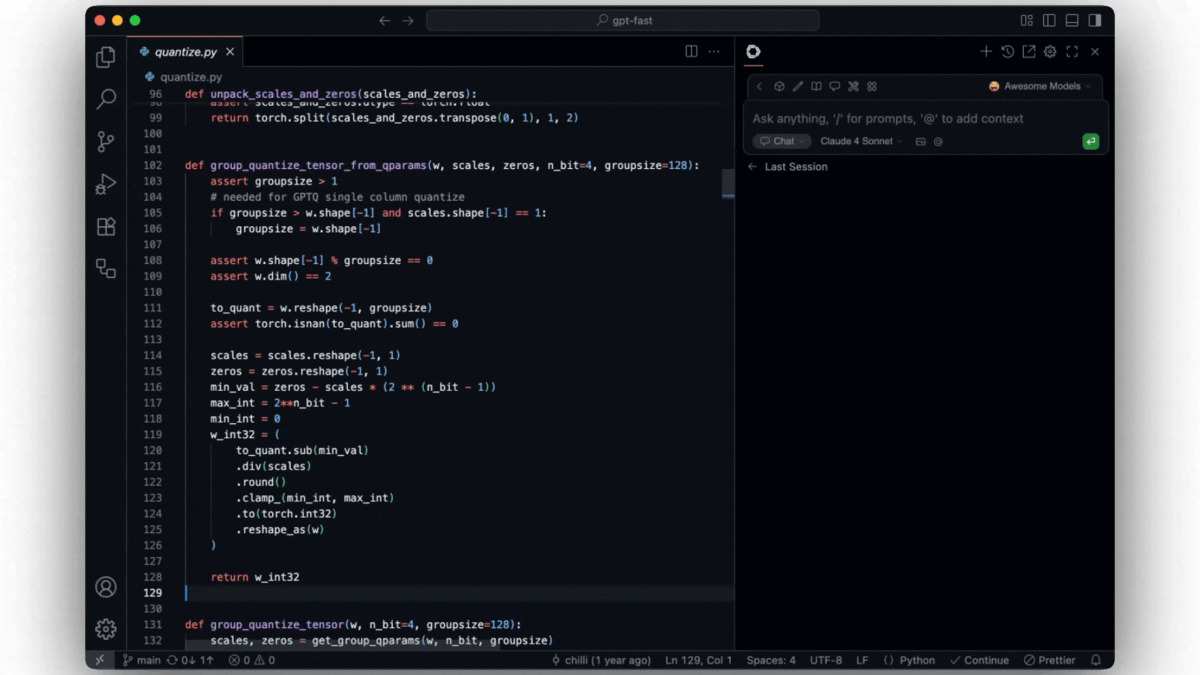 Continue's VS Code interface lets you chat, edit code, and run agents without leaving your IDE.
Source: github.com/continuedev/continue
Continue's VS Code interface lets you chat, edit code, and run agents without leaving your IDE.
Source: github.com/continuedev/continue
Continue's CI integration is worth watching even if you don't use it today. The tool can run AI checks on pull requests and report results as GitHub status checks - green if the code looks good, a suggested fix if not. It's early, but it's the direction open-source coding assistants are heading.
For a broader look at open-source coding tools beyond IDE extensions, we've covered the CLI-first options separately.
Best for: Developers who need full model control, work on proprietary code, or want zero ongoing subscription cost.
Cline
Cline is an open-source VS Code extension that's a proper autonomous coding agent. Unlike simple completion tools, it reads your codebase, writes new files, runs terminal commands, and executes multi-step tasks - all from within VS Code.
The extension is free. You bring an API key. Using Claude Sonnet 4.6, expect roughly $0.01-$0.10 per coding task. For daily active use, $20-50/month in API costs is realistic. That's still cheaper than most paid agent tiers, and you're getting a more capable model than what's behind most proprietary free plans.
The GitHub repository has passed 100K stars, and the user base skews toward indie developers doing serious agentic work - building features, not just autocompleting lines. If your use case involves asking AI to actually build something across multiple files, Cline's loop is notably more effective than Copilot chat or Cascade on the free tier.
For a comparison of how Cline stacks up against full paid IDEs like Cursor, see our Cursor alternatives roundup.
Best for: Developers who want serious agentic capability without a subscription, and who don't mind paying per-token API costs.
Aider
Aider is AI pair programming in your terminal. You run it from the command line, add files to the context, and describe changes in plain English. Aider writes the diff, runs your linter and tests, and commits the result to Git with a descriptive message.
The Git-native workflow is what separates Aider from everything else on this list. Every AI change becomes an atomic commit. Bad output? git revert. The discipline matters for engineers who want AI in their workflow without losing the audit trail that makes codebases maintainable.
Aider supports 100+ languages, voice input, and image context (drop in a screenshot to describe an UI). It connects to any cloud model via API or local models via Ollama. Light-to-moderate use with Claude Sonnet 4.6 normally runs $5-20/month. Heavy use with higher-tier models can reach $50+/month, but you control that by choosing which model to connect.
Best for: Senior engineers who live in the terminal and want an AI that fits into a git-first workflow rather than replacing it.
Gemini Code Assist - Use it now, not next month
Google's free individual tier is the most generous on this list by volume: 6,000 completions per day and 240 chat requests per day, with a 128K context window. Nothing else comes close for raw throughput.
But it has an expiry date. Google has confirmed that Gemini Code Assist IDE extensions will stop serving requests for individual users on June 18, 2026. The product is migrating to a new offering Google is calling "Antigravity." What that new product offers, and whether there's a free tier, isn't clear now.
If you're reading this before June 18, Gemini Code Assist is worth installing for the completion volume alone. 6,000 per day covers any realistic daily session. Just don't architect a workflow around it without checking Google's migration announcements first - the product you're relying on won't exist in less than a month.
Best for: Getting maximum completions on a short-term project before the June 18 deadline.
Best Picks
Start here if you want zero friction: GitHub Copilot Free. Sign in with a GitHub account, install the extension, done. The monthly limits are real, but for occasional use and light daily coding, 2,000 completions and 50 chats cover most sessions.
Start here if you want unlimited autocomplete: Codeium plugin. No caps, 40+ IDEs. The quality matches proprietary paid options for pure inline suggestions.
Start here if you want agentic capability without a subscription: Cline or Continue.dev. Bring an API key, accept some setup time, get a meaningfully more powerful tool than any free proprietary tier.
For the full comparison of paid AI coding tools with no free-tier restrictions, see our AI coding assistants comparison.
FAQ
Is GitHub Copilot Free actually free forever?
GitHub hasn't announced plans to remove the free tier. The 2,000 completions and 50 chat requests per month are a permanent offering, not a trial.
Can I use local models with these tools?
Yes - with Continue.dev, Cline, and Aider. All three connect to local models running via Ollama. That means zero API costs and fully private inference.
What's the cheapest path to unlimited AI coding?
Continue.dev or Cline connected to a local Ollama model gives you unlimited coding assistance at zero ongoing cost. The trade-off is setup time and that local models are generally less capable than frontier cloud models.
What about Amazon Q Developer?
Amazon Q Developer has a free tier with unlimited completions and 50 agentic requests per month, but AWS blocked new free tier signups as of May 15, 2026. If you don't have an existing account, it's not an option.
How do Cline and Aider compare?
Both are open-source BYOK tools. Cline runs inside VS Code with a GUI and is a full agentic system. Aider runs in the terminal with a Git-first workflow. If you spend your day in VS Code, use Cline. If you live in the terminal, use Aider.
Sources
- GitHub Copilot Plans and Pricing - official GitHub pricing page
- Announcing GitHub Copilot Free - GitHub Blog - free tier launch announcement
- Gemini Code Assist Quotas and Limits - official Google documentation
- Gemini Code Assist Free Tier Launch - InfoQ - March 2025 free tier announcement
- How is Codeium Free? - Windsurf - Windsurf's free model explanation
- Windsurf Pricing - official Windsurf pricing page
- Continue.dev GitHub Repository - source code and documentation
- Cline Pricing - official pricing page
- Aider AI Pair Programming - official documentation and features
- Amazon Q Developer Free Tier - official AWS documentation
- Amazon Q Developer End-of-Support - AWS Blog - new signup closure announcement
✓ Last verified May 22, 2026

