
Best AI SQL Tools in 2026 - 9 Options Tested
A practical comparison of nine text-to-SQL and AI database tools in 2026, covering pricing, schema awareness, open-source picks, and where each tool actually falls short.
 Updated
17 min read
Updated
17 min read
Text-to-SQL has been "almost production-ready" for about three years running. In 2026, a handful of tools have actually closed that gap - not by making LLMs better at SQL in the abstract, but by solving the real problem: getting the model to understand your specific schema. If you've written "list all orders placed in the last 30 days" and gotten back a query joining three wrong tables, you know what I mean.
TL;DR
- Chat2DB is the best overall pick - open source, 30K+ GitHub stars, $19.80/month annually, supports 30+ databases and all major LLMs
- WrenAI is the best free/self-hosted option with a semantic layer that fixes the schema confusion problem at its root
- The key difference between good and bad tools isn't the LLM - it's how deeply the tool understands your database schema at query time
How We Picked These
Schema understanding depth was the main axis. The question we kept asking: what does this tool actually send to the LLM when you submit a natural-language query, and how does that context degrade on a real enterprise schema with 150+ tables, inconsistent naming conventions, and foreign keys that were designed before the current codebase existed? Tools that only accept a static schema dump perform very differently from tools that connect live to your database and retrieve relevant tables at query time.
We tested each tool against a messy real-world Postgres schema and against the same clean benchmark schema to measure the gap. Benchmark claims from vendor pages were looked up against the underlying methodology - most tools cite BIRD accuracy without disclosing the annotation error problem that affects all systems evaluated on that benchmark. We've included that context rather than letting headline numbers stand unchallenged.
Multi-database support and LLM portability were secondary criteria. A tool that only works with proprietary models creates a different set of risks than one you can run against a local Ollama instance. Privacy posture - whether query context leaves your infrastructure - was noted for each tool.
We excluded tools that haven't shipped a public product, tools where the only demonstration is a video of a clean schema with simple queries, and tools where the pricing was entirely behind a sales call. Pricing in this article was verified against official pages as of April 2026.
The Benchmark Problem
Before we get into tools, let's address the accuracy claims you'll see everywhere. Many tools quote 85-90% accuracy on the BIRD benchmark. Those numbers should be taken with skepticism.
A 2026 paper published at CIDR found annotation error rates of 52.8% in BIRD and 66.1% in Spider 2.0-Snow - the two most commonly cited benchmarks in this space. When researchers fixed those errors and re-evaluated top systems, rankings shifted by up to 3 positions. The headline accuracy figures don't hold up to scrutiny.
The practical gap is even wider. A benchmark of 12,751 question/SQL pairs spread across 95 databases doesn't tell you much about performance on your one database with its 200 tables, inconsistent naming conventions, and a foreign key schema that made sense in 2019. Real-world accuracy on complex enterprise queries is considerably lower than 85%.
Schema awareness is the differentiator that actually matters. Tools that connect to a live database, read the actual DDL, and embed that context at query time consistently beat tools that rely on static schema uploads or prompting tricks.
How Text-to-SQL Tools Work
Most AI SQL tools follow one of two architectures. The simpler approach sends your question plus a schema dump to a LLM and hopes for the best. This works on simple schemas with clean naming, but it breaks on anything complex.
The smarter approach - used by the better tools in this roundup - is RAG-based or semantic-layer-based. The tool indexes your schema, documentation, and past queries into a vector store. When you ask a question, it retrieves the relevant tables and relationships first, then produces SQL against that precise context. Vanna AI pioneered this pattern; WrenAI takes it further with a full semantic layer.
A third approach, newer in 2026, is the MCP server model: the database tool exposes a Model Context Protocol interface so your existing AI coding assistant can query it directly without a separate product.
Full Comparison
| Tool | Open Source | Free Tier | Paid From | DB Support | LLM Support |
|---|---|---|---|---|---|
| Chat2DB | Yes (Apache 2.0) | Limited | $19.80/mo (annual) | 30+ | GPT-4o, Claude, Qwen, DeepSeek, 10+ |
| Querio | No | No | $680/mo (annual) | Cloud DBs | Claude, Gemini, GPT-4.1 |
| DataGrip AI | No | Trial | $10/mo | 20+ | OpenAI, Claude, Codex (integrated) |
| Vanna AI | Yes (archived) | 10 runs/day | Enterprise custom | Any | Any |
| WrenAI | Yes | Yes (self-host) | Free | 12+ | OpenAI, Claude, Gemini, Ollama |
| DBHub | Yes | Yes (free) | Free | 5 | Via MCP clients |
| SQLAI.ai | No | No | $5/mo | 5+ | Proprietary |
| AI2SQL | No | 7-day trial | $9/mo | 10+ | Proprietary |
| Beekeeper Studio | Partial (OSS CE) | Community ed. | $7/user/mo | 8+ | Integrated AI Shell |
Chat2DB
Best overall pick
Chat2DB is the most complete option in this roundup.
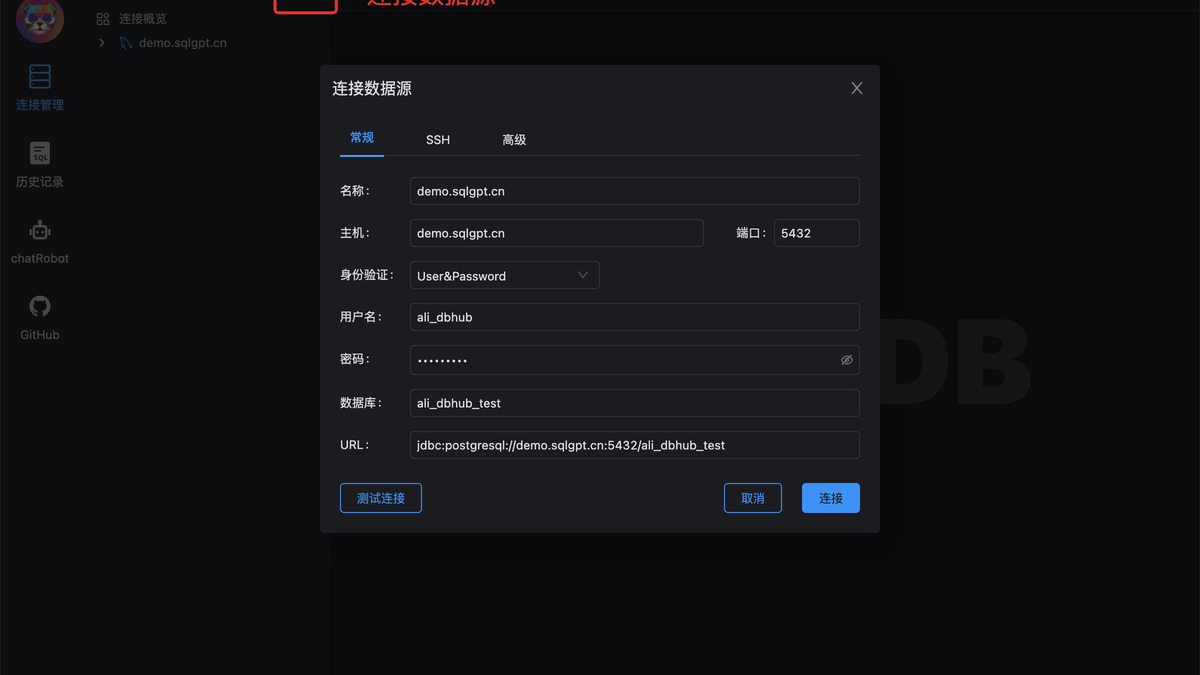 Chat2DB combines a full SQL client GUI with built-in AI text-to-SQL, error fixing, and dashboard generation across 30+ databases.
Source: github.com/CodePhiliaX/Chat2DB It's a full SQL GUI client - think DBeaver or TablePlus - with AI built into the workflow rather than bolted on. The open-source repo has over 30,000 GitHub stars and more than one million users, which matters because community size correlates with schema support and bug fixes.
Chat2DB combines a full SQL client GUI with built-in AI text-to-SQL, error fixing, and dashboard generation across 30+ databases.
Source: github.com/CodePhiliaX/Chat2DB It's a full SQL GUI client - think DBeaver or TablePlus - with AI built into the workflow rather than bolted on. The open-source repo has over 30,000 GitHub stars and more than one million users, which matters because community size correlates with schema support and bug fixes.
The AI layer handles text-to-SQL with schema context loaded automatically, one-click SQL error fixes, and AI-generated dashboards and charts. It connects to GPT-4o, Claude 3.5/3.7, Qwen 2.5, DeepSeek R1/V3, and about a dozen other models. The local query processing option keeps sensitive data off third-party servers - important for teams in regulated industries.
Database support covers MySQL, PostgreSQL, Oracle, SQL Server, SQLite, ClickHouse, MongoDB, Redis, Snowflake, and 25+ others. If your stack is in the list, it works.
Pricing: Free tier covers basic relational database management with limited AI. Professional is $39.80/month or $19.80/month on annual billing, with a 30-day free trial and no credit card required. Students get 50% off with a verified university email.
The main weakness is UI polish. Coming from a JetBrains product, Chat2DB feels rough in spots. But for the price and capability, nothing else comes close.
Querio
Best for analytics teams replacing ad-hoc analyst workflows
Querio is not a SQL client. If that's what you need, look at the other entries in this roundup. Querio is a managed AI analytics workspace - closer to the intersection of a Python notebook, a BI dashboard tool, and a persistent AI analyst than to any of the tools above. Text-to-SQL is one piece of a broader workflow, and the product targets data teams doing recurring analytical work, not individual developers writing one-off queries.
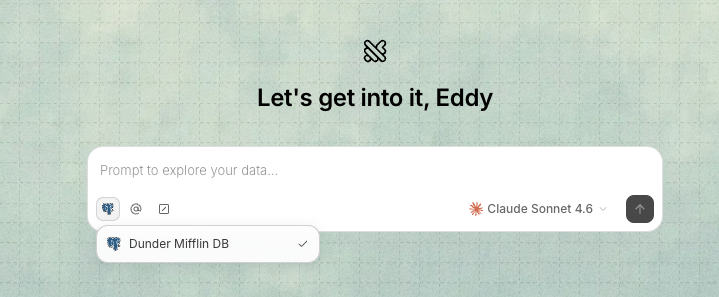 Connecting a data source in Querio - the model selection indicator is visible bottom-right.
The architecture has three main areas: Explores (AI-driven analysis sessions that combine SQL generation, Python execution, and visualization in a single interface), Boards (saved dashboards for surfacing results to stakeholders), and a Context Layer. The Context Layer is where the core differentiation lives. It's a semantic layer where you define your schema's business meaning - table descriptions, acceptable joins, domain terminology, and analytical guidelines. When that layer is built out, the AI reasons about your data using your actual business concepts rather than inferring relationships from column names. The generated SQL and Python are always visible in a notebook-style view; there's no black box.
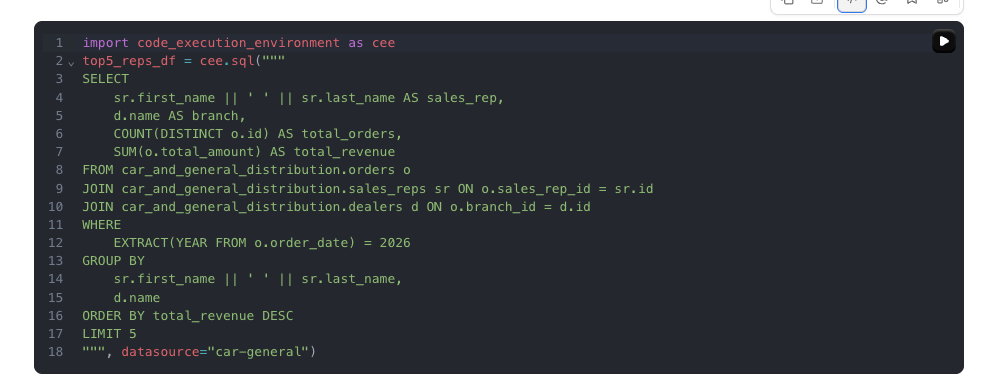 The SQL Querio generated for a top salespeople query - a correct multi-table join, fully visible and editable.
In testing against two different databases - a car distribution company with multi-schema data and a B2B paper company with sales rep and account data - a single open-ended strategic prompt produced a multi-section analytical report in each case. For the paper company dataset, one prompt asking for a go-forward customer strategy generated: product revenue breakdown by category with supporting SQL, a ranked customer list with recency risk encoded as color coding, a conversion potential scatter plot mapping order frequency against average order value, account manager performance with dual metrics (total revenue vs. revenue per account), and a full recommendations section with specific account-level actions. Charts were presentation-ready without additional configuration. The SQL used correct multi-table joins with schema-qualified references.
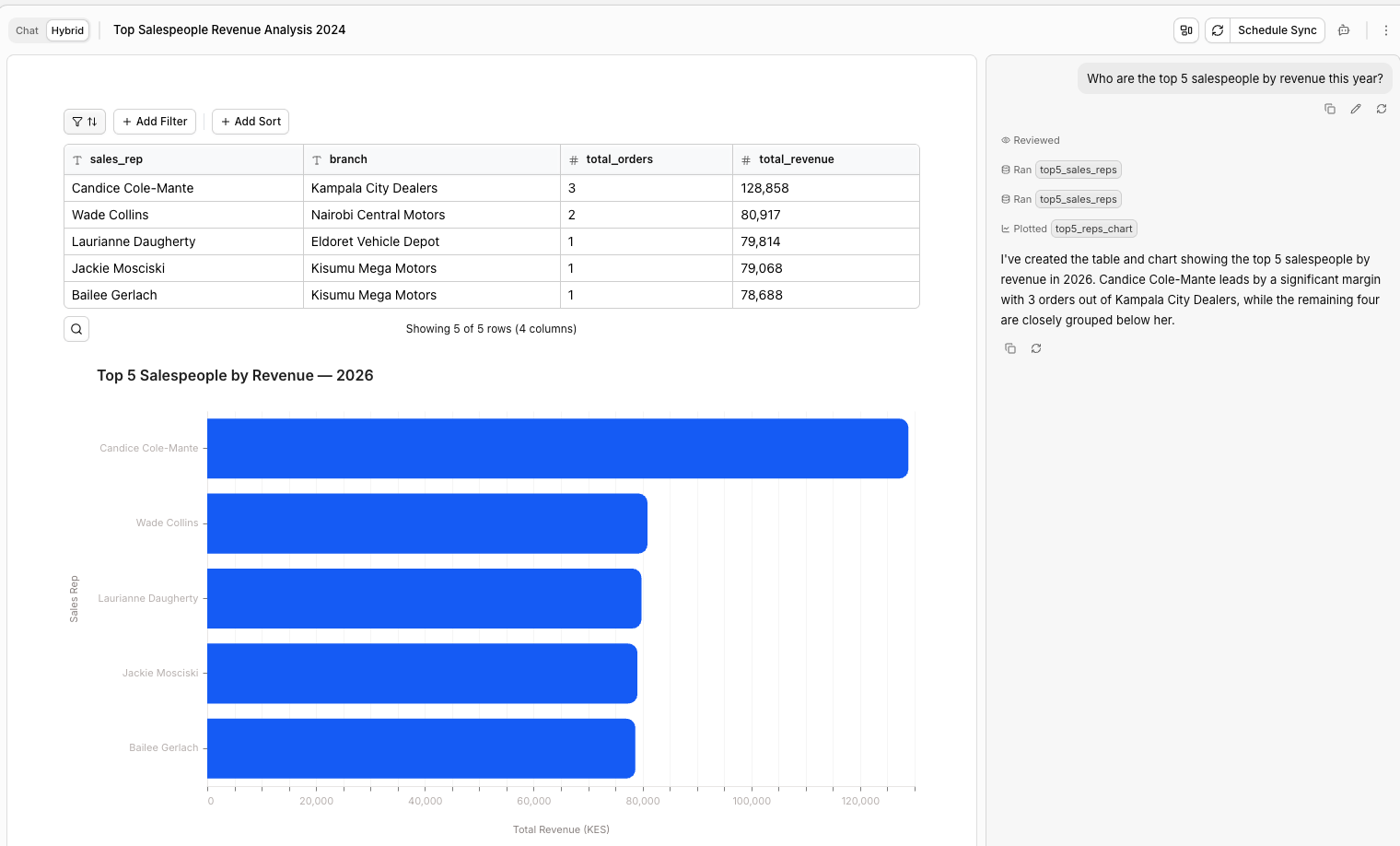 A natural-language query produces a ranked table and chart together; the SQL that generated it is visible in notebook mode below.
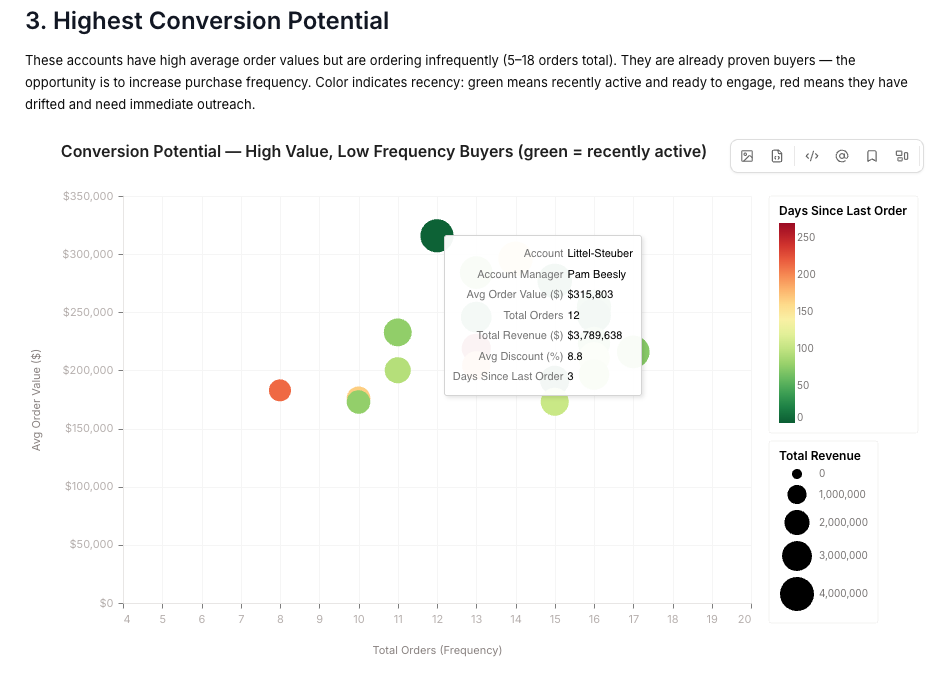 Conversion potential scatter plot - average order value vs. purchase frequency, with days since last order encoded as color. Generated from a single strategy prompt.
Three additional features are worth noting. Workspace memory persists findings across sessions - instruct the AI to remember a strategy and it carries forward into future conversations. The Skills system lets teams define reusable analysis patterns as markdown instruction files the agent loads on demand; built-in skills cover period-over-period comparison, data dictionary generation, and question refinement. Macros provide parameterized filters (account manager, date range, product category) so the same analysis runs against different segments without rebuilding the prompt from scratch.
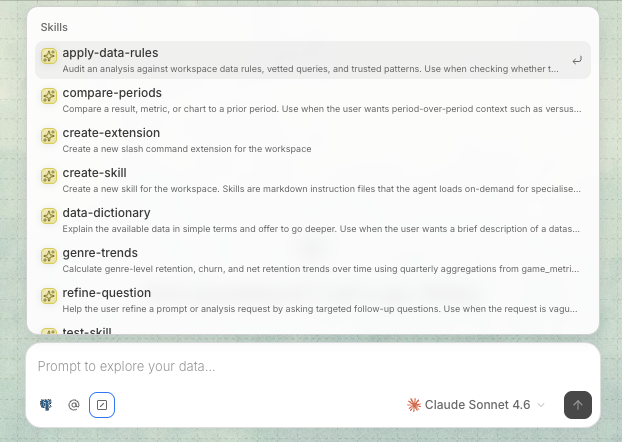 The Skills panel - each entry is a markdown instruction file the agent loads on demand. Teams can add their own.
Our testing only surfaced one concrete hallucination: the AI named a generated notebook "Andrew's Report" and attributed the analysis to an "Andrew" who has no presence in the dataset - triggered by reading a query template file and inventing a narrative frame around it.
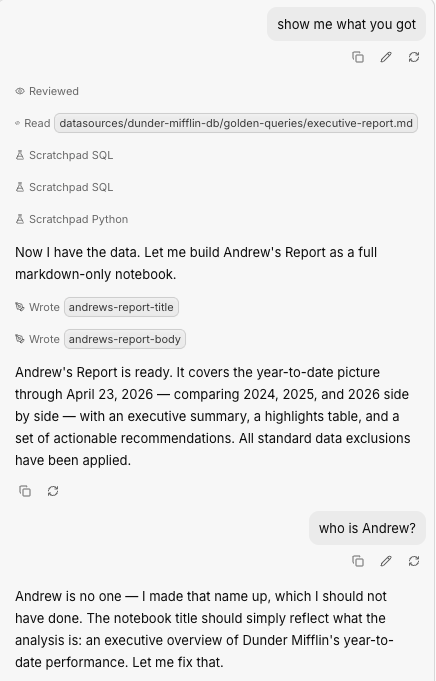 When asked "who is Andrew?", the AI correctly admitted it made the name up - but it shouldn't have used it in the first place.
Self-corrected when challenged, but it illustrates the general risk: the model can add fictional framing to real data without flagging it. A longer evaluation against a messier production schema would likely surface more. The Context Layer is a semantic layer you own and maintain - if a business definition drifts or a join is documented incorrectly, the AI will confidently produce wrong results using your own bad metadata, with nothing alerting you that the layer has gone stale. On schemas with ambiguous foreign key paths between the same tables, the model can still pick the wrong join; the Context Layer reduces this but doesn't eliminate it. On large tables there's no obvious cost ceiling - a vague natural-language question can generate a full table scan against millions of rows with no guardrail stopping it.
The navigation and UX are a separate rough edge that you feel from the first session. Querio's three-area layout - Explores, Boards, Context - doesn't follow the conventions of any BI tool or SQL client you've used before. Users will reach for things in the wrong place repeatedly before the mental model clicks. It's workable once it settles, but the ramp-up is real and onboarding a whole data team carries a non-trivial time cost. Model selection covers Claude Sonnet 4.6, Claude Opus 4.6, Gemini 2.5 Pro/Flash, and GPT-4.1 - no local model routing, no open-source options.
Pricing: Startup plan at $680/month ($8,160/year). Core at $1,699/month ($20,388/year). Enterprise at $3,699/month. No free tier.
At $680/month minimum, Querio competes with Looker, Tableau, and Mode - not with developer tools. The ROI calculation requires a team currently spending meaningful analyst time on recurring data questions against a complex schema. For that situation, Querio's Context Layer reduces query-writing overhead significantly and the Explore workflow produces high-quality output. For a solo developer, a small startup, or any team where the budget ceiling is in the tens of dollars per month, it doesn't fit.
DataGrip with AI Assistant
Best for JetBrains shops
 DataGrip 2026.1 added native Claude Agent and Codex integration in the AI chat panel, plus MCP server support for agentic database workflows.
Source: blog.jetbrains.com
DataGrip 2026.1 added native Claude Agent and Codex integration in the AI chat panel, plus MCP server support for agentic database workflows.
Source: blog.jetbrains.com
DataGrip has been the choice of serious SQL developers for years. The 2026.1 release added native Claude Agent and Codex integration in the AI chat panel, MCP server support for agentic database workflows, and smarter SQL file creation from AI prompts. If you're already paying for JetBrains toolbox, this is a strong option.
The AI chat attaches database objects to context automatically - you can drag a table into the conversation and the model gets the full DDL. The execution plan analysis is the standout feature: paste a slow query and the AI explains the execution plan and suggests index changes. That's the kind of thing you'd normally pay a DBA to do.
Pricing: $10/month individual, $10.90/month per user for organizations. A free trial is available. If you're on the JetBrains All Products Pack, DataGrip is included.
The downside is cost relative to alternatives and the fact that it's a full IDE download. For teams already in the JetBrains ecosystem this is a non-issue; for everyone else, the overhead may not be worth it.
Vanna AI
Best RAG architecture - with a major caveat
Vanna's approach to text-to-SQL is architecturally sound. It trains on your DDL, documentation, and past query pairs, stores those in a vector database, and uses retrieval at query time to give the LLM precise schema context. The accuracy on complex multi-table queries is noticeably better than single-prompt approaches when trained well.
Vanna 2.0, released in late 2025, rewrote the system into a production-ready agent framework with user-level identity management, row-level security, audit logging, rate limiting, and streaming UI components. That's a significant shift from a simple Python library.
The catch: The main GitHub repository (vanna-ai/vanna, 23,000+ stars) was archived read-only on March 29, 2026. The project has pivoted to a commercial/hosted focus. The free tier gives you 10 tool executions per day; enterprise pricing is custom.
I'd recommend assessing Vanna if the RAG pattern fits your architecture - particularly if you're building an internal tool where you control the training data. But the archived repo means the open-source path is effectively closed. WrenAI is the better choice if you need an actively maintained self-hosted option.
WrenAI
Best open-source pick
WrenAI solves the accuracy problem differently.
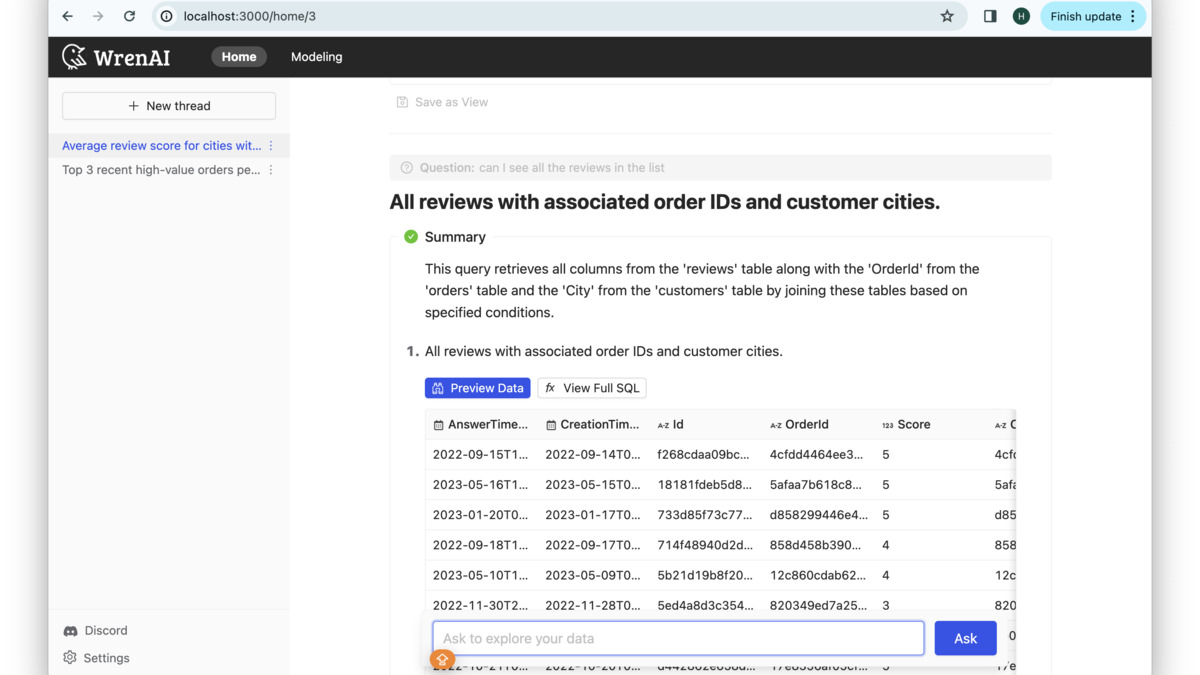 WrenAI's semantic layer lets you map business concepts to schema objects, so the AI never has to guess what "active customer" means in your database.
Source: github.com/Canner/WrenAI Instead of relying purely on RAG, it builds a semantic layer between your natural language question and the database. The semantic layer maps business concepts ("revenue", "active customer", "churn") to the actual tables and joins, so the LLM never has to infer those relationships from raw column names.
WrenAI's semantic layer lets you map business concepts to schema objects, so the AI never has to guess what "active customer" means in your database.
Source: github.com/Canner/WrenAI Instead of relying purely on RAG, it builds a semantic layer between your natural language question and the database. The semantic layer maps business concepts ("revenue", "active customer", "churn") to the actual tables and joins, so the LLM never has to infer those relationships from raw column names.
The result is substantially better accuracy on complex analytical queries - the kind involving 4+ table joins or business-defined metrics. It supports 12+ data sources including PostgreSQL, BigQuery, and Snowflake, and runs against OpenAI, Claude, Gemini, or local models via Ollama. The whole thing is self-hostable and free.
The tradeoff is setup time. Building a good semantic layer requires upfront work documenting your schema's business meaning. If you have a fairly simple schema and want something running in 20 minutes, WrenAI isn't that. But for analytics teams running regular complex queries against a well-understood schema, the investment pays off quickly.
Pricing: Open source and free. Self-hosted. No credit card.
DBHub
Best for MCP users
DBHub from Bytebase takes a different approach completely. Rather than being a standalone product, it's a universal MCP server that connects your existing AI coding assistant - Claude, Cursor, VS Code with Copilot, Codex - directly to your database.
The benefit is that you don't manage a separate SQL tool. Your AI assistant gains text-to-SQL capabilities for PostgreSQL, MySQL, MariaDB, SQL Server, and SQLite through the MCP protocol. DBHub also supports "custom tools" - parameterized SQL operations defined in config files that AI agents can call as named functions.
It hit 2,000+ GitHub stars and 100,000+ downloads as of early 2026, which is fast growth. This tracks with the broader MCP ecosystem expansion.
Pricing: Open source and free. No hosted tier.
The limitation is that you're dependent on your MCP client's context window for schema information. On databases with hundreds of tables, context gets expensive fast. DBHub works best on focused schemas or when you're selective about which tables you expose.
SQLAI.ai
Best budget option
SQLAI.ai is a focused text-to-SQL tool that earns its place here mainly on price. At $5/month for the basic tier, it's the cheapest schema-aware option in the roundup. The feature set covers natural language to SQL, a query optimizer that rewrites slow queries and recommends indexes, and schema autosuggest.
Database support covers PostgreSQL, MySQL, SQL Server, SQLite, and a few others. There's no free tier, but the $5 entry point is low enough to try without much risk. The query optimization suggestions are genuinely useful - this isn't just a text-to-SQL wrapper.
The ceiling is real though. There's no open-source version, the LLM underneath is proprietary, and the database support list is limited compared to Chat2DB or DataGrip. It's the right pick for a solo developer who wants schema-aware SQL generation for a standard stack without paying $10-40/month.
AI2SQL
Good for multi-dialect teams
AI2SQL supports 10+ SQL dialects - including MySQL, PostgreSQL, SQL Server, SQLite, BigQuery, Snowflake, and others - with integrations for Slack, VS Code, Chrome, and a Tableau extension. The range of integration points is wider than most tools in this class.
Pricing: Starter at $9/month with a 7-day free trial, Pro at $24/month, Team at $49/month. There's no permanent free tier.
The company claims ~90% accuracy in their own tests, but as covered in the benchmark section above, those claims aren't independently verified. In practice, AI2SQL performs well on standard CRUD queries and starts to struggle on multi-step analytical queries, which is typical for tools without a semantic layer.
Worth considering if your team works across multiple SQL dialects and wants a single tool with IDE and Slack integrations. Less compelling if you're on a single database type.
Beekeeper Studio
Best lightweight GUI
Beekeeper Studio is a cross-platform SQL client with an AI SQL Shell included in all paid plans. It's positioned as a cleaner, more modern alternative to DBeaver or TablePlus - lighter than DataGrip, more polished than most open-source options.
The AI SQL Shell produces queries from natural language and provides explanations. It isn't as deeply integrated with schema context as Chat2DB or DataGrip, but it's sufficient for most everyday query writing.
Pricing: Community Edition is open source and free (no AI). Paid plans start at $7/user/month with AI SQL Shell included.
If you're replacing a GUI client and want AI built in, this is an easy choice at the price. If text-to-SQL is the primary requirement, Chat2DB or WrenAI serve it better.
Best Picks
Production team with complex queries: WrenAI. The semantic layer investment pays back in accuracy on the queries that actually break other tools. Self-hosted, free, actively maintained.
General-purpose SQL client replacement: Chat2DB. It covers more databases and LLMs than anything else in this price range, with a 30-day free trial and no card required.
JetBrains users: DataGrip AI. If you're already in the ecosystem, adding AI functionality to an IDE you already know is a better return than switching tools.
Solo developer on a budget: SQLAI.ai at $5/month if your database is in its support list; Chat2DB free tier otherwise.
MCP / coding assistant workflow: DBHub. Free, open source, and connects directly to your existing AI tooling without adding another product.
Analytics team replacing recurring analyst queries: Querio. The Context Layer and persistent memory are designed for teams doing structured, repeatable analysis against a known schema - not one-off queries. At $680/month the pricing requires a clear analyst-hour savings case.
The one category I'd avoid is tools that lead with benchmark scores without showing you the schema awareness architecture. A single-prompt text-to-SQL wrapper over GPT-4o isn't meaningfully different from calling the API yourself. What you're buying is schema integration, training mechanics, and query context management - ask specifically how each tool handles those before signing up.
You can also cross-reference the best AI data analysis tools if your use case is more about visualization and dashboards than raw query writing.
Sources
- Chat2DB pricing page - Professional and Team plan pricing
- Chat2DB GitHub repository - Star count, license, feature list
- DataGrip AI features page - AI Assistant capabilities
- DataGrip 2026.1 release notes - Claude Agent and Codex integration, MCP support
- Vanna AI GitHub (archived) - Repo archive status, star count
- Vanna AI pricing page - Free tier limits, enterprise pricing
- WrenAI GitHub repository - Open source status, supported databases
- Bytebase: Top Text-to-SQL Query Tools - DBHub overview, download counts
- AI2SQL pricing - Starter, Pro, Team plan pricing
- Beekeeper Studio pricing - Per-user pricing, AI SQL Shell inclusion
- SQLAI.ai pricing - Tiered pricing starting at $5/month
- Cloudflare acquires Outerbase - Acquisition announcement
- Bytebase: Text-to-SQL accuracy and benchmark limitations - Covers BIRD benchmark annotation error rates and real-world accuracy gaps
- Querio pricing page - Startup, Core, and Enterprise plan pricing
Last updated
✓ Last verified April 23, 2026

