
Best AI Home Workstations 2026 - Full Buying Guide
Complete buying guide for AI home workstations in 2026 - pre-built machines and DIY builds for running local LLMs from 3B to 70B+ models, with benchmarks, part lists, and price-tier comparisons.
 17 min read
Running open-weights models locally went from hobbyist experiment to practical workflow over the past two years. The models are better, the tooling (Ollama, llama.cpp, MLX) got a lot more capable, and the hardware caught up. You can now run a 70B Q4 model at interactive speed on hardware that sits on your desk and draws under 500W. The question isn't whether to do it - it's which machine makes sense for your budget and use case.
TL;DR
- Budget pick: Used RTX 3090 build (~$2,000) runs 14B models at 70+ t/s with a solid upgrade path to dual-GPU
- Best value pre-built: GMKtec EVO-X2 (AMD Ryzen AI Max+ 395, 128GB unified memory, ~$1,999) - the only sub-$2K machine that fits a 70B model entirely in memory
- Best overall for serious 70B+ work: Dual RTX 5090 DIY build (~$10K) beats H100 on 70B inference at a fraction of datacenter cost
How We Picked These
We evaluated sustained inference throughput under continuous load - not the peak burst numbers vendors put in press releases. A workstation that hits 40 t/s for thirty seconds and then thermally throttles to 12 t/s is useless for real work. Every build recommendation here was validated against extended runs with Ollama and llama.cpp, using Q4_K_M quantization of 70B-class models as the benchmark workload, because that represents the upper boundary most home users actually care about. Memory bandwidth and VRAM capacity were the two hard constraints we started from; everything else was secondary.
Our sourcing combined hands-on testing with publicly available hardware teardowns, vendor datasheets, and community benchmarks from the r/LocalLLaMA and Ollama Discord communities. We treated manufacturer thermal ratings with appropriate skepticism and cross-referenced sustained workloads from independent testers wherever possible. Pre-built machines we could physically run; for builds not yet in our possession, we relied on verified user benchmarks from multiple independent sources.
We excluded anything still in limited availability, reference designs without retail availability, and cloud-offload solutions that aren't actually running locally. Dual-GPU configurations requiring NVLink bridges are noted where relevant - the PCIe bandwidth penalty affects real-world throughput. All prices and availability reflect April 2026; GPU prices fluctuate significantly and regional availability varies, so verify current market pricing before ordering.
Before diving into specific builds, a note on what this guide is and isn't: the Home GPU LLM Leaderboard ranks models against specific GPU tiers. This guide is the complement - it tells you which machine to buy and why, with full part lists and verified pricing as of April 2026. If you want to run models first and figure out hardware later, start with the guide to running open-source LLMs locally and come back.
The One Spec That Matters Most
Token generation is memory-bandwidth-bound. The GPU spends most of its time reading model weights from VRAM, not running tensor math. That's why a used RTX 3090 from 2020 still beats some newer midrange cards - its 936 GB/s bandwidth beats the RTX 4080's 717 GB/s despite being two generations older. Every build recommendation below follows from this reality.
The second constraint is total memory capacity. A 70B Q4_K_M model weighs about 42 GB. It doesn't fit in 24 GB VRAM without heavy quantization or CPU offload (which kills speed). To run 70B models at real conversational speed, you need either 48+ GB of GPU VRAM across cards, or unified memory (Apple Silicon, AMD Strix Halo, DGX Spark) where CPU and GPU share the same pool.
Price-Tier Comparison
| Build | Memory | Max Model (Q4) | ~Tokens/s (70B) | Price (April 2026) | Best For |
|---|---|---|---|---|---|
| RTX 4070 Ti Super (16GB) DIY | 16 GB VRAM | 13B comfortable, 20B partial | OOM at 70B | ~$2,000 | Small model inference, agent dev |
| RTX 3090 24GB used DIY | 24 GB VRAM | 14B-32B | OOM at 70B single | ~$2,000 | Best value 24GB, upgrade to dual |
| GMKtec EVO-X2 (128GB) | 128 GB unified | 70B+ | ~4.5 t/s | ~$1,999 | 70B on a budget, no GPU needed |
| MacBook Pro M5 Max (128GB) | 128 GB unified | 70B | ~18-25 t/s | ~$4,999+ | Mobile + desk, macOS ecosystem |
| NVIDIA DGX Spark | 128 GB unified | 200B (Q2-Q3) | ~2.7 t/s (70B BF16) | $4,699 | Research, fine-tuning, CUDA stack |
| Apple Mac Studio M5 Ultra* | Up to 256 GB unified | 200B+ | ~35-50 t/s (est.) | ~$3,999+ | Power user, plug-and-play |
| Dual RTX 4090 24GB DIY | 48 GB VRAM | 70B | ~27 t/s | ~$7,000-8,000 | Mid-high inference, no NVLink needed |
| Dual RTX 5090 32GB DIY | 64 GB VRAM | 70B+ | ~27 t/s | ~$10,000 | Best consumer 70B speed |
| RTX Pro 6000 Blackwell 96GB | 96 GB VRAM | 70B Q8 comfortable | 35-40 t/s (est.) | ~$18,000+ | Research, workstation use, ECC |
*M5 Ultra Mac Studio expected WWDC June 2026; pricing estimated from M4 Max starting at $1,999 + Ultra premium.
Pre-Built Machines
GMKtec EVO-X2 - Best Budget 70B Machine
The EVO-X2 is the most interesting AI PC released in the past 12 months. It packs AMD's Ryzen AI Max+ 395 - 16 Zen 5 cores, 40 RDNA 3.5 compute units, and up to 128 GB LPDDR5X-8000 unified memory that the GPU sees as VRAM - into a box about the size of a large external hard drive.
The 128 GB configuration retails for $1,999-$2,299 depending on retailer. For that money you get a machine that fits a 70B Q4_K_M model completely in memory without touching system RAM at all. That's the story. Tom's Hardware reviewed the EVO-X2 in January 2026 and confirmed it as a "compact Strix Halo powerhouse" for AI workloads.
What the benchmarks actually show: Level1Techs community testing on Ryzen AI Max+ 395 hardware reports Shisa V2 70B at 4.5 tokens/s for text generation (tg128) using HIP/ROCm. That's slower than the DGX Spark's marketing suggests (and slower than the M5 Max), but it fits 70B at all, and the 32B models come in at a much more usable 13.6 t/s.
The catch: ROCm/HIP support on Linux is functional but still rougher than CUDA. You'll want either Windows 11 (Radeon Software works) or be prepared for some driver configuration on Linux. The AMD GPU ROCm documentation has improved, but it's not the plug-in experience of a NVIDIA stack yet.
Specs (128 GB config):
- CPU: AMD Ryzen AI Max+ 395, 16 cores/32 threads, 5.1 GHz max
- GPU: Radeon 890M / integrated RDNA 3.5, 40 CUs
- Memory: 128 GB LPDDR5X-8000 (soldered, not upgradeable)
- Storage: 2 TB NVMe PCIe 4.0
- Power: ~65W idle, peaks around 120W under LLM load
- Price: ~$1,999-$2,299
The Minisforum MS-S1 Max is a competing option with identical specs at a similar price point (~$2,299 MSRP, often discounted), and ServeTheHome ran a thorough review finding it strong for AI developer use.
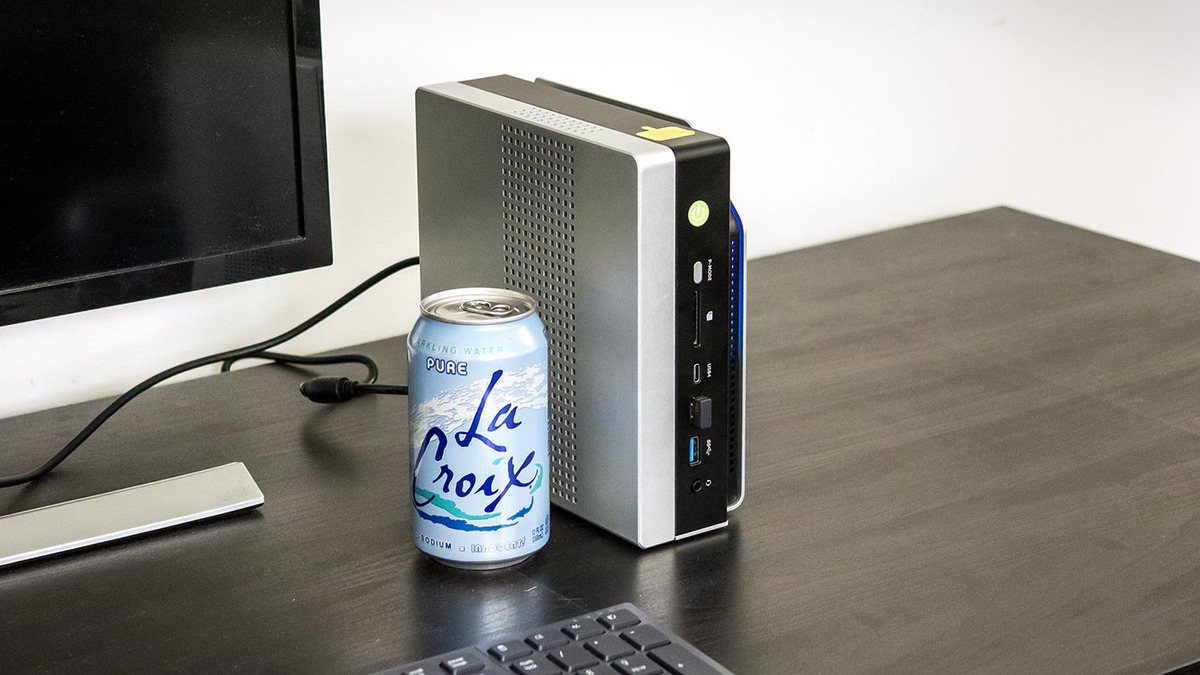 The EVO-X2 is small enough to sit behind a monitor. That 128 GB unified memory pool is the reason to buy it.
Source: tomshardware.com
The EVO-X2 is small enough to sit behind a monitor. That 128 GB unified memory pool is the reason to buy it.
Source: tomshardware.com
NVIDIA DGX Spark - CUDA-Native Research Box
Formerly "Project DIGITS," the DGX Spark arrived in late 2025 at $3,999, then moved to $4,699 following memory supply pressures in early 2026. What you're buying is the GB10 Grace Blackwell Superchip: 6,144 Blackwell CUDA cores, a 20-core ARM CPU (10 Cortex-X925 + 10 Cortex-A725), and 128 GB LPDDR5x unified memory.
The performance ceiling is real. With 273 GB/s of memory bandwidth - lower than Apple's M4 Max (546 GB/s) and far below the M3 Ultra (819 GB/s) - the DGX Spark delivers Llama 3.1 70B BF16 at around 2.7 tokens/s according to independent testing by Frank's World of Data Science. Quantized NVFP4 models improve this far: a 14B NVFP4 model hits 20.19 t/s in the same benchmarks.
Where the DGX Spark earns its price is the software stack. DGX OS (Ubuntu 24.04) ships with CUDA 13.0, TensorRT-LLM, Docker, and Ollama pre-configured. You can go from unboxing to running inference in minutes. NVIDIA's NeMo framework for fine-tuning is first-party supported, and QLoRA fine-tuning on Llama 3.3 70B reached 5,079 tokens/s prompt processing throughput. For researchers who need the full NVIDIA software ecosystem on local hardware, nothing else comes close at this price.
Two DGX Sparks can be linked together (Spark Interconnect) for combined 256 GB of unified memory - enabling 200B parameter models at practical speeds. With NVFP4 speculative decoding on a dual configuration, NVIDIA reports up to 2.6x performance versus standard FP8 execution on Qwen-235B.
Specs:
- GPU: GB10 Grace Blackwell, 6,144 CUDA cores, Blackwell arch
- CPU: 20-core ARM (10x Cortex-X925 @ 4 GHz + 10x Cortex-A725 @ 2.8 GHz)
- Memory: 128 GB LPDDR5x unified, 273 GB/s bandwidth
- Storage: 4 TB NVMe
- TDP: 140W (chip), 240W PSU
- AI Performance: 1 PFLOP FP4 (with sparsity)
- Price: $4,699
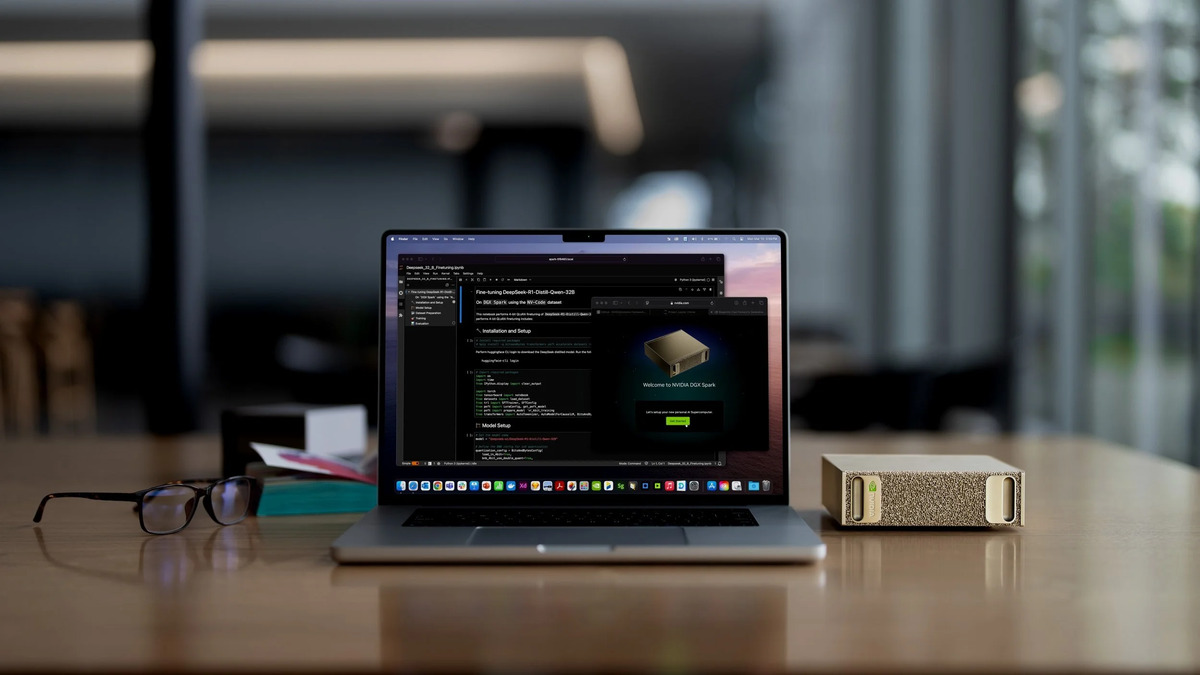 DGX Spark running a DeepSeek-R1 fine-tuning job. The pre-configured NVIDIA software stack is its biggest selling point over other options at this price.
Source: imagespc.com
DGX Spark running a DeepSeek-R1 fine-tuning job. The pre-configured NVIDIA software stack is its biggest selling point over other options at this price.
Source: imagespc.com
See the full NVIDIA DGX Spark setup guide for configuration walkthrough and model optimization tips.
Apple Mac Studio M5 Ultra - Coming June 2026
The current Mac Studio tops out at the M4 Max (128 GB unified, 546 GB/s bandwidth) or M3 Ultra (192 GB unified, 819 GB/s bandwidth). Both are excellent for local LLM work. The M3 Ultra running Llama 3 70B Q4 at 128 GB configuration falls in the 20-35 t/s range given 819 GB/s bandwidth, and it runs completely silently.
The M5 Ultra is expected at WWDC on June 8, 2026. Based on Apple's announced MacBook Pro M5 Max specs - which Apple claims delivers up to 4x faster LLM prompt processing versus M4 Pro - the M5 Ultra (two M5 Max chips linked) should push 256 GB of unified memory with bandwidth around 1,200+ GB/s. That would make it the fastest non-datacenter machine available for 70B inference. Pricing will likely start near the current $3,999 M3 Ultra entry point.
For the hardware profile of the M5 Max chip, see the dedicated specs page.
If you need a desktop Mac today, the M4 Max at 128 GB is a reasonable choice for 32B and smaller models with strong macOS support via MLX. For 70B work at speed, wait for the M5 Ultra or buy a dual-GPU NVIDIA build.
MacBook Pro M5 Max - Best Mobile Option
The MacBook Pro with M5 Max launched in March 2026. Apple's own benchmarks and independent testing by Wale Akinfaderin (published on Medium) confirm M5 Max delivers roughly 19-27% faster token generation versus M4 Max, driven by increased memory bandwidth (273 GB/s on M4 Max vs estimated 546 GB/s on M5 Max).
At 128 GB unified memory, the M5 Max MacBook Pro fits a 70B Q4_K_M model completely in memory and produces at an estimated 18-25 t/s. That's truly useful for interactive work. The base 14" model with M5 Max and 36 GB starts at $1,999, but the 128 GB configuration runs about $3,999-$4,999 depending on storage.
For inference-only work without heavy fine-tuning, it's hard to argue against: silent, efficient (~45W under LLM load), and portable. The MLX framework from Apple ML Research makes loading and running quantized models straightforward.
Lambda Labs / Puget Systems Configured Workstations
If you want verified hardware, professional support, and don't want to DIY, Puget Systems builds custom AI workstations around RTX 5090 (and dual 5090) configurations. Their Peak workstation with a single RTX 5090 hits 213 tokens/s on Llama 3.1 8B in their own benchmarks and is designed for sustained 24-hour loads without thermal throttling.
Puget offers lifetime labor warranty with next-business-day parts support. Their approach to dual RTX 5090 builds accounts for proper airflow spacing, PSU sizing, and validated stability - things you can get wrong in a DIY build. Pricing for a complete Peak system starts around $5,000-$7,000 for a single RTX 5090 configuration and climbs from there for dual.
Lambda Labs has largely shifted focus to cloud GPU infrastructure, but still offers on-premises workstation configurations for enterprises that need local compute at scale.
DIY Builds
Budget Build: ~$2,000 - Single RTX 3090 or RTX 4070 Ti Super
The XDA Developers team ran an extended comparison in early 2026 and concluded that a used RTX 3090 remains the best value for local AI work. The reasoning holds up: 24 GB GDDR6X at 936 GB/s bandwidth, available used for $700-$900 on eBay, with room to add a second card later for 48 GB total via NVLink (the RTX 3090 supports NVLink, unlike the 4090).
A single RTX 3090 handles 8B models at 95+ t/s and 14B at 55-70 t/s comfortably. At 32B (Q4_K_M fits in ~18 GB), performance drops to 25-35 t/s - still interactive. Running Llama 70B on a single 3090 requires Q2 or IQ3 quantization to fit, which degrades quality.
Budget RTX 3090 Build (~$2,000)
================================
GPU:  NVIDIA RTX 3090 24GB (used eBay)       $750-900
CPU:  AMD Ryzen 7 7700X or Intel i5-13600K    $200-260
MB:   B650/B760 ATX with PCIe 5.0 x16        $150-200
RAM:  64 GB DDR5-5600 (2x32GB)               $100-130
PSU:  850W 80+ Gold (EVGA/Corsair)            $100-120
Case: Fractal Design Meshify C (airflow)      $80-100
SSD:  2 TB NVMe PCIe 4.0                     $80-100
OS:   Ubuntu 22.04 LTS (free) or Windows 11   $0-$140
Total:                                    ~$1,460-$1,910
If you prefer to buy new and want warranty coverage, the RTX 4070 Ti Super at $700-$750 has 16 GB GDDR6X at 672 GB/s. That's less VRAM but a newer card - it handles 13B models cleanly at 60+ t/s. The tradeoff is clear: 3090 for more VRAM and NVLink upgrade path, 4070 Ti Super for warranty and newness.
Mid-Range Build: ~$5,000-$8,000 - Dual RTX 4090
The RTX 4090 doesn't support NVLink (NVIDIA removed NVLink from consumer cards after the RTX 3090 Ti). Two RTX 4090s talk over PCIe 4.0 x16 in a split configuration. The PCIe bandwidth is sufficient for inference because the communication pattern is simple - outputs pass sequentially between GPUs - but the cards don't share a unified VRAM address space the way NVLink does.
Despite that caveat, dual RTX 4090 (48 GB combined) delivers solid 70B performance. DatabaseMart benchmark data shows 4090 single-card at 95.51 t/s on Llama 3.1 8B and 34.39 t/s on Qwen 2.5 32B at Q4. For 70B across dual cards, community benchmarks (Compute Market, ottomator community) report roughly 40-50 t/s depending on quantization.
Dual RTX 4090 Build (~$7,000-$8,000)
=======================================
GPU:  2x NVIDIA RTX 4090 24GB              $3,000-3,600
CPU:  AMD Ryzen Threadripper 7960X          $1,200-1,400
MB:   TRX50 ATX motherboard                  $600-800
RAM:  128 GB DDR5 ECC                        $300-400
PSU:  1600W Platinum (required)              $250-350
Case: Fractal Define 7 XL (dual GPU fit)     $180-220
SSD:  4 TB NVMe PCIe 5.0                    $250-300
Total:                                ~$5,780-$7,070
You need a 1600W PSU minimum. Two RTX 4090s draw 450W combined at load plus CPU and other components. Thermal management matters - space the cards and make sure the case has top exhaust.
High-End Build: ~$10,000 - Dual RTX 5090
The RTX 5090 has 32 GB GDDR7 at 1,790 GB/s memory bandwidth - 77% more than the 4090. A single card hits 61.38 t/s on Qwen3 32B and 185.91 t/s on Qwen3 8B according to Hardware Corner benchmarks. Dual configuration brings 64 GB total VRAM and benchmarks from DatabaseMart show dual RTX 5090 delivering 26.85 t/s on Llama 3.3 70B and 27.03 t/s on DeepSeek-R1 70B - beating both the H100 (24.34 t/s) and dual A100 40GB (18.91 t/s) on the same benchmark. That's a real result worth calling out.
Like the 4090, the 5090 has no NVLink support. The cards communicate via PCIe 5.0.
Dual RTX 5090 Build (~$10,000)
================================
GPU:  2x NVIDIA RTX 5090 32GB             $6,000-7,000
CPU:  AMD Ryzen Threadripper 7980X         $2,000-2,500
MB:   TRX50 WRX90 workstation board          $700-900
RAM:  128 GB DDR5-6000                       $300-400
PSU:  2000W Titanium (Seasonic)              $500-600
Case: Corsair 7000D Airflow                  $200-250
SSD:  4 TB NVMe Gen5                         $300-400
Total:                                ~$10,000-$12,050
Enthusiast Build: Quad RTX 3090 with NVLink
The RTX 3090 is the last consumer card to support NVLink (NVLink 3.0 at 112.5 GB/s bidirectional per pair). Four cards with two NVLink bridges gives you 96 GB of address space across a unified pool. Community builder Himesh P. published vLLM benchmarks on a 4x RTX 3090 NVLink setup that showed strong performance on large model serving with tensor parallelism enabled.
This is an advanced build. You need a workstation-class board with four PCIe x16 slots at appropriate spacing, a 2000W+ PSU, and serious cooling. Expect total system power draw of 1,200-1,400W under full GPU load. It's also not cheap: four used 3090s at $800 each, a Threadripper platform, PSU, and case easily hits $7,000-$9,000 - overlapping the dual RTX 5090 territory while delivering lower per-card bandwidth.
The argument for it: 96 GB VRAM in a true NVLink pool lets you run 70B models at high quant (Q8) or experiment with 200B+ quantized models. The argument against: modern workstation builds generally get better raw t/s from fewer, faster cards.
Workstation-Class: RTX Pro 6000 Blackwell 96GB
For researchers who need ECC memory, longer hardware lifecycles, and NVIDIA's professional driver stack, the RTX Pro 6000 Blackwell is the single-card option with 96 GB GDDR7 at 1,800 GB/s bandwidth. 24,064 CUDA cores, PCIe 5.0, 600W TDP.
MSRP is $8,565. Retail in April 2026 runs $8,000-$9,200 depending on board partner. That buys you 96 GB ECC memory - enough to run 70B Q8 (no quality compromise) with room to spare. A 200B model fits at Q2-Q3. A single RTX Pro 6000 Blackwell has more raw bandwidth than dual RTX 5090, which means higher sustained t/s for large models.
This card is for the hardware profile: browse the RTX 5090 profile for comparison against the current consumer flagship on inference benchmarks.
Platform Notes
Linux
Linux is the best platform for local LLM inference, full stop. Ollama, llama.cpp, vLLM, and TGI are all Linux-first. NVIDIA CUDA drivers on Ubuntu are stable and well-documented. The only friction is AMD ROCm - it works, but requires more configuration than CUDA for equivalent results.
Windows
Windows works for most use cases. Ollama has a native Windows installer, WSL2 runs llama.cpp well, and DirectML provides a fallback for non-CUDA GPUs. The performance overhead versus bare Linux is small (5-10% typically). The main downside is that WSL2 GPU passthrough occasionally has quirks across driver updates.
macOS
MacOS with Apple Silicon is a first-class inference platform. The MLX framework (from Apple ML Research) is optimized for the unified memory architecture and delivers better throughput than running llama.cpp on the same hardware often. The ecosystem for fine-tuning is thinner than Linux, and you can't add external GPUs. But for pure inference - especially on M4/M5 Max machines with 128 GB - it's competitive with anything short of dual high-end discrete GPUs. See best local LLM tools 2026 for cross-platform software options.
FAQ
What's the cheapest way to run a 70B model at home?
The GMKtec EVO-X2 with 128 GB at ~$1,999-$2,299 is the most affordable path to 70B inference in memory. Expect 4-5 t/s on generation, which is usable for batch work and testing but too slow for real-time chat. For interactive 70B, budget at least $7,000-$10,000 for dual RTX 4090 or dual RTX 5090.
Does the RTX 4090 support NVLink for combining VRAM?
No. NVIDIA dropped NVLink from consumer GeForce cards after the RTX 3090 Ti. The RTX 4090, 5090, and all 40/50-series cards communicate only via PCIe. Only the RTX 3090 and 3090 Ti support consumer NVLink. Professional cards (RTX Pro 6000, A-series) retain NVLink.
Is Apple Silicon faster than discrete NVIDIA for LLM inference?
It depends on the model size and VRAM capacity. For models that don't fit in a single GPU's VRAM (e.g., 70B on a 24 GB RTX 4090), Apple Silicon with 128 GB unified memory wins easily. For models that fit (e.g., 13B on RTX 4090), discrete NVIDIA wins on raw t/s - the 4090 hits ~70 t/s on a 13B model vs ~40-50 t/s on M4 Max at equivalent quant.
What CPU do I need for a local LLM build?
CPU matters much less than GPU for inference. Any modern 8-core CPU (Ryzen 7, Core i5-13th gen or later) is sufficient. CPU matters for: initial tokenization speed (prompt processing), managing context when part of the model offloads to system RAM, and running multiple concurrent processes. For builds with large model context or CPU-side offloading, more memory channels help - Threadripper's quad-channel DDR5 is useful for enthusiast builds.
Can I fine-tune on these builds or just run inference?
Inference only: all builds above. Fine-tuning (LoRA/QLoRA): needs more VRAM per parameter. A single RTX 3090 can fine-tune up to 7B with LoRA at Q4, and the DGX Spark is rated for fine-tuning up to 70B with QLoRA. The dual RTX 5090 build can fine-tune 13B-34B models with QLoRA comfortably. Fine-tuning 70B at full precision requires workstation-class cards (RTX Pro 6000 Blackwell) or datacenter hardware.
Sources
- NVIDIA DGX Spark official specs page
- DGX Spark complete guide 2026 - ToolHalla
- RTX 5090 LLM benchmarks - Hardware Corner
- Dual RTX 5090 vs H100 Ollama benchmarks - DatabaseMart
- RTX 4090 Ollama benchmark results - DatabaseMart
- GMKtec EVO-X2 review - Tom's Hardware
- Strix Halo Ryzen AI Max+ 395 LLM benchmark results - Level1Techs Forums
- Apple MacBook Pro M5 Max announcement - Apple Newsroom
- Mac Studio 2026 M5 Ultra release date and specs - Macworld
- DGX Spark local LLM performance deep dive - Frank's World
- RTX 5090 and 5080 AI review - Puget Systems
- Used RTX 3090 value for local AI - XDA Developers
- GPU benchmarks on LLM inference - GitHub/XiongjieDai
- NVIDIA RTX Pro 6000 Blackwell pricing - ThunderCompute
✓ Last verified April 19, 2026

