
Suno Review: AI Music Generation Grows Up - But Can It Go Pro?
A hands-on review of Suno, the AI music generator with a $2.45B valuation, Warner Music deal, and a new DAW - testing whether it lives up to the hype for creators and professionals alike.
 11 min read
Suno has become the default name in AI music generation the same way Midjourney became shorthand for AI art. With nearly 100 million people having tried the platform, a $2.45 billion valuation, and a landmark settlement with Warner Music Group, Suno is no longer an experiment - it's an industry. After spending several weeks creating hundreds of tracks across genres, testing the new Studio DAW, and pushing the platform to its limits, here is where things actually stand.
TL;DR
- 7.5/10 - The most accessible and capable AI music generator available, but not yet a professional production tool
- Key strength: Text-to-song generation that produces truly catchy, emotionally resonant tracks in under 60 seconds
- Key weakness: Inconsistent quality, limited fine-grained control, and stem separation that falls short of professional standards
- Use it if you're a content creator, hobbyist musician, or songwriter who needs quick demos. Skip it if you need release-ready masters or full creative control
The State of AI Music in 2026
If you have not checked in on AI music since those early novelty clips circulated in 2023, prepare for a recalibration. Suno's V5 model, released in September 2025, produces full songs with vocals that genuinely sound like human singers. Natural vibrato, breath control, emotional phrasing - the jump from V4 to V5 was not incremental. It was a generational leap.
Type a prompt like "upbeat indie rock song about leaving a small town, female vocalist, jangly guitars" and within 60 seconds you have a complete track with verses, chorus, bridge, and an outro that actually resolves properly. The melodies are catchy. The production is polished. The vocals carry emotion. For anyone who remembers the robotic mumbling of early AI music, this is a different world.
But "impressive for AI" and "ready for professional use" remain two very different things, and Suno lives squarely in the gap between them.
What Suno Actually Does Well
The core text-to-song pipeline is truly remarkable. You can work in two modes: describe what you want in natural language and let Suno handle everything, or write your own lyrics and specify genre tags for more control. Both approaches produce listenable results more often than not.
Vocal quality is Suno's headline achievement in V5. The platform now outputs vocals at 44.1 kHz that capture tone, emotion, and phrasing in ways that are frequently indistinguishable from human performance at casual listening volumes. Pop, rock, country, R&B, and folk vocals all land convincingly. The model handles genre-specific vocal styles - the grit of blues, the smoothness of jazz, the energy of punk - with surprising accuracy.
Genre versatility is another genuine strength. I tested Suno across more than 30 genres and subgenres. Pop, rock, hip-hop, electronic, country, jazz, classical, Latin, Afrobeat, K-pop, metal, folk, ambient - the platform produces competent output across the board. Some genres fare better than others (pop and rock are consistently strong; jazz and classical can feel formulaic), but the breadth is impressive.
Speed and accessibility remain Suno's most underrated advantages. There is no learning curve. You type words, you get a song. For content creators who need background music for YouTube videos, podcast intros, or social media content, this is transformative. What used to require licensing fees, royalty negotiations, or hiring a composer now takes less time than making coffee.
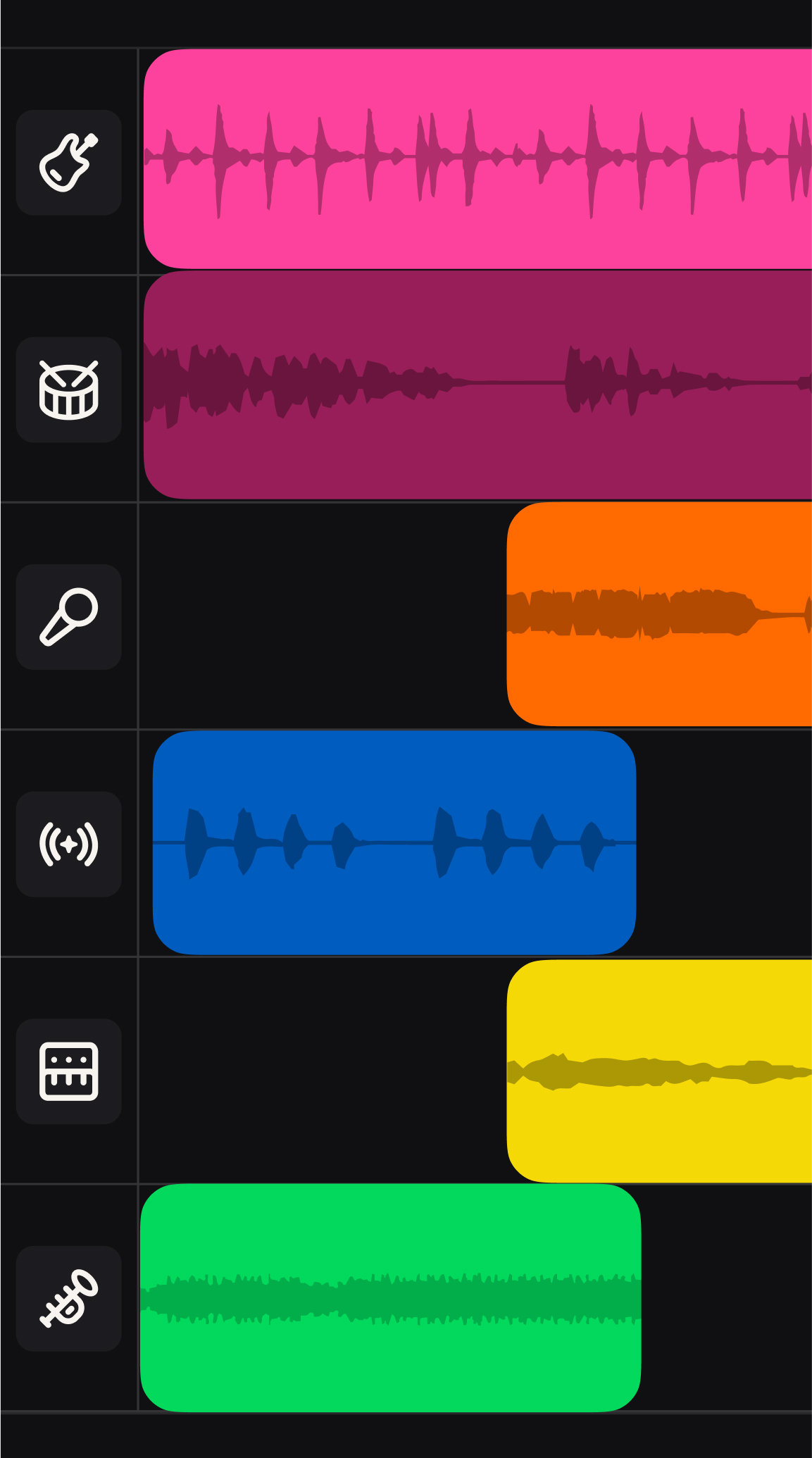 Suno Studio's multitrack editor lets you arrange AI-produced stems on a visual timeline - a genuine step toward professional production workflows.
Suno Studio: The AI-Native DAW
The biggest addition to Suno in the past year is Studio, a built-in DAW that launched with V5 and has been steadily updated since. Available to Premier subscribers, Studio is positioned as "the world's first generative audio workstation" - and it's the feature that most clearly signals where Suno wants to go.
Studio provides a multitrack timeline where you can arrange, layer, and edit AI-generated stems. You can generate individual instrument tracks - drums, bass, guitar, percussion, synth, keyboard, strings, brass, woodwinds, vocals, and backing vocals - and arrange them freely. The February 2026 update added warp markers for timing adjustment, a Remove FX tool for stripping effects from clips, alternate take lanes, and time signature support beyond standard 4/4.
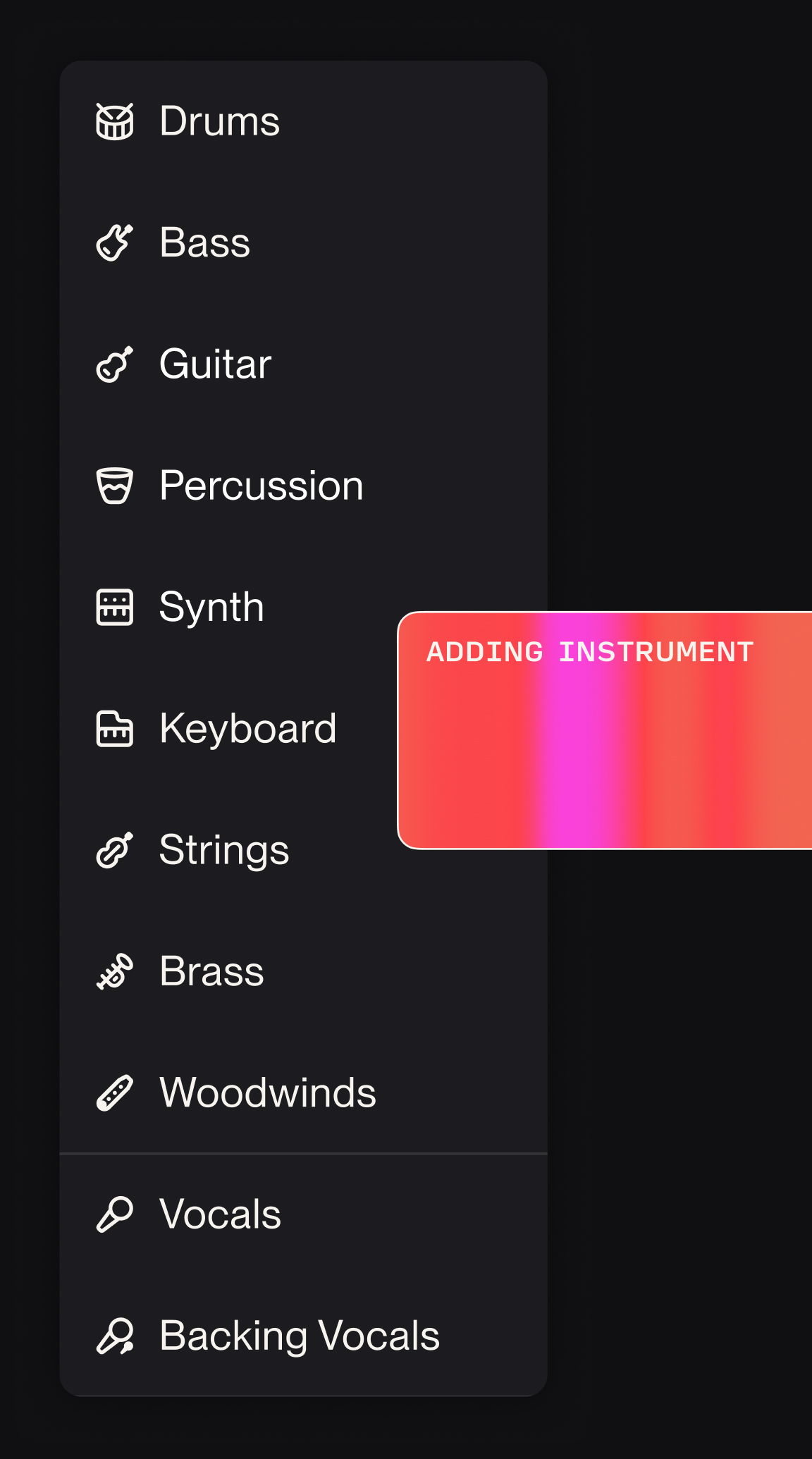 Studio supports generation of up to 12 individual instrument stems, each of which can be edited, replaced, or exported independently.
On paper, this sounds like the future of music production. In practice, it's more like a promising early draft. The stem separation quality is inconsistent - drum bleed into bass tracks, faint vocal artifacts on instrument stems, and occasional phase issues when stems are recombined. Professional producers who are used to the surgical precision of Ableton or Logic Pro will find Studio's output frustrating to work with. MIDI export is a welcome addition, but the exported MIDI often needs substantial cleanup before it's useful in a traditional DAW.
Still, Studio represents a genuine philosophical shift. Instead of producing a finished song and hoping for the best, you can now iterate on individual elements. Don't like the drum pattern? Regenerate just that stem. Want strings added to the bridge? Produce and layer them in. This iterative workflow is meaningful, even if the execution needs refinement.
Where Suno Falls Short
Consistency is the platform's biggest problem. For every track that lands perfectly, you will create three or four that miss the mark. Vocal mispronunciations, awkward phrasing, lyrics that drift from your prompt, structural choices that feel random - the hit rate for professional-quality output hovers around 20-30% in my testing. You learn to generate multiple versions and cherry-pick, which works for casual use but becomes tedious for serious production.
Fine-grained control remains limited. You can specify genre, mood, tempo, and instruments in your prompt, but you can't control specific chord progressions, arrangement choices, or production techniques. If you want a song that modulates from C major to E-flat in the bridge, or a specific drum fill at the 2:30 mark, Suno can't accommodate that level of direction. The AI image generation world solved a version of this problem with tools like ControlNet. AI music hasn't caught up.
Longer tracks degrade in quality. V5 supports songs up to 8 minutes, but audio quality drops noticeably past the 2-minute mark, with high-frequency loss of 15-18 dB reported by audio professionals. Stick to 2-3 minute tracks for best results.
The compositions are often predictable. Suno excels at producing music that sounds professional, but it gravitates toward safe, familiar patterns. The chord progressions, song structures, and melodic choices are competent but rarely surprising. If you're looking for music that takes creative risks - unconventional time signatures, unexpected harmonic turns, genre-defying arrangements - you'll need to fight the model's defaults, and you often won't win.
The Warner Music Deal and the Copyright Question
In November 2025, Warner Music Group settled its copyright lawsuit against Suno and signed a first-of-its-kind partnership. The deal gives artists and songwriters full control over whether their names, likenesses, voices, and compositions can be used in AI-generated content. WMG also sold its Songkick concert-discovery platform to Suno.
This is significant, but it doesn't resolve the broader copyright landscape. Sony Music and Universal Music Group's lawsuits remain active, and the fundamental questions about AI training on copyrighted material remain unsettled. Suno has acknowledged training on copyrighted recordings and argues fair use - a defense that courts haven't yet fully adjudicated.
For individual creators, the practical risk is low. Suno's Pro and Premier plans grant commercial usage rights, and the platform doesn't generate output that sounds like specific copyrighted songs (Suno claims none of the millions of tracks on the platform "contain anything like a sample"). But for brands and enterprises, the legal uncertainty warrants caution. The broader pattern of AI companies navigating creative industry tensions has no clean resolution yet.
Under the Warner deal, Suno will launch new licensed models built on authorized data in 2026, and current models will be deprecated when those arrive. Free-tier users will lose download capabilities, and paid users will face download caps. These changes are coming, and they will reshape the platform's economics.
Pricing: What You Actually Get
Suno's pricing structure has evolved into four tiers:
| Plan | Monthly Cost | Credits | Key Features |
|---|---|---|---|
| Free | $0 | 50/day (~10 songs) | No commercial use, no downloads (post-WMG deal) |
| Plus | $12/mo ($7.50 annual) | 2,000/mo | Commercial rights, downloads |
| Pro | $24/mo ($13 annual) | 5,000/mo | Commercial rights, priority generation |
| Ultra | $99/mo ($45 annual) | 12,000/mo | Studio access, MIDI export, stem export |
The free tier is generous enough for exploration but increasingly limited. The Plus plan at $12/month is reasonable for content creators who need a steady supply of background tracks. The Ultra tier at $99/month is steep but includes Studio access - the only way to get the DAW features that make Suno a production tool rather than a novelty.
For context, a single stock music license can run $15-50 per track, and hiring a composer for custom work starts at several hundred dollars. If you are currently spending money on music licensing, Suno's paid tiers can pay for themselves quickly.
How It Compares
Udio remains Suno's closest competitor. Udio's vocal inpainting and remix features are still superior for adjusting existing tracks, and its lyric-swapping capabilities are unmatched. But Suno V5 has pulled ahead on raw vocal quality, overall polish, and the Studio workflow. For most users producing new tracks from scratch, Suno is the better choice. For detailed editing of existing material, Udio still has the edge.
AIVA targets a different audience completely - film and game composers who need orchestral and cinematic music with more structural control. AIVA produces technically correct compositions but lacks Suno's vocal capabilities and genre versatility.
The comparison to Midjourney in the image space is instructive. Both platforms dominate their categories through aesthetic quality and accessibility rather than precision control. And both face the same tension: the output is impressive enough to displace professional work in many contexts, but not precise enough to satisfy professionals who need exact control.
Who Should Use Suno
Content creators and social media producers will get the most value. If you need background music, intro jingles, or mood-setting tracks and your audience isn't audio engineers, Suno delivers.
Songwriters and musicians can use it as a powerful ideation tool. Produce a rough demo of a song concept in seconds, then take the MIDI and stems into a real DAW for professional production. The AI voice generation space offers complementary tools for further vocal refinement.
Hobbyists and casual creators will find it genuinely fun. Making a personalized birthday song, a parody track, or a soundtrack for a home video has never been this easy.
Professional producers and audio engineers should approach with measured expectations. Studio is a step in the right direction, but the stem quality, mixing limitations, and lack of fine-grained control mean Suno cannot replace a proper DAW workflow today.
Strengths and Weaknesses
Strengths:
- V5 vocals are remarkably realistic, with natural phrasing and emotional range
- Unmatched speed - full songs in under 60 seconds
- Broad genre coverage across 30+ styles
- Studio DAW adds meaningful iterative workflow
- Warner Music deal signals industry legitimacy
- Generous free tier for exploration
- $200M annual revenue and 100M users prove market demand
Weaknesses:
- Inconsistent quality requiring multiple generations to get usable output
- Limited fine-grained control over arrangement and production
- Stem separation artifacts that complicate professional mixing
- Audio quality degrades on longer tracks
- Compositions default to safe, predictable patterns
- Active copyright litigation with Sony and Universal
- Free tier losing download capabilities under Warner deal
- Customer support is virtually nonexistent
Verdict: 7.5/10
Suno is the best AI music generator available in 2026, and it isn't particularly close. V5's vocal quality crossed a threshold that makes the output truly useful rather than only impressive. The Studio DAW, while still rough, points toward a future where AI-assisted music production is a legitimate creative workflow rather than a party trick. The Warner Music deal lends institutional credibility that no competitor can match.
But "best AI music generator" and "professional music production tool" are still different categories. The inconsistency, limited control, and stem quality issues mean that serious musicians will use Suno as one tool in a larger workflow, not as a replacement for their DAW. The active copyright litigation adds a layer of uncertainty that enterprise users can't ignore.
For content creators, hobbyists, and songwriters who want fast, good-enough music on demand, Suno delivers real value at a reasonable price. For professional producers expecting studio-grade precision and control, it's not there yet - but the trajectory is unmistakable, and the gap is closing faster than most people in the industry expected.
Sources:
- TechCrunch - Suno Raises at $2.45B Valuation on $200M Revenue
- Music Business Worldwide - Warner Music Group Settles with Suno
- Rolling Stone - Suno Partners With Warner Music Group After Settlement
- Suno Blog - Introducing Suno Studio
- Suno Blog - What's New in Suno Studio 1.2
- Billboard - Say No to Suno: Artist Groups Challenge AI Training
- TLDL - Suno V5 Studio Guide
