
Gemini CLI Review: Google's Free Terminal AI Agent
A hands-on review of Gemini CLI, Google's open-source AI agent for the terminal - featuring Gemini 3.1 Pro, 1M context, built-in Google Search, MCP support, and the most generous free tier in the category.
 9 min read
Ten months after Google announced it, Gemini CLI has quietly become one of the most capable free coding agents available. Version v0.38.2 - released April 17, 2026 - ships with Gemini 3.1 Pro by default, native Google Search grounding, MCP support, and a free tier that hands individual developers 1,000 model requests per day at no cost. If you haven't revisited it since the early shaky releases, this isn't the same tool.
TL;DR
- 7.5/10 - The best free option in terminal-based AI coding, but not ready to replace Claude Code for production-grade multi-file work
- Strength: most generous free tier in the category, built-in Google Search grounding, PTY shell for interactive commands, and a clean Apache 2.0 license
- Weakness: overconfident outputs with a tendency toward verbose or outdated suggestions; real-world long-context reliability doesn't fully match the 1M-token claim
- Use it if you're a solo developer, student, or open-source contributor on a budget; skip it if your workflows require the precision Claude Code delivers on complex refactors
What Gemini CLI Is
Google announced Gemini CLI on June 25, 2025 as an open-source AI agent for the terminal. The concept is simple: bring a Gemini model into your shell, give it access to your filesystem and execution environment, and let it read code, run commands, write files, and fetch information from the web.
The tool is backed by the same infrastructure as Gemini Code Assist - meaning the same models, the same tooling primitives, and in practice the same reliability profile. Where Gemini Code Assist is a VS Code extension, Gemini CLI is for people who prefer the command line.
Installation takes about 30 seconds:
npm install -g @google/gemini-cli
gemini
From there, you authenticate with a Google account and get immediate access to Gemini 3.1 Pro - without entering a credit card. That's the value proposition in two lines of shell.
The Free Tier Is the Story
No other terminal AI agent comes close on price. Claude Code requires an Anthropic API key and charges $3 per million input tokens. Codex CLI is billed against your OpenAI usage. GitHub Copilot CLI requires a Copilot subscription.
Gemini CLI's free tier - tied to a personal Google account via a Gemini Code Assist license - gives you 60 requests per minute and 1,000 requests per day at zero cost, with access to Gemini 3.1 Pro and its 1M token context window. For someone running a side project or learning to build agents, this is a real competitive advantage.
Paid tiers extend that generosity. Google AI Pro (part of the Google One subscription tier) brings 1,500 requests daily. Google AI Ultra bumps it to 2,000. Enterprise Code Assist Standard and Enterprise both match the Ultra cap. Pay-as-you-go is also available via Vertex AI if your team prefers token-based billing and predictable costs.
One caveat worth flagging: users who sign in with a Workspace account but don't have a Code Assist license may find they hit the Gemini API key limits instead - 250 requests per day on Flash only. The documentation covers this distinction, but the auth flow doesn't warn you clearly when it happens. Run /stats model inside the session to confirm which model and quota tier you're on.
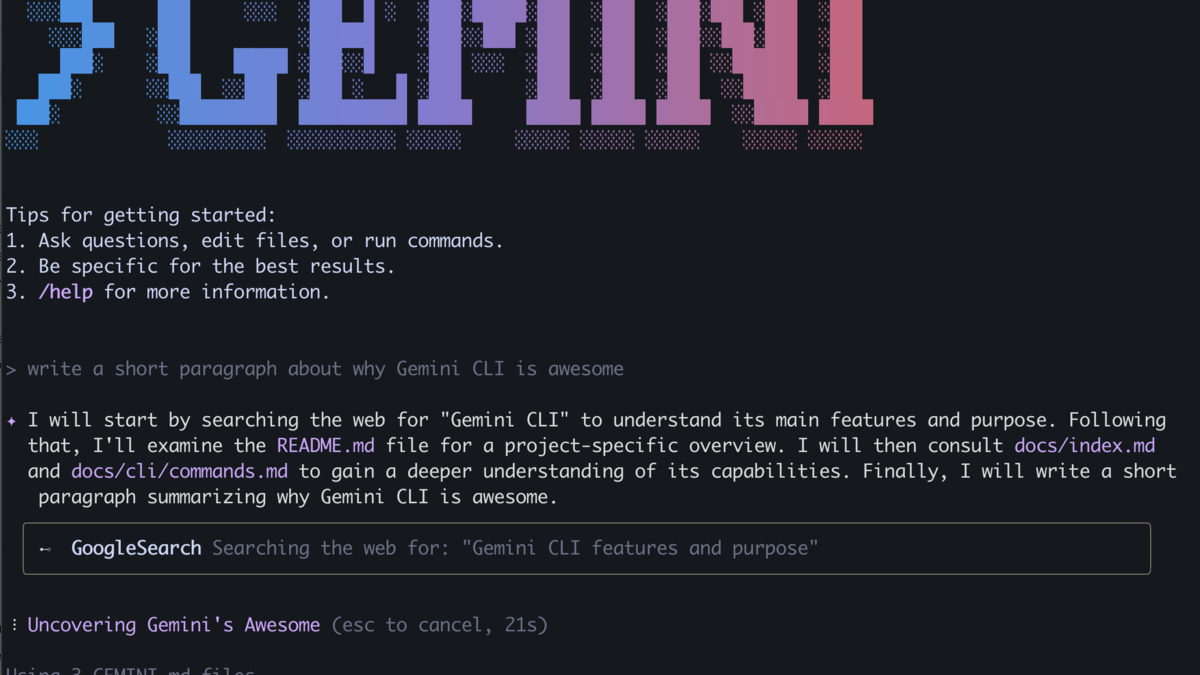 The Gemini CLI interface showing a code task in progress. The compact tool output mode introduced in April 2026 prevents long agent turns from flooding your terminal.
Source: github.com/google-gemini/gemini-cli
The Gemini CLI interface showing a code task in progress. The compact tool output mode introduced in April 2026 prevents long agent turns from flooding your terminal.
Source: github.com/google-gemini/gemini-cli
Core Capabilities: What Works
Google Search Grounding
The most distinctive feature Gemini CLI offers that its rivals don't is native web search. Type @search in your prompt and the model can retrieve current documentation, confirm package versions, or check whether a library API has changed.
In practice this matters. When I asked Gemini CLI to write a handler for the Anthropic Messages API, it searched for the current API spec first and produced code that matched the live documentation. Claude Code without a web-connected tool would work from training data instead. For tasks that touch fast-moving APIs or recent CVEs, this grounding is a genuine advantage.
PTY Shell
The pseudo-terminal support introduced in mid-2025 was a quiet architectural win. Gemini CLI spawns a virtual terminal in the background, which means it can run interactive commands - vim, htop, package installers with interactive prompts - without breaking the conversation session. Other CLI agents that pipe commands through a standard subprocess often choke on tools that expect a real TTY. This one doesn't.
MCP Support
Model Context Protocol integration lets you extend the tool with external services - databases, custom APIs, proprietary tooling - without rebuilding anything in the core binary. Google publishes the largest official MCP server catalog of any single company: 12 fully-managed remote servers for Google Cloud infrastructure and databases, and 12 open-source servers for Workspace and developer workflows.
For teams already on Google Cloud, that's plug-and-play. Connecting BigQuery, Cloud Storage, or Firebase to your terminal agent takes a configuration entry rather than a custom integration.
Automatic Model Routing
Gemini CLI routes between Gemini 3.1 Pro and Gemini Flash based on estimated task complexity. Short questions and simple completions go to Flash, preserving your daily quota. Longer, more demanding sessions route to Pro. You can override this with /model or via a flag at launch. It's a sensible default that prevents quota exhaustion on throwaway queries.
Where Gemini CLI Falls Short
Output Confidence Exceeds Output Quality
The most consistent complaint in community forums and my own testing is overconfidence. Gemini CLI will produce code fluently and state it confidently - and then get a detail wrong. It has used outdated library versions without warning. It has produced math-adjacent logic that was subtly incorrect. It doesn't hedge.
This isn't a disqualifier for exploratory work, but it makes Gemini CLI less suitable as a drop-in automation layer in a CI pipeline or anywhere that code runs without a human in the loop. Claude Code, in comparison, is more likely to surface ambiguity before committing to a solution.
Token Efficiency
Independent comparisons show Gemini CLI using roughly 432K input tokens for tasks that Claude Code resolves in 261K. This doesn't affect users on the free tier - requests are capped by count, not tokens - but it matters on pay-as-you-go billing and on very long sessions where context fills faster than expected.
Part of this is an artifact of Gemini 3.1 Pro's approach: it tends to include more explanatory commentary in its intermediate steps and is wordier in its file modifications. That commentary can be useful, but it's expensive.
Long-Context Reliability in Practice
The 1M token context window is real and available at no extra charge since March 13, 2026, when Gemini made it generally available at standard pricing. The technical capability is there. The practical problem is reliability at scale.
Community testing and issue reports on GitHub suggest that Gemini CLI's ability to reason coherently over very long contexts - full codebases, large document sets - degrades before the 1M token limit. Several users report that effective reliable context is closer to 200K-300K tokens for complex reasoning tasks, which brings it closer to parity with other models rather than ahead of them. Google hasn't published specific long-context accuracy benchmarks to address these reports directly.
Rate Limit Confusion
The gap between advertised free limits and what some users actually receive is a persistent friction point. Paying Pro subscribers have reported hitting aggressive rate limits on Flash that don't match the documentation. The tool doesn't always surface which limit triggered or why. Until this is resolved, treat the rate limits as approximate rather than guaranteed.
Benchmark Context
Gemini CLI's default model - Gemini 3.1 Pro, released February 19, 2026 - holds up well on published benchmarks. Our dedicated Gemini 3.1 Pro model card covers the full benchmark breakdown. The headlines: 80.6% on SWE-bench Verified, which puts it within 0.2 percentage points of Claude Opus 4.6's 80.8% on the same test. On LiveCodeBench Pro, a competitive-coding evaluation using real Codeforces and IOI problems, Gemini 3.1 Pro scores 2887 Elo - a significant lead over both GPT-5.3 and prior Gemini generations. On ARC-AGI-2, it achieves 77.1%, more than double the Gemini 3 Pro score on the same benchmark.
Real-world agentic performance is a different story. Third-party head-to-head evaluations consistently place Claude Code's first-pass correctness on complex multi-file tasks at around 92%, with Gemini CLI running 85-88% on the same suite. These are rough benchmarks, not controlled experiments, but the direction of the gap is consistent across independent testers.
For competitive coding and algorithmic tasks specifically, Gemini 3.1 Pro is currently the leader by a material margin, which the LiveCodeBench numbers support. If your workflow leans that direction - contest problems, optimization, mathematical code - Gemini CLI is worth using even at the cost of some output verbosity.
Who Should Use Gemini CLI
This tool is a clear win for individual developers and students who can't justify a Claude Pro subscription or API costs for exploratory coding. The free tier is truly useful, not a stripped-down preview. If you're prototyping, learning a new framework, or working through open-source contributions on a personal machine, Gemini CLI gets you access to a frontier model without a billing account.
For teams, the picture is more nuanced. Gemini CLI's Google Search grounding, MCP integration, and PTY shell give it real capabilities that Claude Code's terminal interface doesn't match natively. If your stack is already Google Cloud-heavy, the MCP server catalog alone justifies testing it in your workflow.
Production-grade multi-file refactors that require precise code quality and low hallucination rates still favor Claude Code, as we noted in our comparison of Claude Code, Cursor, and Codex. The same logic applies when comparing Gemini CLI to Windsurf and Cursor for sustained agentic work.
Gemini CLI's Google ADK review context also matters here: Google is building a coherent developer ecosystem across ADK, Gemini CLI, and Vertex AI. If you're investing in that ecosystem, the CLI is a natural fit. If you're not, it's a free tool worth keeping around for its search grounding alone.
Verdict
Gemini CLI earns its place as the best free terminal AI agent available today. The free tier isn't a gimmick - 1,000 Gemini 3.1 Pro requests per day is real capacity for real work. The PTY shell and native Google Search grounding solve genuine problems that the competition ignores. MCP support and the Google server catalog give enterprise teams something to work with.
The weaknesses are real too. Output confidence that outpaces output accuracy is a persistent issue. Long-context reliability hasn't caught up to the headline numbers. Rate limit behavior is inconsistent. These aren't deal-breakers for exploratory use, but they are reasons to keep a human in the loop before shipping anything this tool writes.
Score: 7.5 / 10. For the price - specifically free - it's hard to argue with. For high-stakes production work requiring precision, the gap to Claude Code is still measurable.
Sources
- Google Gemini CLI official announcement (June 25, 2025)
- Gemini CLI GitHub repository - google-gemini/gemini-cli
- Gemini CLI quota and pricing documentation
- Gemini 3.1 Pro official announcement - Google DeepMind (February 19, 2026)
- Gemini 3.1 Pro - model card, Google DeepMind
- SWE-bench and LiveCodeBench leaderboard - BenchLM (March 2026)
- Gemini CLI vs. Claude Code comparison - Emergent.sh (2026)
- Gemini CLI MCP server documentation
- Anthropic Claude API release notes - 1M context GA (March 13, 2026)
- Gemini CLI community issues and discussion - GitHub

