
Apple's M5 Pro and Max Make 70B Models Portable
Apple launches M5 Pro and M5 Max MacBook Pros with Neural Accelerators in every GPU core, 128GB unified memory, and 614GB/s bandwidth - enough to run Llama 70B on a laptop.
 6 min read
Apple just shipped the hardware that turns a laptop into a local inference rig. The new MacBook Pro models with M5 Pro and M5 Max - announced today and available March 11 - pack Neural Accelerators into every GPU core, push unified memory to 128GB, and deliver what Apple claims is 4x the AI compute of the M4 generation. For anyone running models locally, the specs matter more than the marketing.
What You Actually Get
Key Specs
| M5 Pro | M5 Max | |
|---|---|---|
| CPU | 18-core (6 super + 12 perf) | 18-core (6 super + 12 perf) |
| GPU | Up to 20-core | Up to 40-core |
| Neural Engine | 16-core | 16-core |
| Unified Memory | Up to 64GB | Up to 128GB |
| Memory Bandwidth | 307 GB/s | 614 GB/s |
| Process | 3nm (3rd gen) | 3nm (3rd gen) |
| Starting Price | $2,199 | $3,599 |
Both chips use Apple's new Fusion Architecture - a two-die design connected into a single SoC on third-generation 3nm. The CPU gets six "super cores" (Apple's highest-IPC core yet) with twelve performance cores. But the real story for AI workloads is below the CPU line.
Neural Accelerators in Every GPU Core
The M5 generation introduced a Neural Accelerator embedded in each GPU core - not a separate block like the Neural Engine, but dedicated matrix-multiplication hardware wired directly into the GPU pipeline. On the M5 Max with 40 GPU cores, that means 40 Neural Accelerators working with the existing 16-core Neural Engine.
 Apple's Fusion Architecture connects two dies into a single SoC, with Neural Accelerators embedded in every GPU core.
This matters because large language model inference is controlled by two operations: matrix multiplications (for prompt processing) and memory reads (for token generation). The Neural Accelerators attack the first bottleneck. Memory bandwidth attacks the second.
Memory Bandwidth: The Real Upgrade
The M5 Max's 614 GB/s of unified memory bandwidth is a 2x jump over the M4 Max's 307 GB/s. For token generation - the memory-bound phase where the model reads weights from memory for every single token - bandwidth is the ceiling.
Apple's own MLX benchmarks on the base M5 showed 19-27% faster token generation versus M4, correlating with the 28% bandwidth increase (153 vs 120 GB/s). The M5 Max doubles that headroom completely.
Running 70B Models on a Laptop
The 128GB unified memory configuration on the M5 Max is what makes this a different class of machine. With unified memory, the GPU can access the full pool directly - no PCIe bottleneck, no copying between CPU and GPU memory. A Llama 3.3 70B model quantized to Q6 occupies roughly 55GB, leaving room for a generous context window and the operating system.
Here is what a local inference session looks like with MLX on M5:
# Install MLX and the LM framework
pip install mlx mlx-lm

# Download and run Llama 70B Q4 quantized
mlx_lm.generate \
  --model mlx-community/Meta-Llama-3.3-70B-Instruct-4bit \
  --prompt "Explain the transformer attention mechanism" \
  --max-tokens 512
Apple's MLX research team published detailed numbers for the base M5 chip (24GB, 153 GB/s). Extrapolating to the M5 Max's bandwidth, the picture gets interesting:
| Model | Size in Memory | TTFT (M5 base) | Generation (M5 base) |
|---|---|---|---|
| Qwen 8B (BF16) | 17.5 GB | 3.6x faster than M4 | 1.2x faster than M4 |
| Qwen 14B (4-bit) | 9.2 GB | 4.1x faster than M4 | 1.3x faster than M4 |
| Qwen 30B MoE (4-bit) | 17.3 GB | 3.5x faster than M4 | 1.2x faster than M4 |
The M5 pushes time-to-first-token under 10 seconds for a dense 14B architecture and under 3 seconds for a 30B MoE - on the base chip with 24GB. The M5 Max with 4x the bandwidth should cut those numbers substantially. For anyone who has been following our guide to running open-source LLMs locally, this is the most significant hardware upgrade since Apple Silicon launched.
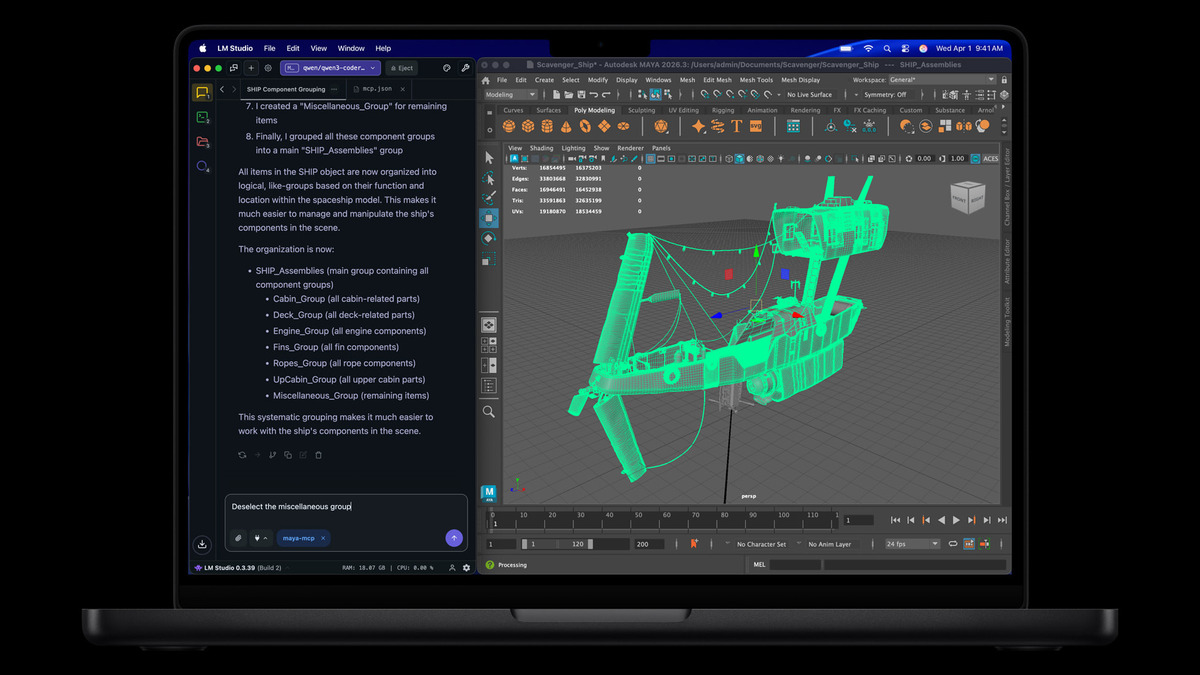 Apple's own press materials show the M5 Max MacBook Pro running LM Studio - a local LLM interface - with heavy 3D workloads.
Image generation gets a similar boost. Producing a 1024x1024 image with FLUX-dev-4bit (12B parameters) on MLX runs 3.8x faster on M5 versus M4. Scale that to the Max variant's GPU and bandwidth, and local Stable Diffusion-class workflows become genuinely practical.
What Else Ships in the Box
Beyond the silicon, Apple packed the MacBook Pro with connectivity upgrades that matter for development workflows:
- Thunderbolt 5 on all three ports - up to 120 Gbps bandwidth for external storage and eGPU enclosures
- Wi-Fi 7 and Bluetooth 6 via Apple's custom N1 networking chip
- Up to 14.5 GB/s SSD read/write speeds - 2x the previous generation
- Memory Integrity Enforcement - an industry-first always-on hardware memory safety feature
- Up to 24 hours of battery life
The SSD speed boost matters more than it might seem. Model loading times scale directly with storage throughput - pulling a 55GB model off disk at 14.5 GB/s means roughly 4 seconds to load, down from 8 seconds on the M4 generation.
 The 16-inch MacBook Pro with M5 Max starts at $3,899 - expensive, but cheaper than the NVIDIA workstation GPUs it competes with on inference tasks.
Where It Falls Short
The M5 Max is impressive for a laptop. It isn't a replacement for a data center GPU, and the marketing leans hard on percentage gains that need context.
Bandwidth Gap
The M5 Max's 614 GB/s sounds fast until you compare it to a NVIDIA H100's 3,350 GB/s of HBM3 bandwidth. For continuous inference serving, a single H100 still moves data roughly 5.5x faster. The M5 Max is a personal inference machine, not a production serving node.
Thermal Constraints
The 14-inch MacBook Pro with M5 Pro ships with a single fan. Last year's M4 Pro 14-inch showed noticeable thermal throttling under sustained loads. Apple hasn't disclosed whether the thermal design changed for M5, and the higher TDP of the new architecture makes this a real concern for long inference runs.
Framework Maturity
MLX has improved enormously since launch, and it consistently runs 20-30% faster than llama.cpp on Apple Silicon. But the CUDA ecosystem has decades of optimization, thousands of contributors, and first-class support from every model developer. If you need to fine-tune or train - not just run inference - NVIDIA still owns that workflow. Our Metal GPU programming guide covers what's possible today, but the gap remains real.
Price Per GB
A 128GB M5 Max MacBook Pro will run close to $5,000 fully configured. You can build a desktop with a RTX 5090 (32GB VRAM) for roughly $3,000, or pick up a used Mac Studio M2 Ultra with 192GB unified memory for around $4,000. The M5 Max wins on portability and power efficiency, but the home GPU LLM leaderboard shows that raw price-performance still favors desktops.
Apple is making a deliberate play for the local AI workstation market - and the M5 Pro and Max are the most convincing hardware argument they have made yet. The Neural Accelerator architecture, combined with unified memory's zero-copy advantage, makes these machines genuinely useful for running serious models without a cloud API key. Whether the thermal design holds up under real workloads, and whether MLX can close the gap with CUDA on model support, are the questions that matter more than any benchmark chart.
Pre-orders open March 4. Availability March 11.
Sources:
- Apple introduces MacBook Pro with all-new M5 Pro and M5 Max
- Apple debuts M5 Pro and M5 Max to supercharge the most demanding pro workflows
- Exploring LLMs with MLX and the Neural Accelerators in the M5 GPU - Apple ML Research
- How M5 Pro and M5 Max push MacBook Pro into high-bandwidth AI era - AppleInsider
- Best Local LLMs for Mac in 2026 - InsiderLLM
- MacBook Pro M5 Pro and M5 Max announced - Tom's Guide
