
Switching from Cursor to Windsurf
A practical guide to switching from Cursor to Windsurf IDE, covering settings migration, Cascade vs Composer differences, pricing savings, and workflow adjustments.
 8 min read
TL;DR
- Can you switch? Yes - both are VS Code forks, so your extensions, keybindings, and settings transfer in minutes
- Windsurf Pro costs $20/month vs Cursor Pro at $20/month, though Windsurf's free tier is more generous
- You'll lose Cursor's Background Agents and Bugbot, but gain Windsurf's Cascade agent with Flow awareness and proprietary SWE-1.5 model
- Low difficulty - expect one to two days to get comfortable with Cascade's workflow
Why People Are Switching
Windsurf climbed to first place in LogRocket's AI dev tool power rankings in February 2026, overtaking Cursor. That ranking shift reflects a broader trend: developers who want more autonomous AI assistance are testing Windsurf's Cascade agent as an alternative to Cursor's Composer.
The reasons vary. Some developers find Cascade's agentic approach more natural for prototyping. Cascade reads your codebase, identifies affected files, and applies changes in a single flow without requiring file-by-file approval. Others are drawn to Windsurf's proprietary SWE-1.5 model, which the company claims is 13x faster than Claude Sonnet 4.5 on coding tasks. A survey from LogRocket found that 67% of developers working on codebases over 100,000 lines of code reported stronger context awareness with Windsurf.
Some of the appeal is practical. Windsurf's free tier includes 25 prompt credits and unlimited autocomplete, while Cursor's free Hobby plan limits both agent requests and tab completions. For developers assessing AI IDEs on a budget, Windsurf lets you test Cascade before paying anything.
If you're already using Cursor and considering the switch, the migration itself is straightforward. Both editors are VS Code forks. Your extensions, themes, and keyboard shortcuts carry over with minimal friction.
 Windsurf and Cursor are the two most popular AI-native code editors as of March 2026.
Source: vitara.ai
Windsurf and Cursor are the two most popular AI-native code editors as of March 2026.
Source: vitara.ai
Feature Parity Table
| Feature | Cursor | Windsurf | Notes |
|---|---|---|---|
| AI agent | Composer (Agent mode) | Cascade (Write mode) | Cascade is more autonomous by default |
| Tab completion | Tab (unlimited on Pro) | Supercomplete (unlimited on Pro) | Both offer multi-line suggestions |
| Inline editing | Cmd+K | Inline Command | Similar capabilities |
| Chat | Sidebar chat | Cascade Chat mode | Both support @ mentions for context |
| Multi-file edits | Agent mode | Cascade Write mode | Both edit across files; Cursor handles 10+ files more reliably |
| Context window | 200K tokens | 100K tokens | Cursor holds more context per session |
| Proprietary models | Cursor's Composer model | SWE-1.5, Fast Context | Windsurf's models optimized for speed |
| Third-party models | Claude, GPT-5, Gemini | Claude, GPT-5, Gemini | Both offer multi-model selection |
| Background agents | Yes (runs in cloud) | Parallel Cascade sessions | Different approaches to async work |
| Project rules | .cursorrules | .windsurf/rules/rules.md | Different file locations |
| Bug detection | Bugbot ($40/user/mo) | Not available | Cursor-only add-on |
| MCP support | Yes | Yes | Both support Model Context Protocol |
| IDE lock-in | Cursor only (VS Code fork) | Windsurf editor + plugins for 40+ IDEs | Windsurf offers broader IDE support |
| Extension marketplace | Open VSX | Open VSX | Neither uses Microsoft's marketplace directly |
What You Gain
- Cascade's Flow awareness. Cascade tracks your edits, terminal commands, clipboard, and conversation history to infer intent. You spend less time re-explaining context.
- SWE-1.5 speed. Windsurf's proprietary model completes most coding turns in under 10 seconds, using 8 parallel tool calls per turn.
- Multi-IDE flexibility. If you work across JetBrains, Vim, or other editors, Windsurf offers plugins for over 40 IDEs. Cursor locks you into its VS Code fork.
- Built-in browser. Windsurf includes an integrated browser that sends page context directly to Cascade, useful for frontend development.
What You Lose
- Background Agents. Cursor's cloud-based agents run tasks while you work on other things. Windsurf's parallel Cascade sessions run locally.
- Bugbot. Cursor's automated PR review tool catches bugs before merge. Windsurf has no equivalent.
- Larger context window. Cursor's 200K token window is double Windsurf's 100K, which matters for large codebases.
- Stability track record. Cursor has 360,000+ users and a more mature codebase. Community feedback on Reddit notes that Windsurf can be "rough around the edges" for some workflows.
Step-by-Step Migration
The actual migration takes about 15 minutes. Both editors build on VS Code, so most of your setup transfers directly.
1. Install Windsurf
Download from windsurf.com/editor. Available for macOS, Windows, and Linux. The installer is about 200MB.
2. Import Your Settings
On first launch, Windsurf offers to import settings from VS Code or Cursor. Select Import from Cursor. This pulls in your:
settings.json(all editor preferences)- Keybindings
- Installed extensions
- Theme and font settings
Your settings.json transfers cleanly between the two editors since both use VS Code's configuration format.
3. Migrate Your Project Rules
This is the one step that requires manual work. Cursor uses .cursorrules in your project root. Windsurf uses a different path: .windsurf/rules/rules.md.
Create the directory and copy your rules:
mkdir -p .windsurf/rules
cp .cursorrules .windsurf/rules/rules.md
The syntax is compatible - both accept plain-text instructions that guide the AI's behavior. You may need to adjust any Cursor-specific references in your rules (like mentions of "Composer") to reference "Cascade" instead.
4. Install Missing Extensions
Most VS Code extensions work in Windsurf. However, both editors use the Open VSX marketplace rather than Microsoft's extension marketplace. If you installed any extensions directly from .vsix files in Cursor, you'll need to reinstall them in Windsurf the same way.
Check your extension list in Cursor (Ctrl+Shift+X), then verify everything shows up in Windsurf. Rarely, an extension built specifically for Cursor won't be available.
5. Configure Your Models
Open Windsurf's Cascade panel and click the model selector at the bottom. Choose your preferred model for different tasks:
- SWE-1.5 - Windsurf's fastest model, good for routine edits
- Claude Sonnet 4.6 - Strong general-purpose coding
- GPT-5.4 - Available since March 2026
- Gemini 3.1 Pro - Good for long-context tasks
Cursor users who relied on "Auto" mode (which picks models automatically) will find a similar workflow in Windsurf - Cascade defaults to SWE-1.5 but switches models based on task complexity.
Adjusting Your Workflow
Cascade Replaces Composer
The biggest mental shift is moving from Cursor's Composer to Windsurf's Cascade. Both do multi-file editing from natural language, but they feel different in practice.
Composer shows you diffs file by file and waits for approval before each change. Cascade defaults to more autonomous execution - it reads relevant files, makes coordinated changes, and presents them together. You see a "Keep Changes" or "Discard" bar at the bottom of the editor.
For developers who liked Composer's step-by-step control, this feels fast but less controlled. You can switch Cascade to Chat mode for more interactive, back-and-forth conversations where changes aren't applied automatically.
Pricing Comparison
Both editors now charge $20/month for their Pro tiers, though the included features differ. For a full breakdown across all AI coding tools, see our AI coding tools pricing comparison.
| Plan | Cursor | Windsurf |
|---|---|---|
| Free | Limited agent + tab completions | 25 credits, unlimited autocomplete |
| Pro | $20/month (extended agent limits, frontier models) | $20/month (standard allowance, all premium models) |
| Power user | Pro+ $60/month (3x usage) | Max $200/month (heavy allowance) |
| Teams | $40/user/month | $40/user/month |
| Enterprise | Custom pricing | Custom pricing |
Cursor includes $20 worth of frontier model credits on Pro, with unlimited usage on its "Auto" mode that picks models automatically. Windsurf refreshes usage on daily and weekly cycles. Both charge extra for heavy premium model usage beyond the included allocation.
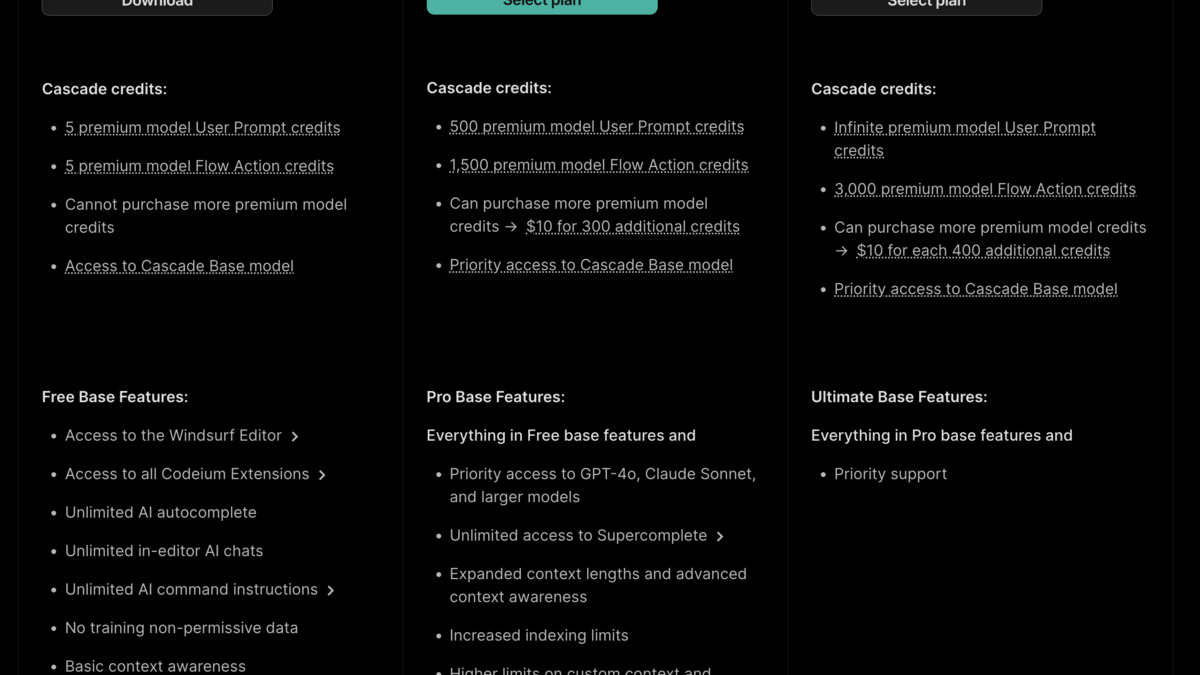 Windsurf's pricing tiers - the Pro plan at $20/month includes access to SWE-1.5 and all premium models.
Source: windsurf.com
Windsurf's pricing tiers - the Pro plan at $20/month includes access to SWE-1.5 and all premium models.
Source: windsurf.com
Known Gotchas
Context window is smaller. Cursor's 200K token window handles larger codebases in a single session. Windsurf's 100K limit means Cascade may lose track of context on very large projects. Break big tasks into smaller, focused requests.
No .cursorrules auto-detection. Windsurf won't read your existing
.cursorrulesfile. You must manually create.windsurf/rules/rules.mdas described in the migration steps above.Extension marketplace differences. While both use Open VSX, some extensions may behave slightly differently. The GitHub Pull Requests extension, for example, required a compatibility fix in Windsurf that shipped in February 2026.
Cascade can over-edit. Because Cascade is more autonomous than Composer, it sometimes makes changes you didn't ask for. Review the "Edited Files" list carefully before accepting. Use Chat mode for sensitive refactors.
SWE-1.5 isn't always best. Windsurf defaults to its proprietary model, but Claude Sonnet 4.6 or GPT-5.4 often produce better results on complex reasoning tasks. Don't hesitate to switch models mid-conversation.
Wave 13 parallel sessions are new. Windsurf's March 2026 update added parallel Cascade sessions with Git worktrees. This feature is still maturing and may have stability issues on large repositories.
For a deeper feature comparison, our Cursor vs Windsurf analysis covers benchmarks and real-world testing across both editors.
FAQ
Can I run Cursor and Windsurf side by side?
Yes. They're separate applications with no conflicts. Many developers keep both installed during the transition period to compare results on real tasks.
Will my VS Code extensions work in Windsurf?
Most VS Code extensions work because Windsurf is a VS Code fork. Extensions from Open VSX transfer directly. Microsoft-exclusive extensions may need alternative sources.
Does Windsurf support .cursorrules?
No. Windsurf uses .windsurf/rules/rules.md for project-level AI instructions. Copy your .cursorrules content to this new path manually.
Is Windsurf better for beginners?
Windsurf's Cascade is generally more beginner-friendly because it requires less manual context management. Our guide to getting started with AI coding assistants covers both tools for newcomers.
Which editor has better model selection?
Both support Claude, GPT-5, and Gemini model families. Windsurf adds its proprietary SWE-1.5; Cursor adds its Composer model. The overlap is significant. See our Cursor review and Windsurf review for detailed model comparisons.
Can I migrate back to Cursor if Windsurf doesn't work out?
Yes. The migration works in both directions since both are VS Code forks. Export your Windsurf settings and import them into Cursor, then convert .windsurf/rules/rules.md back to .cursorrules.
Sources:
✓ Last verified March 26, 2026

