
NVIDIA RTX 4090 - The Home Lab AI Standard
Full specs and benchmarks for the NVIDIA GeForce RTX 4090 - 24GB GDDR6X, 1,008 GB/s bandwidth, Ada Lovelace architecture, and why it remains the default home lab GPU for local AI inference.
 21 min read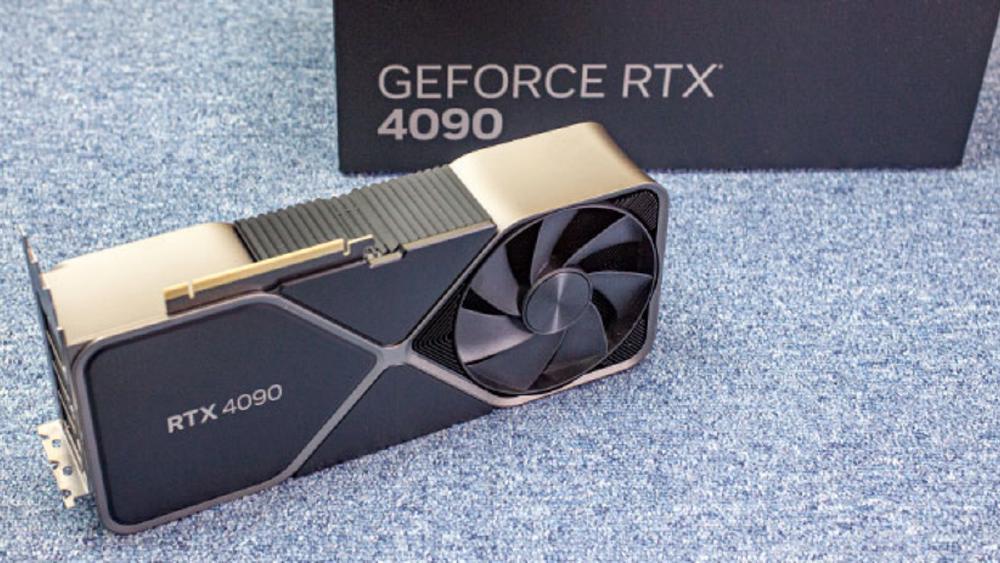
TL;DR
- 24GB GDDR6X at 1,008 GB/s - enough to run most 7B-34B models at high quantization and up to ~38B parameters in Q4_K_M
- 330 TFLOPS FP8 with fourth-generation Tensor Cores - still the performance benchmark that every other home lab option is measured against
- Ada Lovelace architecture on TSMC 4N with excellent software maturity - every inference framework is optimized for this card
- MSRP was $1,599 at launch but street prices sit at $1,800-$2,000 in early 2026 - used prices are $1,400-$1,600
- The default recommendation for anyone building a single-GPU inference rig today, unless you need the extra VRAM of the RTX 5090
Overview
The NVIDIA GeForce RTX 4090 is the card that defined the home lab AI era. Launched in October 2022, it arrived just as the wave of open-weight LLMs - starting with Meta's LLaMA and accelerating through Mistral, Mixtral, and the Llama 2/3 series - made local inference a practical reality for individual developers and researchers. Its 24GB of GDDR6X and 330 TFLOPS of FP8 compute hit a sweet spot that no competitor has fully displaced, and more than three years after launch, it remains the single most popular GPU in the home lab AI community.
The reason is straightforward: 24GB is enough. Not enough for everything - you cannot run a 70B model without aggressive quantization and partial CPU offloading - but enough for the workloads that matter most. Llama 3.1 8B at Q8_0 precision fits comfortably with room to spare. Mistral 7B, Phi-3, Gemma 2 9B, Qwen 2.5 14B - all run at full quality with fast generation speeds. Even Code Llama 34B in Q4_K_M fits within the 24GB envelope. For the vast majority of local inference use cases, 24GB is the right amount of VRAM at the right price point.
The Ada Lovelace architecture underneath has also aged well. TSMC 4N fabrication gives it respectable power efficiency at 450W, the fourth-generation Tensor Cores handle FP8 and FP16 natively, and CUDA Compute Capability 8.9 means it runs every major inference framework without compatibility issues. The RTX 4090 is not the fastest option anymore - the RTX 5090 beats it by 15-25% in tokens per second - but it is the most battle-tested, best-documented, and most widely optimized consumer GPU for AI workloads.
Key Specifications
| Specification | Details |
|---|---|
| Manufacturer | NVIDIA |
| Product Family | GeForce RTX 40 Series |
| Architecture | Ada Lovelace (AD102) |
| Process Node | TSMC 4N |
| CUDA Cores | 16,384 |
| Tensor Cores | 512 (4th gen) |
| RT Cores | 128 (3rd gen) |
| Memory | 24GB GDDR6X |
| Memory Bus | 384-bit |
| Memory Bandwidth | 1,008 GB/s |
| FP8 Performance | 330 TFLOPS |
| FP16 Performance | 165 TFLOPS |
| TDP | 450W |
| Power Connector | 16-pin 12VHPWR |
| Recommended PSU | 850W |
| PCIe Interface | PCIe 4.0 x16 |
| Slot Width | 3-slot (reference) |
| MSRP | $1,599 |
| Release Date | October 2022 |
| NVENC Encoders | 2x (AV1) |
| CUDA Compute Capability | 8.9 |
Performance Benchmarks
All inference benchmarks use llama.cpp with the noted quantization unless stated otherwise. Numbers represent generation speed (tokens per second) at batch size 1.
Inference Throughput
| Benchmark | RTX 5090 (32GB) | RTX 4090 (24GB) | RTX 3090 (24GB) | M4 Max 128GB |
|---|---|---|---|---|
| Llama 3.1 8B Q4_K_M (tok/s) | ~155 | ~130 | ~70 | ~55 |
| Llama 3.1 8B Q8_0 (tok/s) | ~110 | ~95 | ~48 | ~42 |
| Mistral 7B Q4_K_M (tok/s) | ~160 | ~135 | ~75 | ~58 |
| Code Llama 34B Q4_K_M (tok/s) | ~42 | ~30 | ~15 | ~22 |
| Mixtral 8x7B Q4_K_M (tok/s) | ~45 | ~35* | N/A (VRAM) | ~28 |
| Qwen2.5 14B Q4_K_M (tok/s) | ~75 | ~62 | ~32 | ~38 |
| Phi-3 14B Q4_K_M (tok/s) | ~85 | ~70 | ~36 | ~40 |
| Gemma 2 9B Q4_K_M (tok/s) | ~100 | ~82 | ~44 | ~46 |
| Max Model Size (Q4_K_M) | ~55B | ~38B | ~38B | ~200B+ |
*Mixtral 8x7B on the RTX 4090 requires careful quantization (Q3_K_M or lower) to fit active experts in 24GB. Performance varies significantly depending on the quantization level and context length.
Power and Efficiency
| Metric | RTX 5090 | RTX 4090 | RTX 3090 | M4 Max |
|---|---|---|---|---|
| TDP | 575W | 450W | 350W | ~90W (system) |
| Typical Inference Power | ~350-450W | ~250-350W | ~200-280W | ~60-80W (system) |
| System Idle Power | ~80-100W* | ~65-85W* | ~55-75W* | ~15-20W |
| Tokens per Watt (8B Q4) | ~0.37 | ~0.43 | ~0.28 | ~0.79 |
| Annual Cost (8hr/day, $0.12/kWh) | ~$155-$195 | ~$110-$150 | ~$85-$120 | ~$25-$35 |
*System power estimates assume a typical desktop build (Ryzen 7/9 or Core i7/i9, 32-64GB DDR5, NVMe SSD).
The RTX 4090 delivers the best overall balance of speed, VRAM, and software maturity in the consumer GPU space. It is 15-25% slower than the RTX 5090 in raw tokens per second, but it is also $400-$700 cheaper and draws 125W less power. For models that fit in 24GB - which covers the vast majority of practical local inference use cases - the performance gap rarely justifies the cost premium.
Where the RTX 4090 falls short is on larger models. Anything above ~38B parameters in Q4_K_M does not fit, and CPU offloading kills performance. If your primary workload involves 70B-class models, you need either the RTX 5090 (32GB, still tight), a multi-GPU setup with two RTX 3090s (48GB total), or an Apple M4 Max with 128GB unified memory.
Prompt Processing (Time to First Token)
The RTX 4090's prompt evaluation speed remains competitive for its price tier. These numbers matter for interactive use cases and RAG pipelines where long prompts are common.
| Prompt Length | RTX 5090 (8B Q4) | RTX 4090 (8B Q4) | RTX 3090 (8B Q4) | M4 Max (8B Q4) |
|---|---|---|---|---|
| 512 tokens | ~0.08s | ~0.10s | ~0.20s | ~0.25s |
| 2,048 tokens | ~0.25s | ~0.32s | ~0.65s | ~0.85s |
| 4,096 tokens | ~0.48s | ~0.60s | ~1.20s | ~1.60s |
| 8,192 tokens | ~0.95s | ~1.15s | ~2.30s | ~3.10s |
For typical chatbot interactions with 500-2,000 token prompts, the RTX 4090 responds essentially instantly. The prompt processing gap only becomes noticeable at 4,000+ tokens, and even then it is well within usable latency for most applications.
Framework-Specific Performance
The RTX 4090 benefits from being the reference hardware for virtually every inference framework. When developers optimize their CUDA kernels, they test on 4090s first.
llama.cpp (GGUF)
llama.cpp is the most common inference backend for RTX 4090 users. The GGUF quantization format offers multiple quality/speed tradeoffs.
| Model | Q4_K_M | Q5_K_M | Q8_0 | FP16 |
|---|---|---|---|---|
| Llama 3.1 8B | ~130 tok/s | ~115 tok/s | ~95 tok/s | ~55 tok/s |
| Mistral 7B | ~135 tok/s | ~120 tok/s | ~100 tok/s | ~58 tok/s |
| Qwen2.5 14B | ~62 tok/s | ~55 tok/s | ~42 tok/s | ~26 tok/s |
| Code Llama 34B | ~30 tok/s | ~26 tok/s | N/A (VRAM) | N/A (VRAM) |
| Gemma 2 9B | ~82 tok/s | ~72 tok/s | ~60 tok/s | ~36 tok/s |
Note the Q8_0 column carefully. On the RTX 4090, you can run most 7B-9B models at Q8_0 (near-lossless quality) and still get 60-100 tokens/second. For production use cases where output quality matters - code generation, technical writing, structured data extraction - Q8_0 on the 4090 offers a quality/speed tradeoff that is difficult to beat.
vLLM
vLLM on the RTX 4090 can serve Llama 3.1 8B to 3-4 concurrent users at 25-30 tokens/second per user. The smaller VRAM (compared to the RTX 5090) means less room for KV cache, which limits the number of concurrent long-context sessions. For a personal inference server with 1-2 concurrent users, this is more than sufficient.
Ollama
Ollama runs identically on the RTX 4090 and RTX 5090 - the same commands, the same API, the same automatic GPU detection. The only difference is throughput numbers and the maximum model size that fits in VRAM. Ollama's automatic memory management works well on the 4090 - it will warn you if a model does not fit and offer to use partial CPU offloading, though you should avoid offloading if possible.
Real-World Workflow Examples
Local coding assistant (Qwen2.5 Coder 14B). The RTX 4090 runs Qwen2.5 Coder 14B at Q4_K_M comfortably within 24GB. At ~62 tokens/second, code completions are fast and responsive through Continue.dev or Copilot alternatives. The model plus a 8K context window uses about 12GB, leaving 12GB free for the system. This is a smooth, production-quality local coding experience.
Running the most popular models. Llama 3.1 8B, Mistral 7B, Phi-3 Medium 14B, Gemma 2 9B, Qwen2.5 7B/14B - all of these run at full quality (Q8_0 or higher) with excellent throughput on the RTX 4090. This covers roughly 90% of what most home lab users want to run. The models are good, the speed is fast, and the experience is polished.
Fine-tuning small models. The RTX 4090's 24GB VRAM is sufficient for LoRA fine-tuning on 7B-14B models using frameworks like Unsloth, Axolotl, or Hugging Face TRL. A typical LoRA fine-tune of Llama 3.1 8B with a batch size of 4 and sequence length of 2048 uses about 18-20GB of VRAM. This is a use case where the Apple M4 Max cannot compete - CUDA's training ecosystem has no Metal equivalent at this level of maturity.
The 24GB wall. The moment you need Mixtral 8x7B (26GB at Q4_K_M), or want to run Code Llama 34B at Q5_K_M (27GB), you hit the wall. The options at that point are: drop to Q3_K_M or lower (quality degradation), switch to partial CPU offloading (severe speed penalty), or buy a different card. This is the RTX 4090's single biggest limitation, and it is binary - models either fit or they do not.
Key Capabilities
24GB Sweet Spot. The 24GB VRAM ceiling is not an accident - it is the result of years of ecosystem co-evolution between hardware and model sizes. Model developers target 24GB as a deployment floor because the RTX 4090 (and 3090) installed base is enormous. Quantization tools like GGUF/GPTQ are optimized for 24GB targets. Framework developers test against 24GB cards first. This creates a flywheel where the most popular models and tools are specifically tuned for the hardware you already have.
To illustrate: when Meta released Llama 3.1, the most-downloaded quantized versions on HuggingFace were the 8B Q4_K_M (fits in 6GB) and the 8B Q8_0 (fits in 9GB). The 70B Q4_K_M (fits in 40GB) was third. Model creators quantize first for the 24GB audience because that is where the users are.
Mature Software Ecosystem. Three years of production use means the RTX 4090 has the most optimized inference pathways of any consumer GPU. llama.cpp CUDA kernels, vLLM PagedAttention, Ollama's automatic layer splitting, ExLlamaV2's quantization pipeline - all of these were developed and tested primarily on RTX 4090 hardware. You will not hit obscure driver bugs or unsupported compute paths. Everything just works.
This maturity also extends to troubleshooting. If you encounter an issue running a model on an RTX 4090, there is almost certainly a GitHub issue, Reddit thread, or Discord conversation that covers it. The community knowledge base around this card is unmatched. For the RTX 5090, which has only been available for 14 months, the community knowledge is still developing.
Reasonable Power Envelope. At 450W TDP, the RTX 4090 draws about 250-350W under typical inference workloads. That is 100-125W less than the RTX 5090 and only 50-70W more than the RTX 3090. For continuous inference serving in a home lab, the power difference between a 4090 and a 5090 adds up to roughly $50-$100 per year in electricity at average US rates - not negligible, but not a dealbreaker either.
The 450W TDP also means a quality 850W PSU is sufficient, which is a standard component that most enthusiast builders already own. The 5090's 1,000W+ PSU requirement pushes you into a less common (and more expensive) power supply tier.
FP8 and INT8 Tensor Core Support. The fourth-generation Tensor Cores in the RTX 4090 natively support FP8 and INT8 computation. While the RTX 3090's third-gen Tensor Cores are limited to FP16, the 4090 can use FP8 quantized models with full hardware acceleration. This means 8-bit quantized models run at near-full Tensor Core throughput, and the growing ecosystem of FP8 quantization tools (like llama.cpp's Q8_0 format) benefits directly from this hardware support.
Build Considerations
The RTX 4090 is more accommodating than the RTX 5090 from a system-building perspective, but still demands attention to a few details.
Power Supply. An 850W 80+ Gold PSU is the recommended minimum. Quality 850W units from Corsair, Seasonic, or EVGA are widely available for $120-$180. The 16-pin 12VHPWR connector was controversial at launch due to melting concerns with early adapters, but direct 12VHPWR cables on modern PSUs have resolved this. If your PSU is more than two years old, verify it has a native 12VHPWR output rather than using a MOLEX or 8-pin adapter.
Cooling and Clearance. The reference RTX 4090 is a 3-slot card, slightly more compact than the 5090's 3.5-slot design. Most mid-tower cases with 320mm+ GPU clearance will fit it. Thermal performance is well-characterized - the card typically runs at 70-80C under sustained inference loads with decent case airflow. It does not require exotic cooling solutions.
CPU and System RAM. Like the RTX 5090, the RTX 4090 is not particularly CPU-dependent for inference. A mid-range Ryzen 5/7 or Core i5/i7 is sufficient. 32GB of system DDR4 or DDR5 is enough for standard inference; 64GB is useful if you plan to do partial CPU offloading for models that slightly exceed 24GB VRAM. The RTX 4090 uses PCIe 4.0 x16, so there is no benefit from a PCIe 5.0 motherboard unless you are planning a future GPU upgrade.
Pricing and Availability
The RTX 4090 launched at $1,599 MSRP in October 2022. As of early 2026, new units sell for $1,800-$2,000 from retailers, while used cards in good condition go for $1,400-$1,600 on secondary markets. The RTX 5090's launch has not significantly depressed RTX 4090 prices because demand for 24GB NVIDIA GPUs remains strong.
| Comparison | MSRP | Street Price (Typical) | Price per GB VRAM |
|---|---|---|---|
| RTX 5090 | $1,999 | $2,200-$2,500 | $69-$78/GB |
| RTX 4090 | $1,599 | $1,800-$2,000 | $75-$83/GB |
| RTX 4090 (used) | N/A | $1,400-$1,600 | $58-$67/GB |
| RTX 3090 (used) | N/A | $700-$900 | $29-$38/GB |
| M4 Max MacBook Pro (128GB) | N/A | $4,399+ | $34/GB (system) |
The RTX 4090 is the most cost-effective option for maximum single-GPU performance on models up to ~38B parameters. If you primarily run 7B-14B models and want the fastest possible inference on a single card without spending $2,200+, it is the right choice. If you need more VRAM, the used RTX 3090 market offers 24GB for nearly half the price - just with significantly lower throughput.
A complete RTX 4090 build costs roughly $2,600-$3,200 (GPU at street price plus CPU, motherboard, RAM, PSU, case, storage). That is $400-$700 less than an equivalent RTX 5090 build, and the 4090 system can use a less expensive power supply and does not require as aggressive a cooling solution.
Strengths
- 24GB GDDR6X hits the sweet spot for the vast majority of local inference workloads (7B-34B models)
- 330 TFLOPS FP8 delivers fast inference for any model that fits in VRAM
- Three years of software ecosystem maturity - the most tested and optimized consumer GPU for AI
- 1,008 GB/s memory bandwidth is sufficient for memory-bound inference at batch size 1
- 450W TDP is manageable with a standard 850W PSU and good airflow
- Strong used market ($1,400-$1,600) makes it accessible to more builders
- Better tokens-per-watt ratio than the RTX 5090 on models that fit in 24GB
Weaknesses
- 24GB VRAM ceiling means models above ~38B parameters require aggressive quantization or CPU offloading
- Cannot run Mixtral 8x7B or Llama 3.1 70B at reasonable quality without multi-GPU or CPU spilling
- Street prices remain $200-$400 above the $1,599 MSRP more than three years after launch
- The 16-pin 12VHPWR connector has had documented reliability concerns (though largely resolved in later revisions)
- No native FP4 Tensor Core support - limited to FP8/FP16 precision
- 384-bit memory bus is narrower than the RTX 5090's 512-bit, limiting bandwidth scaling
- PCIe 4.0 (not 5.0) may become a bottleneck for certain multi-GPU communication patterns
Recommended Inference Software Stack
For RTX 4090 users, here is the recommended software stack depending on your use case.
Personal assistant / chatbot: Ollama. Install it, run ollama pull llama3.1 (or any model), and start chatting via the CLI or connect it to a web UI like Open WebUI. Zero configuration, automatic GPU detection, model management built in. This is the right starting point for most home lab users.
Development API: Ollama or vLLM. Both expose an OpenAI-compatible API that your applications can call. Ollama is simpler to set up. vLLM is better for production serving with multiple concurrent users (3-4 on the 4090).
Maximum throughput: llama.cpp with specific model and quantization tuning. llama.cpp gives you the most control over quantization format, GPU layer allocation, context size, and generation parameters. Use this when you need to squeeze every token/second out of the hardware.
Fine-tuning: Unsloth (fastest LoRA training), Axolotl (flexible configuration), or Hugging Face TRL (most community support). All work within 24GB for 7B-14B models with LoRA.
Image generation: ComfyUI with SDXL or Flux models. The RTX 4090's 24GB and fast compute handle SDXL comfortably and Flux at medium resolutions.
What Fits in 24GB - Model Compatibility Matrix
This is the practical question every RTX 4090 buyer needs answered. Here is a comprehensive list of popular models and whether they fit in 24GB at various quantization levels.
| Model | Q4_K_M | Q5_K_M | Q8_0 | FP16 | Notes |
|---|---|---|---|---|---|
| Llama 3.1 8B | 5.0GB | 5.7GB | 8.5GB | 16GB | Fits easily at any quantization |
| Mistral 7B | 4.4GB | 5.1GB | 7.7GB | 14.5GB | Fits at all levels |
| Gemma 2 9B | 5.8GB | 6.6GB | 9.8GB | 18GB | FP16 tight but works |
| Phi-3 Medium 14B | 8.5GB | 9.6GB | 14.3GB | N/A (28GB) | Q8_0 max for 24GB |
| Qwen2.5 14B | 8.6GB | 9.7GB | 14.5GB | N/A (28GB) | Q8_0 max for 24GB |
| Code Llama 34B | 20GB | 23GB | N/A (36GB) | N/A (68GB) | Q5_K_M is the max |
| Mixtral 8x7B | 26GB | 30GB | N/A (46GB) | N/A (90GB) | Does not fit at Q4_K_M |
| Llama 3.1 70B | 40GB | 46GB | N/A | N/A | Does not fit at any level |
| Qwen2.5 72B | 41GB | 47GB | N/A | N/A | Does not fit at any level |
Memory figures are approximate and include model weights only. KV cache and runtime overhead add 1-4GB depending on context length and batch size.
The table shows clearly why 24GB remains a practical sweet spot. Everything up to ~14B parameters fits at high quality (Q8_0). Models up to ~34B fit at Q4_K_M. Above that, you need more VRAM. The RTX 5090's 32GB pushes the ceiling to Mixtral 8x7B and some 40B-class models, but the truly large models (70B+) require either a dual RTX 3090 setup or an Apple M4 Max with 128GB.
Who Should Buy This
The RTX 4090 is the right choice for most home lab builders. If you are starting from scratch and your primary goal is running 7B-34B models locally with the best possible inference speed, this is the default recommendation. The software ecosystem is mature, the performance is excellent, and the total system cost is $400-$700 less than an RTX 5090 build.
Buy the RTX 5090 instead if you regularly need to run models in the 25-55B parameter range that do not fit in 24GB.
Buy a used RTX 3090 instead if budget is your primary constraint and you can accept ~50% lower throughput.
Buy an M4 Max instead if you need 70B+ model support without multi-GPU complexity, value power efficiency, or want a portable solution.
RTX 4090 vs Alternatives - Quick Decision Matrix
| If you need... | Best choice | Why |
|---|---|---|
| Maximum speed on 7B-14B models | RTX 4090 | Best speed/cost balance on the most common models |
| Models larger than 38B | RTX 5090 | 32GB fits Mixtral 8x7B, ~55B models |
| 70B+ model support | M4 Max 128GB | Only single-device option for 70B at Q4_K_M |
| 48GB VRAM on a budget | 2x RTX 3090 | $1,400-$1,800 total, NVLink support |
| Lowest entry cost (24GB) | RTX 3090 used | $700-$900, same VRAM as 4090 |
| Power efficiency | M4 Max | 60-80W system vs 350-450W system |
| Production serving (multi-user) | RTX 4090 or RTX 5090 | vLLM + CUDA for highest throughput |
| Fine-tuning (LoRA) | RTX 4090 | 24GB VRAM + mature CUDA training stack |
| Portability | M4 Max MacBook | Only portable option in this comparison |
Long-Term Outlook
The RTX 4090 will remain relevant for local AI inference well into 2027 and beyond. Here is why:
Model developers optimize for 24GB. The 24GB VRAM tier (RTX 4090 + RTX 3090) has the largest installed base of any AI-capable GPU segment. Model developers at Meta, Mistral, Google, and others consistently release quantized variants that target 24GB deployment. As long as this continues - and there is no sign it will stop - the RTX 4090 will run the models that matter.
7B-14B models are getting better, not bigger. The trend in open-weight models is toward better performance at smaller sizes, not toward larger models. Phi-4, Gemma 2, Qwen2.5, and Mistral Small all demonstrate that 7B-14B models can approach 70B model quality on many tasks through improved training techniques. This plays directly to the RTX 4090's strengths.
Used prices will decline. As RTX 5090 adoption grows and RTX 6090 approaches (likely 2027), RTX 4090 used prices will gradually decline from the current $1,400-$1,600 range. A used RTX 4090 at $1,000-$1,200 in late 2026 or 2027 would be an exceptional value proposition.
CUDA ecosystem lock-in is durable. Every major AI tool, framework, and library has first-class CUDA support. This ecosystem advantage compounds over time. The RTX 4090's CUDA 8.9 compute capability will remain supported for many years to come.
Dual-use value. Unlike datacenter GPUs that only do compute, the RTX 4090 is also one of the best gaming GPUs ever made. If your home lab doubles as a gaming PC, the 4090 handles both workloads. You can run inference during the day and play games at night. This dual-use value proposition does not apply to any other hardware in this comparison - the M4 Max has limited gaming options, the RTX 3090 is slower for both tasks, and the RTX 5090 costs significantly more.
Energy efficiency improvements with power limiting. Advanced users can use nvidia-smi to set a power limit below the 450W TDP. At 300W (67% power limit), the RTX 4090 loses only about 10-15% inference performance while saving 150W of power draw. This is because inference workloads are typically memory-bandwidth-bound, not compute-bound, so reducing the power (and clock speed) of the compute units has a disproportionately small impact on inference throughput. For 24/7 inference serving, running at 300W saves roughly $60-$80 per year in electricity at US rates with minimal performance impact.
Related Coverage
- NVIDIA RTX 5090 - The Blackwell successor with 32GB GDDR7
- NVIDIA RTX 3090 - Budget 24GB option for local inference
- Apple M4 Max - Unified memory alternative for very large models
- Cambricon MLU590 - Chinese inference ASIC with 192GB HBM2e
Frequently Asked Questions
Should I buy an RTX 4090 or wait for the RTX 5090 to drop in price?
The RTX 5090 is unlikely to drop significantly in the near term - NVIDIA's pricing strategy does not include mid-generation price cuts on flagship GPUs. If you need a GPU now and your workloads fit in 24GB, buy the 4090. If you need more than 24GB, the 5090 is already available. There is no reason to wait unless you are hoping for a used RTX 5090 market to develop, which is at least 1-2 years away.
Is a used RTX 4090 safe to buy?
Generally yes, with caveats. The RTX 4090 has only been available since October 2022, so used cards are at most three years old. The main concerns are the 12VHPWR connector (check for any signs of heat damage or discoloration) and thermal pad condition. Run a 30-minute stress test and check GPU and memory temperatures before committing.
Can I use the RTX 4090 for training, not just inference?
Yes, for small-scale training. LoRA fine-tuning on 7B-14B models works well with 24GB VRAM. Full fine-tuning on anything larger than a 3B model exceeds 24GB. For serious training workloads, datacenter GPUs (A100, H100) or multi-GPU setups are more appropriate. The 4090 is primarily an inference card for home lab use.
RTX 4090 vs two RTX 3090s?
If your primary workload is models under 24GB (7B-34B at Q4_K_M), a single 4090 is simpler, faster, and uses less power. If you need 48GB for 70B-class models, two RTX 3090s are the only option under $2,000 for GPUs. The dual 3090 setup is slower per-token but enables model sizes that the 4090 cannot touch.
What about the RTX 4080 SUPER for AI?
The RTX 4080 SUPER has 16GB GDDR6X at 736 GB/s. At 16GB, it can run 7B models comfortably and 14B models with aggressive quantization, but it hits the VRAM wall much faster than the 4090's 24GB. At $999-$1,100 MSRP, it is a poor value for AI inference specifically - you lose 33% of the VRAM for 40% less money. The used RTX 3090 at $700-$900 gives you 24GB for less money.
How long will the RTX 4090 remain relevant for AI?
The 24GB VRAM ceiling will remain relevant as long as 7B-14B models are the workhorses of local inference, which shows no sign of changing. Model developers continue to optimize for 24GB deployment targets because the installed base of 4090s and 3090s is massive. The RTX 4090 will likely remain a strong home lab GPU for another 2-3 years at minimum.
Does the RTX 4090 support quantization formats beyond GGUF?
Yes. The RTX 4090 works with GGUF (llama.cpp), GPTQ (ExLlamaV2, AutoGPTQ), AWQ (various tools), and EXL2 (ExLlamaV2). Each format has different tradeoffs. GGUF is the most widely used and has the best model availability. GPTQ and AWQ are popular for vLLM deployments. EXL2 offers the most flexible quantization levels. All of these formats run on the RTX 4090 with CUDA acceleration.
Can I run multimodal models (vision + language) on the RTX 4090?
Yes. Vision-language models like LLaVA 1.6 (7B and 13B), InternVL2, and Qwen-VL fit within 24GB at appropriate quantization levels. The RTX 4090's compute and VRAM handle image encoding alongside text generation without issues. Larger multimodal models (34B+) may require aggressive quantization.
What about Speculative Decoding?
Speculative decoding uses a small draft model to propose tokens and a larger target model to verify them, improving effective throughput. On the RTX 4090, you need enough VRAM to hold both models simultaneously. For example, Llama 3.1 8B (target, 5GB at Q4_K_M) plus a 1B draft model (0.7GB) fits easily with room to spare. Speculative decoding can improve effective throughput by 30-60% on well-matched model pairs, though framework support is still maturing.
Sources
