
NVIDIA RTX 3090 - The Budget 24GB Value King
Full specs and benchmarks for the NVIDIA GeForce RTX 3090 - 24GB GDDR6X at 936 GB/s, Ampere architecture, and why used 3090s remain the best value option for local AI inference in 2026.
 21 min read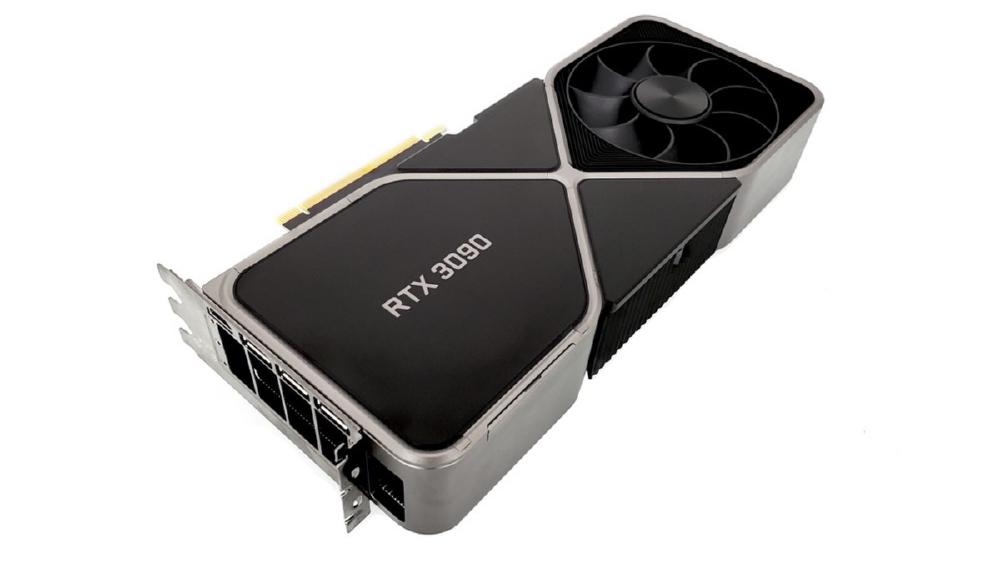
TL;DR
- 24GB GDDR6X at 936 GB/s - the same VRAM capacity as the RTX 4090 at a fraction of the price
- Used prices of $700-$900 make this the most cost-effective way to get 24GB of NVIDIA GPU memory for local inference
- Ampere architecture with ~142 TFLOPS FP16 - no native FP8, but FP16 inference is well-supported across all frameworks
- Roughly half the tokens-per-second of an RTX 4090 on equivalent workloads, but the math changes when you buy two
- The go-to recommendation for budget-conscious home lab builders - two used 3090s cost less than one RTX 4090 and give you 48GB total VRAM
Overview
The NVIDIA GeForce RTX 3090 was the flagship Ampere consumer GPU when it launched in September 2020, priced at $1,499. Five and a half years later, it has found a second life as the budget champion of the home lab AI community. Used 3090s sell for $700-$900 - less than half the street price of an RTX 4090 - and they deliver the same 24GB VRAM capacity that makes local LLM inference practical. If your primary question is "what is the cheapest way to run a 7B-34B model locally on NVIDIA hardware," the answer is almost always a used RTX 3090.
The Ampere architecture shows its age in raw compute throughput. The GA102 die on Samsung's 8nm process delivers about 142 TFLOPS at FP16, with no native FP8 support from its third-generation Tensor Cores. In tokens-per-second benchmarks, the RTX 3090 runs at roughly 50-55% the speed of an RTX 4090 on equivalent models and quantization levels. That is a meaningful gap when you are serving inference in real time. But for batch workloads, experimentation, fine-tuning experiments, and use cases where absolute speed is less critical than model quality, the 3090's 24GB of VRAM lets you run the same models as cards costing twice as much.
The real power move with the RTX 3090 is buying two. A pair of used 3090s gives you 48GB of total VRAM for $1,400-$1,800 - less than a single RTX 4090 at street prices. With frameworks like llama.cpp and vLLM supporting tensor parallelism across multiple GPUs, two 3090s can run 70B-class models that do not fit on any single consumer card. The tradeoff is complexity (you need a motherboard with two x16 PCIe slots and adequate lane configuration), higher total power draw (700W for two cards), and a dependency on multi-GPU support in your inference stack. But for pure VRAM-per-dollar, nothing in the consumer space comes close.
Key Specifications
| Specification | Details |
|---|---|
| Manufacturer | NVIDIA |
| Product Family | GeForce RTX 30 Series |
| Architecture | Ampere (GA102) |
| Process Node | Samsung 8nm |
| CUDA Cores | 10,496 |
| Tensor Cores | 328 (3rd gen) |
| RT Cores | 82 (2nd gen) |
| Memory | 24GB GDDR6X |
| Memory Bus | 384-bit |
| Memory Bandwidth | 936 GB/s |
| FP16 Performance | ~142 TFLOPS |
| FP8 Support | No (emulated only) |
| TDP | 350W |
| Power Connector | 2x 8-pin PCIe |
| Recommended PSU | 750W |
| PCIe Interface | PCIe 4.0 x16 |
| NVLink Support | Yes (NVLink bridge, 112.5 GB/s per direction) |
| Slot Width | 3-slot (reference) |
| Original MSRP | $1,499 |
| Used Market Price | $700-$900 |
| Release Date | September 2020 |
| NVENC Encoders | 1x |
| CUDA Compute Capability | 8.6 |
Performance Benchmarks
All inference benchmarks use llama.cpp with the noted quantization unless stated otherwise. Numbers represent generation speed (tokens per second) at batch size 1.
Inference Throughput - Single GPU
| Benchmark | RTX 5090 (32GB) | RTX 4090 (24GB) | RTX 3090 (24GB) | M4 Max 128GB |
|---|---|---|---|---|
| Llama 3.1 8B Q4_K_M (tok/s) | ~155 | ~130 | ~70 | ~55 |
| Llama 3.1 8B Q8_0 (tok/s) | ~110 | ~95 | ~48 | ~42 |
| Mistral 7B Q4_K_M (tok/s) | ~160 | ~135 | ~75 | ~58 |
| Code Llama 34B Q4_K_M (tok/s) | ~42 | ~30 | ~15 | ~22 |
| Qwen2.5 14B Q4_K_M (tok/s) | ~75 | ~62 | ~32 | ~38 |
| Phi-3 14B Q4_K_M (tok/s) | ~85 | ~70 | ~36 | ~40 |
| Gemma 2 9B Q4_K_M (tok/s) | ~100 | ~82 | ~44 | ~46 |
| Max Model Size (Q4_K_M) | ~55B | ~38B | ~38B | ~200B+ |
Dual RTX 3090 Performance (Tensor Parallelism)
The dual 3090 configuration is the RTX 3090's killer feature for home lab inference. With NVLink and 48GB combined VRAM, you can run models that are impossible on any single consumer GPU.
| Benchmark | 2x RTX 3090 (48GB, NVLink) | 2x RTX 3090 (48GB, PCIe) | RTX 5090 (32GB) | M4 Max 128GB |
|---|---|---|---|---|
| Llama 3.1 70B Q4_K_M (tok/s) | ~16 | ~14 | ~22* | ~18 |
| Mixtral 8x7B Q4_K_M (tok/s) | ~20 | ~17 | ~45 | ~28 |
| Qwen2.5 72B Q4_K_M (tok/s) | ~15 | ~12 | ~20* | ~17 |
| Llama 3.1 70B Q8_0 (tok/s) | ~8 | ~7 | N/A (VRAM) | ~9 |
| Max Model Size (Q4_K_M) | ~80B | ~80B | ~55B | ~200B+ |
*RTX 5090 70B numbers use aggressive Q3_K_M quantization to fit in 32GB. The dual 3090 setup runs these models at full Q4_K_M quality with room to spare.
The NVLink advantage is visible but not transformative - roughly 10-15% faster than PCIe for cross-GPU communication during tensor parallelism. For most home lab users, the NVLink bridge is worth the $50-$80 cost if your 3090 variant supports it (Founders Edition and most AIB cards do), but you are not losing much without it.
Power and Efficiency
| Metric | RTX 5090 | RTX 4090 | RTX 3090 | 2x RTX 3090 | M4 Max |
|---|---|---|---|---|---|
| TDP | 575W | 450W | 350W | 700W | ~90W (system) |
| Typical Inference Power | ~350-450W | ~250-350W | ~200-280W | ~400-560W | ~60-80W |
| Tokens per Watt (8B Q4) | ~0.37 | ~0.43 | ~0.28 | ~0.28 | ~0.79 |
| Annual Cost (8hr/day, $0.12/kWh) | ~$155-$195 | ~$110-$150 | ~$85-$120 | ~$170-$240 | ~$25-$35 |
The RTX 3090 is not power-efficient. It has the worst tokens-per-watt of the single-GPU options in this comparison, and a dual 3090 setup doubles that inefficiency. If you are running inference 8+ hours daily, the annual electricity cost difference between a single 3090 and an M4 Max is $50-$85 - not enough to change the purchase decision, but worth acknowledging.
Framework-Specific Performance
The RTX 3090 is well-supported across all major inference frameworks. Its CUDA Compute Capability 8.6 is above the minimum for every current tool.
llama.cpp (GGUF)
| Model | Q4_K_M | Q5_K_M | Q8_0 | FP16 |
|---|---|---|---|---|
| Llama 3.1 8B | ~70 tok/s | ~60 tok/s | ~48 tok/s | ~28 tok/s |
| Mistral 7B | ~75 tok/s | ~64 tok/s | ~50 tok/s | ~30 tok/s |
| Qwen2.5 14B | ~32 tok/s | ~28 tok/s | ~20 tok/s | ~12 tok/s |
| Code Llama 34B | ~15 tok/s | ~13 tok/s | N/A (VRAM) | N/A (VRAM) |
| Gemma 2 9B | ~44 tok/s | ~38 tok/s | ~30 tok/s | ~18 tok/s |
At 70-75 tokens/second on 7B-8B models with Q4_K_M, the RTX 3090 produces text faster than most people can read. For interactive chat, this is indistinguishable from "instant" in practice. The speed gap with the RTX 4090 only becomes perceptible on larger models (14B+) or when you are generating long outputs where the time difference accumulates.
The lack of native FP8 Tensor Core support means the RTX 3090 runs FP16 inference through its third-gen Tensor Cores and Q4/Q5/Q8 inference through integer pathways. The compute penalty versus the 4090's FP8 Tensor Cores is partially offset by the 3090's still-respectable 142 TFLOPS FP16.
vLLM and Ollama
Both frameworks run on the RTX 3090 without issues. vLLM can serve Llama 3.1 8B to 2-3 concurrent users at 15-20 tokens/second per user. Ollama provides the same plug-and-play experience as on newer cards. The CUDA 8.6 compute capability is well within the support range for both frameworks.
Fine-Tuning Capability
The RTX 3090 supports LoRA fine-tuning for 7B models using the same tools as the RTX 4090 - Unsloth, Axolotl, TRL. Performance is slower (roughly 2x longer training times for the same dataset), but the 24GB VRAM supports the same batch sizes and sequence lengths. For hobbyist fine-tuning where training time is measured in hours rather than minutes, the 3090 gets the job done.
One important note: the RTX 3090 does not support FP8 training, which some newer fine-tuning frameworks leverage for faster training on Ada Lovelace and Blackwell hardware. You are limited to FP16 and BF16 training precision.
Real-World Workflow Examples
Budget local assistant (Llama 3.1 8B + Ollama). The simplest possible setup: buy a used 3090 for $800, install Ollama, run ollama pull llama3.1. Within 5 minutes of plugging in the card, you have a local AI assistant generating at 70 tokens/second. Total investment: $800 for the GPU plus whatever your existing system costs. If you already have a desktop with a 750W PSU and a PCIe 4.0 slot, the 3090 is a drop-in upgrade.
Dual 3090 inference server (Llama 3.1 70B). The flagship dual-GPU use case. Two used 3090s ($1,600 total), NVLink bridge ($60), a motherboard with two x16 slots, and a 1,200W PSU. Load Llama 3.1 70B at Q4_K_M across both cards via llama.cpp tensor parallelism. Generation speed: ~14-16 tokens/second. Not blazing fast, but this is a 70B model running locally for under $2,500 total system cost. The same model on cloud APIs costs $0.40-$25.00 per million output tokens - the dual 3090 setup pays for itself in token costs within weeks of moderate use.
Learning and experimentation. For students, career-changers, and developers getting into AI for the first time, the RTX 3090 is the right entry point. At $700-$900, it provides the same 24GB VRAM experience as a $1,800 RTX 4090 - same models, same frameworks, same concepts. The only thing you sacrifice is speed, and for learning, speed is the least important factor. Understanding how quantization works, how context length affects memory, how different model architectures perform on different tasks - all of this transfers to any NVIDIA hardware.
Secondary GPU in a multi-GPU rig. Some builders pair an RTX 4090 (primary) with an RTX 3090 (secondary) to get 48GB total VRAM. This works via llama.cpp's layer splitting - you can assign more layers to the faster 4090 and fewer to the slower 3090. The asymmetric performance means you will not get optimal throughput compared to two matched cards, but it maximizes your total VRAM for large model loading.
Key Capabilities
24GB for Under $1,000. The RTX 3090 is the only way to get 24GB of NVIDIA VRAM for under $1,000 in early 2026. The RTX 3090 Ti offers marginal improvements (slightly higher clocks) at similar used prices, and the RTX 4090 costs twice as much. For the critical question of "can I run this model" - which is a binary yes/no based on VRAM capacity - the 3090 gives the same answer as the 4090 for every model up to ~38B parameters in Q4_K_M.
To put this in perspective: a used RTX 3090 at $800 gives you 24GB at $33/GB. An RTX 4090 at $1,800 gives you 24GB at $75/GB. You are paying a 2.3x premium for roughly 1.85x the performance. The 3090 is not the fastest option, but it is the most rational option for anyone who is not in a hurry.
Multi-GPU Scaling Path. The RTX 3090 supports NVLink via an NVLink bridge, enabling peer-to-peer memory access between two cards. This is a feature the RTX 4090 does not have - NVIDIA removed consumer NVLink from the Ada Lovelace generation. With NVLink, two 3090s can share their combined 48GB memory pool more efficiently than two 4090s communicating over PCIe. In practice, llama.cpp and vLLM handle multi-GPU without NVLink, but the bandwidth advantage of NVLink (112.5 GB/s per direction vs PCIe 4.0 x16 at ~25 GB/s) matters for inter-GPU communication during tensor parallelism.
The dual 3090 setup is arguably the best value proposition in the home lab AI space. For $1,400-$1,800 (two used cards), you get 48GB of VRAM - more than the RTX 5090's 32GB - with NVLink interconnect for efficient tensor parallelism. You can run Llama 3.1 70B at Q4_K_M comfortably, Mixtral 8x7B without any quantization tricks, and even experiment with 80B-class models. The only consumer option with more usable memory is the Apple M4 Max at 128GB, but it costs 2.5-3x more.
Proven Reliability. The RTX 3090 has been in the field for over five years. Hardware failure modes are well-documented, common failure points (thermal pad degradation, fan bearing wear) are well-understood, and replacement parts are widely available. When buying used, this maturity is an advantage - the community knows what to look for and what to avoid. Cards that have survived five years of use are past the infant mortality phase.
Standard Power Connectors. The RTX 3090 uses two standard 8-pin PCIe power connectors - the same connectors that have been used on GPUs for over a decade. No 12VHPWR, no 12V-2x6, no adapter concerns. Any PSU with two 8-pin PCIe outputs will work. This simplifies builds and eliminates the connector reliability questions that plagued the RTX 4090's 12VHPWR at launch.
Buying Guide for Used RTX 3090s
Since the RTX 3090 is only available on the secondary market, buying used requires some diligence. Here is what to look for and what to avoid.
What to Check
Thermal Pad Condition. The RTX 3090's GDDR6X memory modules run hot - memory junction temperatures can reach 100-110C under gaming loads. Poor thermal pad contact leads to throttling. If buying in person, run a 10-minute stress test and check memory junction temps with GPU-Z or HWiNFO. If buying online, ask the seller for thermal screenshots under load.
Fan Operation. All fans should spin freely without grinding or clicking noises. Fan bearing wear is the most common age-related issue. Replacement fans are available for $15-$30 per fan for most AIB models, but it is better to start with working fans.
Visual Inspection. Check for physical damage, bent PCB, damaged display outputs, and signs of liquid contact. Inspect the PCIe connector gold fingers for wear patterns - heavy insertion/removal cycles can degrade contact quality over time.
Stress Test. If possible, run FurMark or a sustained llama.cpp inference workload for 30+ minutes. Monitor GPU temperature (should stay under 85C), memory junction temperature (should stay under 108C), and watch for artifacts or driver crashes.
Pricing Guide
| Condition | Expected Price | Notes |
|---|---|---|
| Excellent (near-new, original box) | $850-$950 | Rare, often from upgraders |
| Good (working, clean, no issues) | $700-$850 | Most common |
| Fair (working, worn fans, thermal pad replacement needed) | $600-$700 | Factor in $20-$40 for thermal pad kit |
| RTX 3090 Ti (used) | $750-$1,000 | ~5% faster, same 24GB, worth $50-$100 premium |
Where to Buy
eBay, r/hardwareswap, and local classifieds (Craigslist, Facebook Marketplace) are the primary channels. eBay offers buyer protection but higher prices due to fees. r/hardwareswap and local sales are cheaper but riskier. For dual-GPU builds, buying two cards from the same seller or batch increases the chance of getting matching hardware.
Mining Cards - Are They Safe?
Yes, generally. GPU mining (Ethereum, before the merge to proof-of-stake) ran cards at constant temperatures and often at reduced power limits. The thermal cycling from gaming (heat up, cool down, heat up) is actually harder on solder joints and thermal pads than steady-state mining. Well-maintained mining cards can be in better condition than gaming cards with unknown histories. The main concern with ex-mining cards is fan bearing wear from years of continuous operation - check the fans carefully.
Build Considerations for Dual 3090 Setups
If you are building a dual 3090 inference rig, there are specific requirements beyond a standard single-GPU build.
Motherboard. You need a board with two x16 PCIe slots that can both run at x16 or at minimum x8/x8. Consumer boards often share PCIe lanes between the two slots, dropping to x8/x8 when both are populated. For inference, x8/x8 is acceptable - the PCIe bandwidth is not the bottleneck. Verify your board's lane layout in the manual before purchasing.
Power Supply. Two RTX 3090s draw up to 700W total (2x 350W TDP). With CPU, RAM, and other components, total system draw can hit 900-1,000W under peak load. A 1,200W PSU is recommended. You need four 8-pin PCIe power cables - verify your PSU has enough connectors.
Case and Cooling. Two 3-slot GPUs need serious physical space. A full-tower case or open bench is typical. With the NVLink bridge, the cards sit directly adjacent with no gap for airflow between them. Aggressive case ventilation is essential - at least three 140mm intake fans and two 120mm exhaust fans. Some builders opt for an open-air test bench or a mining-style open frame to avoid thermal issues entirely.
NVLink Bridge. The RTX 3090 NVLink bridge is a 4-slot SLI bridge that connects the two cards' NVLink connectors. They cost $50-$80 on the used market. Not all 3090 models have exposed NVLink connectors (some AIB cards do not), so verify compatibility with your specific card model before relying on NVLink in your build plan.
Pricing and Availability
The RTX 3090 is discontinued and only available on the secondary market. Prices have stabilized in the $700-$900 range for standard cards in good condition, with some variation based on brand (EVGA, ASUS, MSI), condition, and seller. The RTX 3090 Ti (slightly faster, same 24GB) occasionally appears for $50-$100 more and is worth the premium if you find one.
| Comparison | Price | VRAM | Cost per GB | Tokens/sec (8B Q4) |
|---|---|---|---|---|
| RTX 3090 (used) | $700-$900 | 24GB | $29-$38/GB | ~70 |
| 2x RTX 3090 (used) | $1,400-$1,800 | 48GB | $29-$38/GB | ~70 (single), ~16 (70B TP) |
| RTX 4090 | $1,800-$2,000 | 24GB | $75-$83/GB | ~130 |
| RTX 5090 | $2,200-$2,500 | 32GB | $69-$78/GB | ~155 |
| M4 Max MacBook Pro (128GB) | $4,399+ | 128GB | $34/GB | ~55 |
RTX 3090 vs RTX 4090 - The $1,000 Question
The most common question about the RTX 3090 is whether the ~$1,000 savings over an RTX 4090 is worth the performance tradeoff. Here is a detailed comparison focused on the factors that actually matter for inference.
| Factor | RTX 3090 | RTX 4090 | Winner |
|---|---|---|---|
| VRAM | 24GB GDDR6X | 24GB GDDR6X | Tie |
| Bandwidth | 936 GB/s | 1,008 GB/s | RTX 4090 (8% faster) |
| FP8 compute | N/A | 330 TFLOPS | RTX 4090 |
| FP16 compute | 142 TFLOPS | 165 TFLOPS | RTX 4090 (16% faster) |
| Inference speed (7B Q4) | ~70 tok/s | ~130 tok/s | RTX 4090 (86% faster) |
| Price (street) | $700-$900 | $1,800-$2,000 | RTX 3090 (56% cheaper) |
| Price per tok/s | $10-$13 per tok/s | $14-$15 per tok/s | RTX 3090 (better value) |
| TDP | 350W | 450W | RTX 3090 (100W less) |
| NVLink | Yes | No | RTX 3090 |
| Power connector | 2x 8-pin | 12VHPWR | RTX 3090 (simpler) |
| PSU requirement | 750W | 850W | RTX 3090 (cheaper PSU) |
The RTX 4090 is roughly 85% faster in tokens/second, but it costs roughly 110-130% more. In pure performance-per-dollar terms, the RTX 3090 wins. But performance-per-dollar is not the only metric that matters. If you are building a local inference server and every token/second translates to lower latency for your users, the RTX 4090's absolute speed advantage is worth the premium. If you are doing development work where "fast enough" is the bar (and 70 tok/s on an 8B model clears that bar), the RTX 3090's savings can be redirected to other parts of your setup - more RAM, a larger SSD for model storage, or a second 3090 for 48GB total VRAM.
Strengths
- Best VRAM-per-dollar ratio in the consumer GPU market at $29-$38 per GB
- 24GB GDDR6X runs the same models as the RTX 4090 - just slower
- NVLink support enables efficient dual-GPU setups with 48GB combined VRAM
- 350W TDP is the lowest power draw of the three NVIDIA cards in this comparison
- Standard 2x 8-pin PCIe power connectors - no 12VHPWR adapter concerns
- Massive used market with wide availability and competitive pricing
- Five years of proven reliability - hardware failure modes are well-documented
Weaknesses
- ~50-55% the inference speed of an RTX 4090 on equivalent workloads
- No native FP8 Tensor Core support - limited to FP16/FP32 precision paths
- Samsung 8nm process is less power-efficient per TFLOP than newer TSMC nodes
- Worst tokens-per-watt ratio of the single-GPU options compared here
- Older CUDA Compute Capability 8.6 may miss optimizations targeting newer architectures
- Thermal design can be challenging - many 3090 models run hot and require case airflow attention
- Only a single NVENC encoder limits video processing throughput if you use the card for multiple tasks
Long-Term Outlook
The RTX 3090 is in the sunset phase of its hardware lifecycle, but its relevance for AI inference will persist for years to come.
The 24GB installed base is massive. Between the RTX 3090 and RTX 4090, the 24GB VRAM tier has the largest installed base of any AI-capable GPU segment. Model developers will continue targeting 24GB as a deployment floor for the foreseeable future. Every new 7B-14B model that gets released extends the RTX 3090's useful life.
Used prices may decline further. As RTX 4090 prices eventually drop on the used market (pushed by 5090 adoption), RTX 3090 prices could settle in the $500-$700 range. At those prices, the value proposition becomes even more compelling - 24GB of NVIDIA VRAM for the cost of a mid-range gaming GPU.
Hardware aging risks. The RTX 3090 was released in September 2020. By 2027-2028, many used units will be 7-8 years old. While GPUs can last much longer than that, the probability of thermal pad degradation, capacitor failures, and fan bearing wear increases with age. Budget $30-$50 for preventive maintenance (thermal pad replacement, fan cleaning) when buying used units from unknown histories.
CUDA 8.6 longevity. NVIDIA's CUDA backward compatibility is excellent, but eventually CUDA Compute Capability 8.6 will drop off the supported tier for cutting-edge frameworks. This is unlikely before 2028 at the earliest, and even then, established versions of llama.cpp and Ollama will continue to work. But the newest performance optimizations and features in frameworks like vLLM may eventually require newer hardware.
Who Should Buy This
The RTX 3090 is the right choice if you are building a home lab inference rig on a budget. Specifically:
Single card, budget build. If you have $800-$1,200 for a GPU and your workloads are 7B-34B models, the 3090 gives you the same model compatibility as the RTX 4090 at half the cost. You trade speed for savings, but 70 tokens/second on Llama 3.1 8B is perfectly usable for development, testing, and interactive chat.
Dual card, maximum value VRAM. If you need to run 70B-class models locally and your budget is under $2,000 for GPUs, two used 3090s with NVLink give you 48GB for less than the cost of a single RTX 4090. No other setup at this price point can run Llama 3.1 70B at Q4_K_M quality.
Experimentation and learning. If you are new to local AI and want to learn the toolchain - llama.cpp, Ollama, vLLM, quantization techniques, prompt engineering - the 3090 is the lowest-cost entry point that does not compromise on VRAM. You can learn everything you need to know on a 3090, and the skills transfer directly if you upgrade later.
Do not buy a 3090 if latency is critical for your use case. If you are serving inference to users and every token-per-second matters, the RTX 4090 or RTX 5090 is worth the premium.
Related Coverage
- NVIDIA RTX 4090 - The faster 24GB option for those with larger budgets
- NVIDIA RTX 5090 - The Blackwell flagship with 32GB GDDR7
- Apple M4 Max - Unified memory approach for very large models
- Cambricon MLU590 - Chinese inference ASIC with 192GB HBM2e
RTX 3090 vs RTX 3090 Ti
The RTX 3090 Ti is an overclocked variant of the 3090 that appeared in March 2022. Here is a quick comparison.
| Specification | RTX 3090 | RTX 3090 Ti |
|---|---|---|
| CUDA Cores | 10,496 | 10,752 |
| Memory | 24GB GDDR6X | 24GB GDDR6X |
| Memory Bandwidth | 936 GB/s | 1,008 GB/s |
| TDP | 350W | 450W |
| Power Connector | 2x 8-pin | 16-pin (12VHPWR) |
| Used Price | $700-$900 | $750-$1,000 |
| Inference Speed (8B Q4) | ~70 tok/s | ~75 tok/s |
The 3090 Ti is roughly 5-8% faster due to slightly higher core counts and the memory bandwidth bump from 936 to 1,008 GB/s (matching the RTX 4090). The 450W TDP means it draws 100W more power and requires a 12VHPWR connector. The $50-$100 used price premium is worth it if you find one, but do not overpay - the performance difference is modest.
Frequently Asked Questions
Is a 5-year-old GPU still reliable for daily use?
Yes, if it has been properly maintained. GPUs do not have moving parts aside from fans, and the silicon itself does not degrade under normal operating conditions. The primary wear points are thermal interface material (thermal paste and pads), fan bearings, and capacitors. All of these are either replaceable or have long service lives. A well-maintained RTX 3090 should run for another 5+ years without issues.
Can I mine cryptocurrency with an RTX 3090 and also use it for AI?
Mining is largely irrelevant since Ethereum's merge to proof-of-stake in September 2022. The RTX 3090 is not profitable for mining any major cryptocurrency in 2026. Use it exclusively for AI inference and compute tasks.
Should I buy one RTX 3090 now or save for an RTX 4090?
If budget is tight, buy the 3090 now and start learning. The skills you develop - working with quantized models, managing VRAM, using llama.cpp and Ollama - transfer directly to any NVIDIA GPU. You can always sell the 3090 later and upgrade. Waiting months to save for a 4090 means months of not building skills and experience with local inference.
Does the RTX 3090 support Flash Attention?
Yes. Flash Attention 2 works on Ampere architecture (CUDA Compute Capability 8.0+). The RTX 3090's CUDA CC 8.6 fully supports it. This means vLLM's PagedAttention and other Flash Attention-based optimizations work correctly on the 3090.
What is the maximum context length I can use on the RTX 3090?
It depends on the model size. After loading model weights, the remaining VRAM is available for KV cache. For Llama 3.1 8B at Q4_K_M (5GB weights), you have ~19GB for KV cache, which supports context lengths well beyond 32,768 tokens. For Code Llama 34B at Q4_K_M (20GB weights), you have only ~4GB for KV cache, limiting practical context to roughly 2,048-4,096 tokens.
Can I use the RTX 3090 for image generation (Stable Diffusion)?
Yes. SDXL and Flux models run well on the 24GB RTX 3090. Image generation is less bandwidth-sensitive than LLM inference, so the 3090's lower bandwidth matters less. For users who want both LLM inference and image generation on the same card, the 3090 is a solid choice.
How much faster is the RTX 3090 Ti compared to the RTX 3090?
The 3090 Ti is approximately 5-8% faster in inference throughput due to slightly higher core counts and faster memory (1,008 GB/s vs 936 GB/s). The performance difference is minimal. If you find a used 3090 Ti for $50-$100 more than a 3090, it is worth the premium. If the price gap is larger, save your money and buy the standard 3090.
Can I run embedding models on the RTX 3090?
Yes. Embedding models (used for semantic search, RAG, and vector databases) are typically smaller than LLMs and fit easily in 24GB. Models like BGE-large, E5, and Nomic Embed run at high throughput on the 3090. You can even run an embedding model and an LLM simultaneously if the combined memory fits within 24GB.
What about running whisper (speech-to-text) alongside an LLM?
Whisper Large V3 uses about 3GB of VRAM. Running it alongside a 7B LLM at Q4_K_M (5GB) uses about 8GB total, leaving 16GB free. This is a viable setup for building a local voice assistant - Whisper handles speech recognition, and the LLM generates responses. The RTX 3090 handles both tasks comfortably.
Sources
