
What Are AI Reasoning Models?
A plain-English guide to AI reasoning models - what they are, how they think step by step, and when you should actually use one.
 9 min read
If you have been following AI news lately, you have probably seen phrases like "thinking model," "chain of thought," or "reasoning mode" pop up everywhere. OpenAI, Google, Anthropic, and DeepSeek are all racing to make their AI models smarter at solving hard problems - and reasoning models are the result.
But what does it actually mean for an AI to "reason"? And should you care?
TL;DR
- Reasoning models are AI models that think step by step before answering, instead of responding instantly
- They excel at math, coding, logic, and complex analysis - but they cost more and take longer
- The major players are OpenAI's o3, DeepSeek R1, Claude's extended thinking, and Gemini 2.5 Pro
- For everyday questions, standard models are still faster and cheaper - save reasoning models for hard problems
The Simple Version
Think of a regular AI model (called a Large Language Model, or LLM) like a student who blurts out the first answer that comes to mind. It reads your question and right away starts creating words. Most of the time, this works fine - especially for simple questions, writing tasks, or casual conversation.
A reasoning model is more like a student who pauses, scribbles out their work on scratch paper, checks their logic, and only then gives you an answer. It takes longer, but for tricky problems - multi-step math, complex code, or questions with lots of moving parts - that extra thinking time makes a real difference.
The technical term for this "scratch paper" process is chain of thought (CoT). The model creates a series of intermediate steps before producing its final answer. Some models show you these steps. Others keep them hidden behind the scenes.
How Chain of Thought Actually Works
Here is a simple example. Say you ask an AI: "If a train goes 60 miles per hour for 2.5 hours, then slows to 40 miles per hour for 1.5 hours, how far does it travel in total?"
A standard model might jump straight to an answer - and sometimes get it wrong, especially if the numbers are tricky.
A reasoning model would work through it step by step:
- First segment: 60 mph times 2.5 hours = 150 miles
- Second segment: 40 mph times 1.5 hours = 60 miles
- Total: 150 + 60 = 210 miles
That step-by-step process is chain of thought in action. The model is not just pattern-matching to produce an answer. It's breaking the problem into pieces, solving each piece, and combining the results.
 Reasoning models work through problems by following connected chains of logic - much like signals flowing through a circuit.
What Makes Reasoning Models Different Under the Hood
Standard LLMs are trained to predict the next word in a sequence. They learn patterns from massive amounts of text and become very good at creating plausible-sounding responses. But they do all their "thinking" in a single forward pass - one shot, no do-overs.
Reasoning models add an extra step. They are trained (often using reinforcement learning, or RL) to create a chain of reasoning before committing to a final answer. Here is the key difference:
- Standard LLM: Question goes in, answer comes out right away
- Reasoning model: Question goes in, the model generates "reasoning tokens" (its internal scratch work), then produces a final answer
Those reasoning tokens cost real money and take real time. A reasoning model might produce hundreds or even thousands of hidden tokens working through a problem before you see a single word of its response. That's why reasoning models are normally 5 to 10 times more expensive per request than standard models.
The breakthrough insight behind modern reasoning models - most famously demonstrated by DeepSeek R1 - is that you can teach a model to reason using reinforcement learning alone, without needing humans to write out example reasoning chains. The model learns to think step by step simply by being rewarded for getting the right answer. Along the way, it spontaneously develops behaviors like self-checking, backtracking when it spots errors, and breaking hard problems into smaller pieces.
The Major Reasoning Models in 2026
Several companies now offer reasoning models. Here is a quick tour of the biggest names.
OpenAI o3
OpenAI's o-series models (o1, o3, and o4-mini) pioneered the commercial reasoning model category. The o3 model uses a "private chain of thought" - it thinks before answering, but you see only a summary of its reasoning, not every detail.
Key features:
- Adjustable thinking effort: You can set reasoning effort to low, medium, or high, trading speed for accuracy
- Tool use during thinking: o3 can browse the web, run code, and analyze images as part of its reasoning process
- Visual reasoning: It can think with images, cropping and zooming to analyze diagrams during its chain of thought
DeepSeek R1
DeepSeek R1 was a watershed moment for open-source AI. Released in January 2025, it showed that reasoning capabilities do not require a proprietary model or a massive corporate budget.
Key features:
- Fully open source: Weights are freely available, and the model can run locally on your own hardware
- Visible thinking: R1 wraps its chain of thought in
<think>and</think>tags, so you can read exactly how it reasoned through your question - Pure RL training: Trained using reinforcement learning without human-written reasoning examples, proving that models can learn to think on their own
Claude's Extended Thinking
Anthropic's Claude models - including Claude Opus 4.6 - offer "extended thinking" as a toggleable feature. Rather than being a separate model, it's a mode you can switch on when you need deeper reasoning.
Key features:
- Adaptive reasoning: Claude can decide when to use extended thinking based on task difficulty
- Effort controls: Four levels (low, medium, high, max) let you balance reasoning depth against speed and cost
- Visible thought process: When extended thinking is on, you can see Claude's step-by-step reasoning
Gemini 2.5 Pro
Google's Gemini 2.5 Pro is a "thinking model" by default - it reasons through problems before responding. It debuted at number one on LMArena (formerly Chatbot Arena) by a significant margin.
Key features:
- Thinking budget control: Developers can set how many tokens the model spends on reasoning
- Deep Think mode: An enhanced reasoning mode that considers multiple hypotheses before responding
- Strong benchmarks: State-of-the-art scores on math (AIME), science (GPQA), and Humanity's Last Exam
For a deeper look at how these models stack up on specific benchmarks, check out our reasoning benchmarks leaderboard.
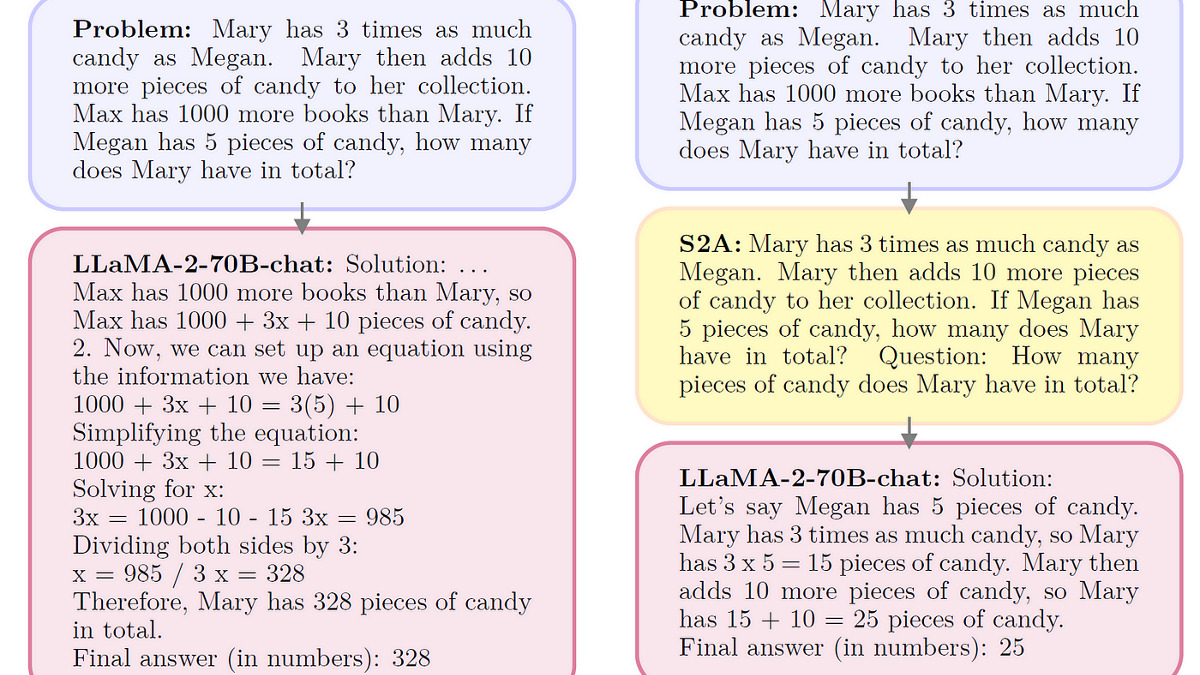 Research from IBM shows how reasoning approaches (right) help models filter out distracting information and focus on what actually matters for solving a problem, compared to standard models that get confused by irrelevant details (left).
When Should You Use a Reasoning Model?
Reasoning models aren't always the right choice. They're slower, more expensive, and sometimes overthink simple questions. Here is a practical guide.
Use a reasoning model when:
- You need to solve multi-step math or logic problems
- You're writing or debugging complex code
- You're analyzing data with multiple variables
- You need the model to plan a sequence of actions (like an AI agent completing a multi-step task)
- You are working through a problem where getting the wrong answer has real consequences
Stick with a standard model when:
- You are writing emails, summaries, or creative text
- You're asking factual questions with straightforward answers
- You need a quick response and speed matters more than precision
- You're having a casual conversation or brainstorming
- The question is simple enough that "thinking harder" won't change the answer
A good rule of thumb: if you wouldn't need scratch paper to solve the problem yourself, a standard model is probably fine. If you'd reach for a calculator, a whiteboard, or a spreadsheet, consider a reasoning model.
If you are still figuring out which model fits your workflow, our how to choose the right LLM guide walks through the decision in more detail.
The Limits of Reasoning Models
Reasoning models are impressive, but they're not magic. A 2025 study from Apple researchers titled "The Illusion of Thinking" found that reasoning models have a clear pattern of strengths and weaknesses:
- Low-complexity tasks: Standard models often perform just as well or better, since reasoning models waste time overthinking simple problems
- Medium-complexity tasks: This is where reasoning models shine - they clearly outperform standard models on moderately difficult challenges
- High-complexity tasks: Both model types struggle with very hard problems. Reasoning models hit a "collapse threshold" where they actually reduce their thinking effort instead of scaling it up
The researchers also found that reasoning models sometimes produce longer chains of thought without actually doing better reasoning. More words do not always mean better thinking.
Another limitation is cost. Because reasoning models create many more tokens internally, they can be 5 to 10 times more expensive per request. For a business running thousands of AI queries per day, that adds up fast.
 Reasoning models add layers of computational processing before producing an answer - each "thinking step" adds both capability and cost.
How to Try Reasoning Models Today
You don't need to be a developer to try reasoning models. Here are the simplest ways to get started:
ChatGPT (free or Plus): Select "o3" or "o4-mini" from the model picker. The free tier includes limited reasoning model access.
Claude (free or Pro): Toggle "Extended Thinking" on by clicking the thinking icon in the chat interface. The free tier offers limited access.
Gemini (free or Advanced): Gemini 2.5 Pro with thinking is available through the Gemini app and Google AI Studio.
DeepSeek (free): Visit chat.deepseek.com and toggle "DeepThink" mode. You can watch its thinking process in real time with the
<think>tags visible.Run locally: If you have a capable GPU, you can run DeepSeek R1 distilled models locally using tools like LM Studio or Ollama. Our guide on how to run open-source LLMs locally covers the setup.
A good first test: give the model a math word problem, a logic puzzle, or a piece of buggy code and ask it to work through the solution. Compare the result with and without reasoning mode enabled - you'll see the difference right away.
What Comes Next
Reasoning is quickly becoming a standard feature rather than a special add-on. Most new frontier models now ship with some form of thinking capability built in, and the overall LLM rankings increasingly reward reasoning performance.
The trend to watch is efficiency. Early reasoning models burned through enormous amounts of compute on every problem. The next generation - models like Gemini 2.5 Flash and smaller DeepSeek R1 distilled variants - aim to bring reasoning capabilities to cheaper, faster models that are practical for everyday use.
For now, the practical takeaway is simple: when you hit a problem that stumps a regular AI model, try switching on reasoning mode. It won't always help, but when it does, the difference can be dramatic.
Sources:
- DeepSeek-R1: Incentivizing Reasoning Capability in LLMs via Reinforcement Learning - DeepSeek AI, 2025
- Introducing OpenAI o3 and o4-mini - OpenAI, 2025
- Claude's Extended Thinking - Anthropic
- Gemini 2.5: Our Newest Gemini Model with Thinking - Google, 2025
- Reasoning Models vs Standard LLMs: Choosing the Right AI Tool for the Job - Magai
- The Illusion of Thinking: Understanding the Strengths and Limitations of Reasoning Models - Apple Machine Learning Research, 2025
- What Is a Reasoning Model? - IBM
- Understanding Reasoning LLMs - Sebastian Raschka
