
How to Use AI for Shopping and Find Better Deals
Learn how to use ChatGPT, Perplexity, Gemini, and Amazon's AI assistant to research products, compare prices, and spot fake reviews before you buy.
 9 min read
Shopping online used to mean dozens of browser tabs, contradictory reviews, and still not knowing if you're getting a fair price. AI assistants have changed that. Instead of typing "best wireless headphones" into a search engine and wading through sponsored results, you can describe exactly what you need - budget, use case, deal-breakers - and get a curated shortlist in minutes.
TL;DR
- Four major AI tools now offer built-in shopping features: ChatGPT, Perplexity, Google Gemini, and Amazon's Alexa for Shopping
- The quality of your results depends heavily on how you phrase your request - this guide includes prompt examples you can copy
- Takes about 15 minutes to try your first AI-assisted purchase, no account upgrades required for most features
The tools doing this work are ones you probably already use: ChatGPT, Perplexity, Google's Gemini app, and Amazon's built-in assistant. Each one works a bit differently, and knowing which to reach for saves time. This guide walks through how each works, how to phrase your requests, and how AI can help you cut through fake reviews before you spend a cent.
The Four Main AI Shopping Tools
All four tools have a free tier, though some features - like in-chat checkout - require being signed in to an account.
| Tool | Best For | Checkout in Chat | Free Tier |
|---|---|---|---|
| ChatGPT Shopping Research | Multi-source product guides | Yes (Instant Checkout) | Yes |
| Perplexity Shopping | Visual search, virtual try-on | Yes (Instant Buy via PayPal) | Yes (US only) |
| Google Gemini / Universal Cart | Cross-platform cart, Gmail alerts | Yes (via retailers) | Yes |
| Amazon Alexa for Shopping | Amazon-native price history | No direct checkout | Yes |
If you're new to all of this and want one recommendation to start: ChatGPT's shopping research is the most conversational and works well for complex purchases where you have multiple requirements. For a deeper look at how these tools compare for general use, our Perplexity vs. ChatGPT comparison is worth a read.
ChatGPT Shopping Research
OpenAI launched a dedicated shopping research feature inside ChatGPT in early 2026. Unlike typing a query into Google, ChatGPT asks you clarifying questions before surfacing recommendations - budget, who it's for, which features matter most - then searches across the web and returns a personalized buyer's guide.
The feature runs on a version of GPT-5 mini trained specifically for shopping tasks. OpenAI says it hits 52% product accuracy on complex multi-constraint queries, compared to 37% for standard ChatGPT Search. Recommendations are ranked by relevance, not paid placement.
How to use it
- Open chatgpt.com and start a new chat
- Type a shopping query - something specific gets better results than something vague
- Answer the clarifying questions ChatGPT asks (budget, use case, preferences)
- Browse the product cards it returns; click "Not interested" or "More like this" to refine
- When you find something, you can complete checkout directly in the chat window via Instant Checkout
ChatGPT works especially well for electronics, beauty, kitchen appliances, and sports gear - categories where product specs matter a lot and reviews tend to be more detailed.
Example prompts that work well:
"I need a laptop for my 70-year-old mother. She only uses it for video calls and email. Budget is $600. Large text and simple setup are priorities."
"What's the best robot vacuum under $400 for a household with pets? I have hardwood floors and one medium-sized dog."
"Compare standing desks with built-in cable management under $500. I work from home and need one that fits in a 60-inch space."
The more specific you're about your constraints, the more useful the output. If you're not sure what information to give, our prompt engineering basics guide covers the fundamentals of writing clear AI requests.
 ChatGPT Shopping Research returns visual product cards with prices, pros and cons, and a one-click checkout option.
Source: openai.com
ChatGPT Shopping Research returns visual product cards with prices, pros and cons, and a one-click checkout option.
Source: openai.com
Perplexity Shopping
Perplexity's shopping feature is especially useful when you want to search visually - uploading a photo of something you saw and asking "find me something like this" - or when you want to buy directly without leaving the conversation.
Three features make it particularly useful:
Snap to Shop. Upload any image - a screenshot, a photo you took in a store, something you saw on Instagram - and Perplexity finds similar products for sale. You don't need to know the brand or exact product name.
Virtual Try-On. Create an avatar and preview how clothing items look on you before buying. It's not perfect for fit, but it does give a much better sense of color and style than product photos alone.
Instant Buy. Powered by PayPal, this lets you complete a purchase from participating retailers without leaving the Perplexity interface. You pay through your existing PayPal account.
Perplexity also remembers your past searches, so if you regularly search for mid-century modern furniture, it factors that aesthetic into new recommendations without you having to explain it each time.
Perplexity's shopping features are free and available to all US users. If you've never tried Perplexity before, it's one of the strongest AI search tools around - more on that in our Perplexity vs. ChatGPT comparison.
Google Gemini and Universal Cart
Google's approach is built around Universal Cart, which launched across Search and the Gemini app in early 2026. The big idea: you add products to your cart from anywhere on Google's ecosystem - Search results, Gemini chat, YouTube, even Gmail - and manage them in one place.
Three things make it useful for everyday shoppers:
- Background price monitoring. Once you add an item to your cart, Google monitors the price and alerts you to drops via Gmail.
- Price history. You can see a product's price history before committing, which tells you whether a "sale" is actually a discount or just the regular price.
- Cross-retailer cart. Universal Cart aggregates items from different retailers, so you're not locked into buying everything from one place.
You can also buy directly from Etsy and Wayfair inside the Gemini app, which is handy if you're already using Gemini for other tasks. Universal Cart is rolling out across the US through summer 2026.
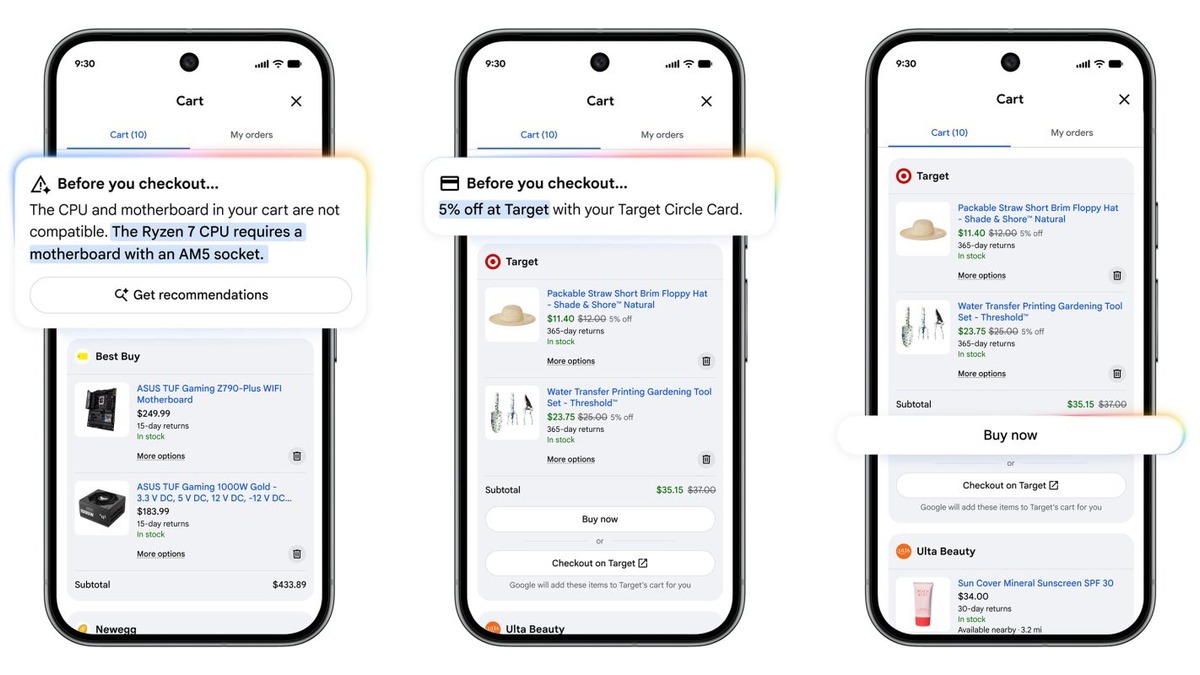 Google's Universal Cart aggregates items across retailers in one view, with built-in price drop alerts.
Source: 9to5google.com
Google's Universal Cart aggregates items across retailers in one view, with built-in price drop alerts.
Source: 9to5google.com
Amazon's Alexa for Shopping
Amazon renamed its Rufus AI chatbot to Alexa for Shopping in May 2026, merging it with Alexa+ into a single assistant that works across the Amazon app, website, and Echo devices.
What it does well:
- Price history. Alexa for Shopping shows up to a full year of price history on product pages - essential for deciding whether to buy now or wait.
- Personalized guides. Ask it to build a buying guide for a big purchase (say, a new mattress), and it pulls product knowledge, web information, and your Amazon purchase history to make suggestions.
- Deal alerts. It automates deal-finding and cart-building based on your stated preferences, notifying you when something you were eyeing drops in price.
Alexa for Shopping doesn't require Prime or an Echo device. It's available to all Amazon customers through the standard shopping app.
Monthly active users of the combined assistant grew more than 115% year-over-year, with engagement up nearly 400%, according to Amazon's own data.
How to Write a Good Shopping Prompt
The biggest difference between getting useful AI shopping results and getting generic ones comes down to how you ask.
Bad prompt: "Recommend a coffee maker."
Good prompt: "I want a coffee maker for a two-person household. We each drink one cup in the morning. I prefer pour-over taste but want the convenience of a machine. Budget is $150. Counter space is limited, so smaller is better."
The good prompt gives the AI four pieces of information: who it's for, the use case, budget, and a constraint. The more of those you include, the less the AI has to guess.
Prompt patterns that work
For gift buying:
"Suggest gifts for a 35-year-old who loves hiking and camping. Budget is $75. She already has all the basic gear - I want something she wouldn't buy herself."
For comparing options:
"Compare the three most-recommended noise-cancelling headphones under $300. Focus on battery life, call quality, and how they perform for someone who wears glasses."
For big-ticket research:
"I'm buying a dishwasher for a family of four. My main concerns are noise level and energy efficiency. Walk me through what specs matter and suggest three models worth considering."
For deal-checking:
"Is $349 a good price for the Sony WH-1000XM5 headphones right now? When do they typically go on sale?"
For more on how to write clear requests that get better results from any AI tool, the prompt engineering basics guide covers the core techniques in plain language.
Using AI to Spot Fake Reviews
Fake reviews are a real problem. A May 2026 study found that a hybrid AI model can now identify fake reviews with 93% accuracy on Amazon and 91% on Yelp, using a combination of language analysis and behavioral cues - like whether the emotional tone of a review matches its star rating, or whether the same account posted dozens of reviews in a single day.
You don't need specialist software to get some of this protection. One free browser tool is worth installing right away:
- Fakespot (fakespot.com) - analyzes Amazon, Walmart, and eBay reviews and assigns a letter grade (A through F) to a product's review quality. It flags suspicious patterns like sudden review bursts, duplicate phrasing, and accounts that only ever review one brand.
You can also ask AI assistants directly. A prompt like this often surfaces useful patterns:
"I'm looking at this product on Amazon. The average rating is 4.7 stars with 2,300 reviews. What questions should I ask to check whether those reviews are trustworthy?"
ChatGPT or Claude won't analyze a specific product page for you, but they're good at explaining what review fraud patterns look like - so you know what to watch for when you're reading.
Practical Tips Before You Buy
Cross-check recommendations. AI tools sometimes surface popular products over newer alternatives that might be a better fit. Use the AI to narrow your shortlist, then do a quick search to confirm nothing better came out recently.
AI can't feel quality. For items where material, build quality, or comfort matter - shoes, bags, furniture, bedding - read recent human reviews after you've used AI to narrow the field. AI synthesizes existing opinion; it doesn't add new judgment.
Price history is your friend. Before buying anything over $50, check the price history using CamelCamelCamel (free, for Amazon) or Honey. A discount that shows "30% off" might be measured against a briefly inflated list price. Both tools are free and work as browser extensions.
AI isn't a substitute for return policy research. If you're buying something you might need to return, check the retailer's policy directly. AI assistants sometimes have outdated or summarized information about specific store policies.
Sources:
- Introducing shopping research in ChatGPT - OpenAI
- Shopping That Puts You First - Perplexity
- Google Shopping introduces Universal Cart - Google Blog
- Amazon ditches Rufus chatbot, launches Alexa shopping agent - CNBC
- New AI tool detects fake reviews with 93% accuracy on Amazon - Knowridge
- Using shopping research in ChatGPT - OpenAI Help Center
- Perplexity Shopping: How to Optimize Your Store for AI - Shopify
✓ Last verified June 2, 2026

