
How to Use AI for Resume and Interview Prep
A practical beginner's guide to using AI tools to write a stronger resume, craft tailored cover letters, and prepare confidently for job interviews.
 10 min read
Getting a job in 2026 means competing against hundreds of applicants, many of whom are already using AI to write sharper resumes and prepare smarter for interviews. If you're not using these tools yet, you're not behind - but this guide will get you caught up fast.
TL;DR
- AI can help you write, tailor, and score your resume - but it's a drafting tool, not a ghostwriter
- 98% of large employers filter resumes through software before a human reads them; AI helps you pass that filter
- Dedicated tools like Teal, Rezi, and Yoodli handle resume scoring and interview practice; ChatGPT and Claude work well for drafting
- Takes 30-60 minutes to set up, no coding or technical background required
Why AI Has Changed the Job Application Process
Before you even reach a human recruiter, your resume passes through an ATS - an Applicant Tracking System. This is software that scans your resume for keywords matching the job description and filters out candidates who don't score high enough. According to Tufts University research, 98.4% of Fortune 500 companies use an ATS, and 87% of companies overall use them.
That means writing a great resume is now a two-part task: impressing a piece of software first, then impressing a person. AI tools are built to help with both.
The other shift is on the preparation side. Mock interview practice used to mean calling a friend or paying for a career coach. Now there are tools that will simulate a real interview, analyze how you speak, and flag the filler words ("um," "like," "so") that make you sound nervous on video calls.
None of this replaces genuine experience or strong communication skills. But it evens things out for anyone who doesn't have a coach, a well-connected network, or hours to spend drafting and redrafting.
Step 1: Get Your Resume into Shape
The fastest way to use AI for your resume isn't to have it write one from scratch. It's to give it your existing resume and a job description, then ask it to close the gap between the two.
 A strong resume does two things: satisfies ATS keyword requirements and convinces a human recruiter in under 10 seconds.
Source: unsplash.com
A strong resume does two things: satisfies ATS keyword requirements and convinces a human recruiter in under 10 seconds.
Source: unsplash.com
Using ChatGPT or Claude for Resume Writing
Both ChatGPT and Claude work well for this. Claude's larger context window (it can handle very long documents) makes it particularly good for comparing multiple job descriptions at once. For more help choosing between AI tools, see our guide on which AI model to use.
A prompt that works:
I'm a [job title] with [X] years of experience in [industry]. I'm applying for this role: [paste job description]. Here is my current resume: [paste resume]. Rewrite my bullet points to better match this job description using the skills and keywords from the posting. Use strong action verbs. Don't invent any experience I haven't listed. Keep each bullet under 20 words.
The key constraints in that prompt matter: "do not invent" stops the AI from hallucinating metrics you can't back up in an interview. "Under 20 words" forces concise language. Never skip those guardrails.
After you get a draft, read every line. Add your own voice. If any bullet sounds like something you wouldn't actually say about yourself, rewrite it. The goal is AI-assisted, not AI-authored.
Dedicated Resume Builders
If you want built-in ATS scoring and resume-specific features, these tools are worth trying:
| Tool | Best for | Free tier |
|---|---|---|
| Teal | Job tracking + keyword matching | Yes (limited AI credits) |
| Rezi | Real-time ATS score as you edit | Yes (1 resume) |
| Kickresume | Strong first drafts and summaries | Yes (1 resume) |
| Jobscan | Deepest keyword gap analysis | Yes (5 scans/month) |
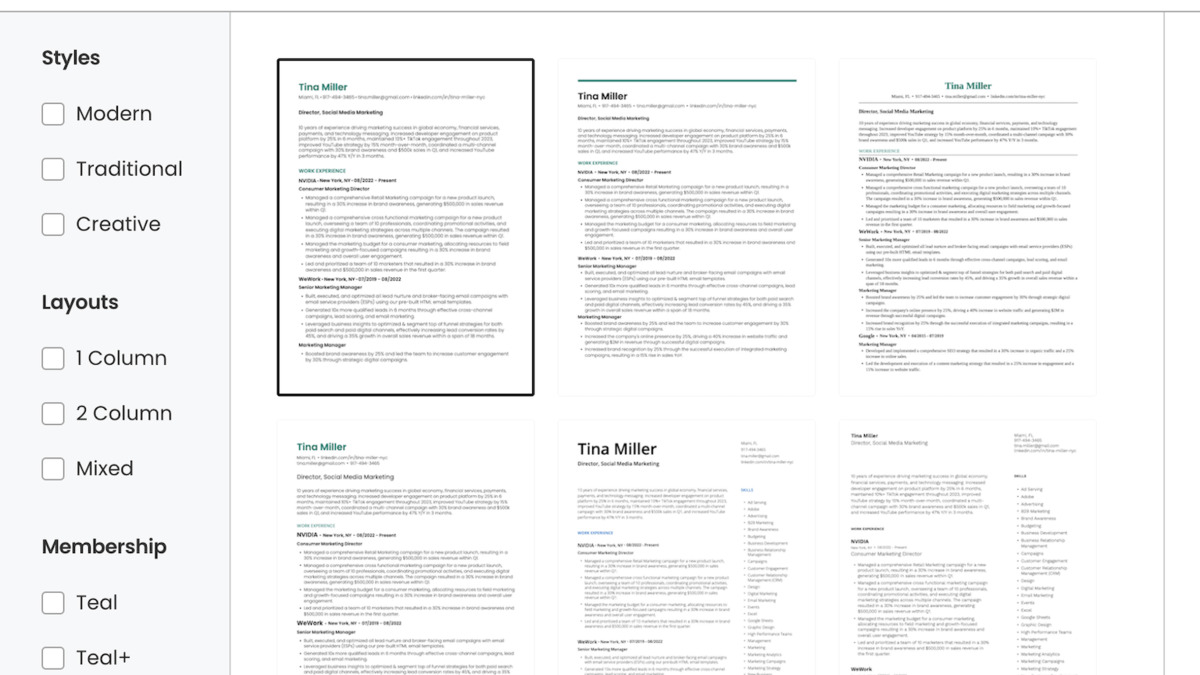 Teal's resume builder pairs a template library with a keyword matching tool that compares your resume directly against any job description.
Source: resumegenius.com
Teal's resume builder pairs a template library with a keyword matching tool that compares your resume directly against any job description.
Source: resumegenius.com
Teal is a good starting point because it combines a resume builder with a job tracker. You paste in the job description, and it shows you which keywords are missing from your resume. Rezi gives you a live score from 0 to 100 so you can see exactly how each edit affects your ATS compatibility.
Step 2: Understand and Beat ATS Filters
An ATS (Applicant Tracking System) reads your resume like a very literal search engine. It doesn't care how good your writing sounds - it looks for specific words and phrases that match the job posting.
A few formatting rules that make a big difference:
- Single column only. Two-column layouts scramble when ATS software reads them left-to-right. The result is garbled text that might get you filtered out even with the right keywords.
- No tables or text boxes. These also break ATS parsing.
- Standard section headings. Use "Work Experience," "Education," and "Skills" - not creative alternatives like "Where I've Been."
- Keep contact info in the body. Many ATS systems skip headers and footers completely, so your phone number goes unread.
To see what an ATS actually sees, paste your resume into a plain text editor like Notepad. If it looks readable there, it'll parse correctly.
For keyword matching, read the job description carefully and note which skills appear multiple times. Those are likely required qualifications being scored by the ATS. Use AI to naturally weave those exact phrases into your resume - not as a list, but in context. For instance, if the posting says "experience with Salesforce," your bullet point should mention Salesforce by name, not just "CRM software."
Step 3: Write a Cover Letter That Actually Fits the Role
Most cover letters are generic. AI makes it easy to tailor one for each application, which is exactly what recruiters want to see.
Use this structure as a prompt:
Write a three-paragraph cover letter for this job posting: [paste job description]. I'm applying from this background: [2-3 sentences about yourself]. In the first paragraph, mention one specific thing about the company that interests me. In the second, connect two of my actual experiences to what they're asking for. In the third, close without clichés. Do not start with "I am writing to express my interest." Keep it under 300 words.
The instruction to "mention one specific thing about the company" forces you to research the employer - and signals to the recruiter that you did. Pair AI drafting with your own research and the result is a cover letter that reads personal even though it was fast to write.
Kickresume and Teal both have built-in cover letter generators that pull from your resume data. If you'd rather use a general AI assistant, the prompt above gets you there faster than most specialized tools.
Step 4: Prepare for the Interview
Most people rehearse by reading questions and mentally noting answers. That doesn't prepare you for the actual experience of being on camera, thinking out loud under pressure, and managing nerves. AI practice changes that.
 AI interview coaches let you practice on video anytime, then give feedback on your pacing, filler words, and answer structure.
Source: unsplash.com
AI interview coaches let you practice on video anytime, then give feedback on your pacing, filler words, and answer structure.
Source: unsplash.com
Practice Tools
Yoodli is the best free option for speech coaching. It records you answering questions and gives feedback on pacing, filler words, and whether your answers are too long or too short. The free Starter tier is enough to get started.
Final Round AI goes further with structured mock interviews and post-session analytics. It's useful if you're applying to competitive roles or want detailed feedback on your actual answers.
Using ChatGPT or Claude for Answer Preparation
For behavioral interview questions (the "Tell me about a time when..." type), AI can help you structure answers using the STAR format: Situation, Task, Action, Result. Give it a real experience from your past and ask it to help you shape it:
I need to answer "Tell me about a time you handled a difficult client." Here's what happened: [describe the situation in plain language]. Help me shape this into a STAR-format answer under 2 minutes when spoken aloud. Keep the language natural and first-person.
This works well for creating the structure. You fill in the specifics. Never read AI-written answers verbatim in an interview - they'll sound rehearsed rather than real.
For technical roles, you can also ask AI to simulate a technical screen:
Act as a technical interviewer for a [role] position at a mid-size tech company. Ask me five questions you'd typically ask in a first-round technical screen, one at a time. After I answer each one, give me brief feedback before moving to the next.
For deeper prompt techniques, our prompt engineering basics guide covers how to write more effective AI prompts across any task.
Mistakes to Avoid
Don't submit AI output without editing. A 80% figure from a CV Genius survey shows hiring managers can spot AI-created text - and 57% say they're less likely to hire candidates who use it carelessly. The fix is editing, not avoiding AI completely.
Never let AI invent metrics. If your draft says "increased revenue by 40%" and that number came from the AI, delete it. You'll be asked about every specific claim in an interview.
Don't stuff keywords. Packing a resume with every keyword from the job posting looks manipulative to human readers, even if it passes the ATS. Aim for natural integration, not repetition.
Align your resume with your LinkedIn profile. Hiring tools in 2026 increasingly cross-check both automatically. Different job titles or dates between the two create red flags.
Don't add skills you can't demonstrate. If AI suggests adding "Apache Kafka" to your skills section and you've never actually used it, leave it out. An interviewer will ask.
Be careful about real-time AI in interviews. Some employers explicitly prohibit it and consider it equivalent to cheating. Practice with AI before the interview, not during.
Quick-Start Prompts to Copy Today
For a resume tailoring prompt:
Rewrite these bullet points to better match this job description. Use the keywords from the posting naturally. Do not add experience I haven't listed. Each bullet under 20 words. [Paste bullets + job description]
For a cover letter:
Write a tailored 3-paragraph cover letter for this role. Mention one specific thing about the company. Connect two of my experiences to what they want. No clichés, under 300 words. [Paste job description + 2 sentences about yourself]
For interview prep:
Simulate a first-round interview for [role] at [type of company]. Ask me one question at a time. Give brief feedback after each answer before continuing.
Once you have your job applications running, our guide to using AI for the full job search process covers how to find and track roles efficiently with the application work.
FAQ
Can employers tell if I used AI on my resume?
Generic AI output is recognizable, but heavily edited AI assistance usually isn't. The risk isn't AI use itself - it's submitting a draft that sounds robotic or claims things you can't back up. Edit everything.
Is it cheating to use AI for my resume?
No. AI is a drafting and refinement tool, the same way spell check is a proofreading tool. What matters is that every claim you make is accurate and yours. Fabricating experience is always wrong, with or without AI.
Which AI tool is best for resumes?
For ATS keyword scoring: Jobscan or Rezi. For an all-in-one job search system: Teal. For flexible drafting without extra tools: Claude or ChatGPT with a strong prompt.
Will AI interview prep actually help?
Yes, for delivery. Tools like Yoodli catch things you can't self-detect: filler words, pacing problems, answers that run too long. Content coaching still comes from real-world practice and understanding the role.
How long does it take to prepare a resume with AI?
If you have an existing resume, tailoring it to a specific job using AI takes 20-30 minutes. Building from scratch with a dedicated tool like Rezi or Kickresume takes 45-90 minutes for a complete first draft.
Sources:
- AI in Hiring Statistics - DemandSage
- Best AI Resume Builders 2026 - Rezi
- Best AI Resume Builders 2026 - Zapier
- Claude Resume Prompts Guide - The Interview Guys
- Best AI Interview Prep Tools - Final Round AI
- Teal Resume Builder
- Jobscan ATS Optimization
- Yoodli Interview Preparation
- AI Resume Mistakes to Avoid - Job Shinobi
- 121 AI Hiring Statistics - Novoresume
✓ Last verified May 28, 2026

