
How to Use AI for Project Management
A practical guide to using AI tools for task prioritization, sprint planning, meeting notes, and risk detection in project management.
 10 min read
If you manage projects - whether you're a product manager, team lead, or solo founder - you've probably felt the weight of status meetings, sprint planning sessions, and the endless task shuffling that comes with keeping a team on track. AI tools are starting to take real chunks of that work off your plate.
This isn't about replacing project managers. It's about letting AI handle the repetitive overhead so you can focus on decisions that actually need a human brain.
TL;DR
- Major PM tools like Asana, Monday.com, Notion, and ClickUp now ship built-in AI for status updates, task creation, and risk detection
- You can use ChatGPT or Claude directly for sprint planning, meeting summaries, and prioritization - no special tooling required
- AI meeting assistants like Fireflies.ai and Otter.ai auto-create action items and push them into your PM workflow
- Start with one use case (meeting notes or status updates) before going all-in
AI Built Into Your PM Tools
The fastest way to start using AI for project management is through tools you're likely already paying for. Most major platforms shipped AI features in 2025 and 2026, and they've gotten surprisingly capable.
Asana AI
Asana rolled out what it calls "AI Teammates" in early 2026 - bots that sit inside your workspace and handle tasks the way a junior project coordinator would. The platform launched with 21 prebuilt AI teammates that can draft marketing briefs, plan product launches, manage IT queues, and break large projects into subtasks. You can also build custom ones with your own prompts.
The more practical features for day-to-day PM work include Smart Status (AI-generated project status updates that pull from task completion data), Smart Projects (auto-created project plans from a text description), and AI Studio for building custom automations without code. Asana AI is available on all paid tiers, starting at $10.99 per user per month.
Asana also launched a Claude integration that lets you manage projects through natural conversation - creating tasks, updating statuses, and building entire project structures by chatting with Claude directly. If you're curious about what AI agents actually are, that integration is a solid real-world example.
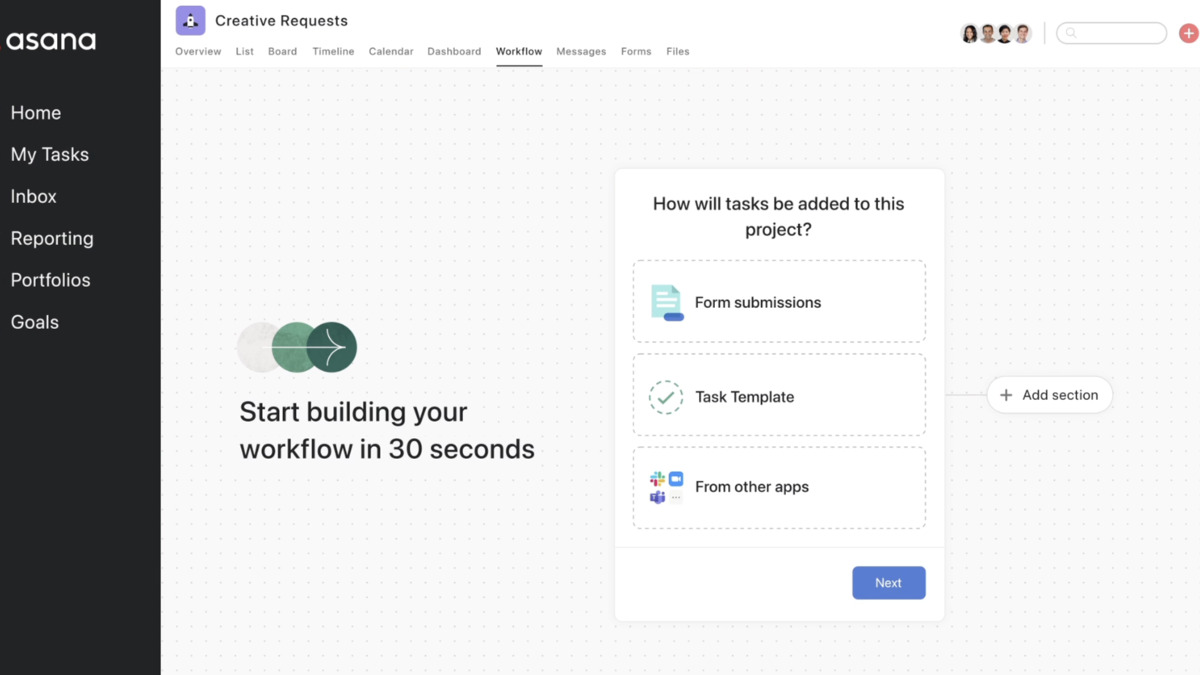 Asana's visual workflow interface for building automated project processes.
Source: firebearstudio.com
Asana's visual workflow interface for building automated project processes.
Source: firebearstudio.com
Monday.com AI
Monday.com has taken a different approach, building what it calls an "Agent Factory" where you create custom AI agents tailored to your team's workflows. These agents can monitor projects in real time, flag bottlenecks, and take actions like reassigning tasks when someone's plate is full.
The standout feature is predictive work management. Monday's AI applies machine learning across your project history, team performance metrics, and current workloads to flag bottlenecks weeks before they become problems. According to Monday.com's own data, this approach helps teams spot potential delays early enough to actually do something about them.
Monday also offers "Monday Magic," which turns a simple text prompt into a ready-to-use project board, and "Monday Vibe," an AI-powered app builder for custom internal tools. Paid plans start at $13 per seat per month.
Notion AI
Notion 3.0 (launched September 2025) introduced autonomous AI agents that can execute multi-step workflows across your workspace. The latest version, Notion 3.2 from January 2026, brought these agents to mobile and added support for multiple AI models including GPT-5.2, Claude Opus 4.5, and Gemini 3.
What makes Notion's approach interesting for project management is the agent's ability to work across hundreds of pages simultaneously for up to 20 minutes of autonomous operation. You can set up agents to answer questions in Slack, route incoming tasks, and share weekly project updates automatically. Notion also captures meeting notes with AI transcription, summarizing key points and extracting action items. Plans start at $10 per seat per month.
ClickUp and Linear
ClickUp Brain creates entire projects from prompts, writes task updates, and builds automations from natural language instructions. It's especially strong for cross-functional teams that need to unify engineering, marketing, and executive reporting in one place. Plans start at $7 per user per month.
Linear keeps things focused on engineering velocity. Its AI produces sub-issue lists and acceptance criteria almost instantly, making it the fastest option for breaking down technical work. The free plan covers small teams, with paid tiers starting at $8 per user per month.
Using LLMs Directly for PM Tasks
You don't need a fancy integration to get AI help with project management. ChatGPT, Claude, and other large language models (LLMs) are remarkably good at several core PM tasks when you give them the right prompts. If you want to sharpen your prompting skills first, we have a guide for that.
Task Prioritization
Paste your backlog into Claude or ChatGPT and ask it to prioritize based on specific criteria. A prompt that works well:
"I have these 15 tasks for the next sprint. Prioritize them based on: business impact (revenue-affecting items first), technical dependencies (blockers before dependent work), and effort (quick wins before multi-day efforts). Flag anything that looks like it has unresolved dependencies."
The model won't know your business context as well as you do, but it's excellent at spotting dependency chains you might miss and forcing you to articulate your prioritization criteria clearly.
Writing Status Updates
One of the most time-consuming PM chores is turning raw task data into a status update that executives can actually read. Feed your sprint board data to an LLM with a prompt like:
"Summarize this sprint data into a stakeholder update. Include: what shipped this week, what's in progress with estimated completion, blocked items with the reason for each block, and any risks to the sprint goal."
This alone can save 30 to 60 minutes per week if you're running multiple projects.
 AI handles the administrative overhead of project tracking, freeing teams to focus on actual collaboration.
Source: pexels.com
AI handles the administrative overhead of project tracking, freeing teams to focus on actual collaboration.
Source: pexels.com
Breaking Down Epics
When you have a large feature or project, ask the LLM to break it into user stories or tasks. Provide context about your team's capabilities and typical sprint velocity, and it'll generate a reasonable work breakdown structure that you can refine.
Meeting Notes and Action Items
AI meeting assistants have become one of the most practical categories of PM tooling. The workflow is simple: the AI joins your video call (or records system audio), transcribes everything, and outputs a structured summary with action items.
Fireflies.ai records and transcribes meetings across Zoom, Teams, and Google Meet. After each call, you get detailed notes, a searchable transcript, and extracted action items. It supports over 100 languages and integrates with most PM tools.
Otter.ai takes a similar approach but adds real-time transcription during the meeting itself. It captures decisions, action items, and key insights, then assigns next steps to specific team members automatically.
Fellow focuses specifically on the PM workflow, flowing action items directly into Jira, Asana, Linear, or ClickUp after each meeting. This closes the loop between "we discussed it" and "it's actually tracked."
ClickUp Super Agents turn meetings into immediate workflows - capturing blockers, assigning owners, and updating tasks without manual follow-up.
The current trend in 2026 is "botless" recording, where the tool captures system audio without joining the call as a visible participant, which removes the awkwardness of having "AI Notetaker" show up in your meeting lobby.
Sprint Planning and Estimation
AI-assisted sprint estimation is where things get truly useful for engineering teams. According to Gartner research, organizations using AI-assisted agile tools report up to 40% faster release cycles and a 35% reduction in planning overhead. Teams using historical Git data for estimation can cut estimation meeting time by up to 60%.
Tools like Baseliner AI use machine learning to analyze your past sprint data and predict realistic estimates for upcoming work. Forecast handles effort estimation and resource allocation for complex, multi-dependency projects. Jira and Zenhub both offer AI-assisted estimation features built into their existing sprint planning workflows.
The key insight from teams that have adopted these tools: AI estimation works best as a calibration tool, not a replacement for collaborative estimation. Teams that use historical data to inform their planning poker sessions get more accurate estimates without losing the group discussion benefits.
If you're building no-code automations with your PM workflow, many of these estimation tools integrate through Zapier or native connectors.
 Sprint planning benefits from AI-produced estimates based on historical team velocity data.
Source: pexels.com
Sprint planning benefits from AI-produced estimates based on historical team velocity data.
Source: pexels.com
Risk and Blocker Detection
One of the most valuable (and underused) AI capabilities in PM tools is proactive risk detection. Monday.com's predictive engine scans project data to flag issues weeks before they surface. Asana's Smart Status pulls from task completion patterns to identify projects drifting off schedule.
You can also do this manually with an LLM. At the end of each week, paste your project status data and ask:
"Review this project data and identify: tasks that are overdue or at risk of missing their deadline, team members who appear overloaded based on task count and due dates, dependencies where the upstream task isn't on track, and any patterns suggesting scope creep."
This kind of analysis takes a human PM 20 to 30 minutes per project. A LLM does it in seconds, and it's surprisingly good at catching patterns you might overlook when you're too close to the work.
AI Scheduling: Reclaim.ai
Reclaim.ai deserves a separate mention because it solves a different PM problem - protecting time for focused work. Rather than replacing your calendar, Reclaim sits on top of it and uses AI to schedule tasks, habits, and focus time around your existing meetings.
You add tasks with deadlines, durations, and priority levels, and Reclaim automatically schedules them during your working hours based on urgency. As priorities shift all through the week, it rearranges your calendar. It integrates with Asana, Jira, ClickUp, Todoist, and Google Tasks, which means your PM tool's tasks can automatically appear as blocked time on your calendar.
Over half a million users and thousands of companies use Reclaim as of 2026, from startups to large enterprises.
Tools at a Glance
| Tool | Best For | AI Highlights | Starting Price |
|---|---|---|---|
| Asana | Cross-functional teams | AI Teammates, Smart Status, Claude integration | $10.99/user/mo |
| Monday.com | Predictive planning | Agent Factory, bottleneck prediction | $13/seat/mo |
| Notion | Docs-heavy teams | Autonomous agents, multi-model AI, meeting notes | $10/seat/mo |
| ClickUp | All-in-one PM | Brain AI, project generation from prompts | $7/user/mo |
| Linear | Engineering teams | Fast sub-issue generation, Git-native | $8/user/mo |
| Jira | Enterprise agile | Sprint estimation, Confluence context | $7.16/user/mo |
| Reclaim.ai | Time management | AI scheduling, focus time protection | Free tier available |
FAQ
Do I need to pay extra for AI features in PM tools?
Most platforms include AI on paid tiers at no extra charge. Asana AI works on all paid plans. Monday.com, Notion, and ClickUp bundle AI into their standard pricing. Free plans typically exclude AI features.
Can AI replace a project manager?
No. AI handles administrative tasks like status reports, meeting summaries, and task breakdowns. Strategic decisions, stakeholder management, team motivation, and handling ambiguity still require a human. Think of AI as a capable assistant, not a replacement.
Which tool is best for small teams just starting with AI PM?
ClickUp at $7 per user per month offers the broadest feature set for the price. For teams already using Notion for documentation, its built-in AI agents avoid adding another tool. Linear is ideal for engineering-only teams that want speed over breadth.
Is it safe to paste project data into ChatGPT or Claude?
Check your company's data policies first. Both OpenAI and Anthropic offer enterprise plans with data privacy guarantees. For sensitive projects, use the AI features built into your PM tool - they typically have stronger data handling agreements. Never paste confidential client data into a free-tier chatbot.
How long does it take to see results from AI PM tools?
Most teams report noticeable time savings within the first week for meeting notes and status updates. Sprint estimation improvements take two to three sprints of historical data before the AI's predictions become reliable.
Sources:
- Asana AI for Work & Project Management
- Asana Winter 2026 Release: AI Teammates
- How to Use AI for Project Management - Monday.com
- Notion 3.2 Release Notes - January 2026
- Top 11 AI Project Management Tools - Fellow
- Jira Intelligence vs Linear vs ClickUp Brain: 2026 AI Benchmarks
- Sprint Planning Challenges and Best Practices for 2026 - Easy Agile
- AI in Agile Project Management: What's Actually Working in 2026
- Reclaim AI Review 2026
- Top 18 AI Meeting Assistants & Note Takers of 2026 - Reclaim
✓ Last verified March 26, 2026

