
How to Use AI for Home Buying - A Beginner's Guide
A practical guide for first-time and repeat home buyers on using AI tools to research neighborhoods, compare mortgages, analyze inspection reports, and prep for negotiation.
 10 min read
Buying a home is one of the most stressful things most of us ever do. There's the neighborhood research, the mortgage math, the inspection jargon, the negotiation tactics - and most first-time buyers are doing all of it for the first time, without a map. A NerdWallet survey of 2,000+ U.S. adults in late 2025 found that 48% of prospective buyers planned to use AI tools during their search. That number will only grow. The good news: you don't need to be a tech expert to benefit. You just need to know where AI truly helps and where it'll lead you astray.
TL;DR
- AI tools are most useful for neighborhood research, mortgage comparisons, and analyzing inspection reports
- Zillow AI Mode and Realtor.com RealAssist (both in 2026 beta) let you search homes conversationally
- ChatGPT and Claude can parse dense documents like inspection reports or mortgage disclosures
- Takes about 20 minutes to read, no prior AI experience needed - but a licensed agent still matters
What AI can - and can't - do for you
AI shines in the research and prep stages of home buying. It's great at pulling together information, comparing numbers, summarizing documents, and helping you draft questions or letters. Think of it like having a very well-read friend who's patient with your questions at 11pm.
What it can't do is replace boots on the ground. AI tools don't have access to live MLS (Multiple Listing Service) data - the database real estate agents use. If you ask ChatGPT "What homes are for sale right now in this zip code?", it will often make up listings that don't exist. HousingWire's 2026 real estate AI guide documents a test where ChatGPT provided six comparable sales for a real address - three of the properties didn't exist in the MLS, and only one was accurate. Use AI for research and analysis. Use actual real estate platforms or a licensed agent for live listings.
With that clear, here's where AI makes a real difference.
Step 1 - Search smarter with AI-native platforms
Two major real estate platforms launched conversational AI search in 2026, and they're worth knowing about.
Zillow AI Mode (currently in beta) lets you search by typing naturally instead of setting filters. You can ask things like "Find me a 3-bedroom under $450k in a neighborhood with good schools and a short commute to downtown" and get results that match the spirit of what you're looking for, not just checkbox criteria. The "Ask Zillow" chat box sits at the bottom of search results on desktop and mobile. The feature also remembers your preferences across sessions, so you don't start from scratch every time.
Realtor.com RealAssist AI launched June 2, 2026, built with Google Gemini. Its standout feature is neighborhood exploration using Google Maps data - you can ask about commute times at different hours of the day, nearby businesses, or how a neighborhood looks at night. RealAssist also has a 3D FlyAround tool that gives a drone-like aerial view of a property and its surroundings before you ever schedule a tour.
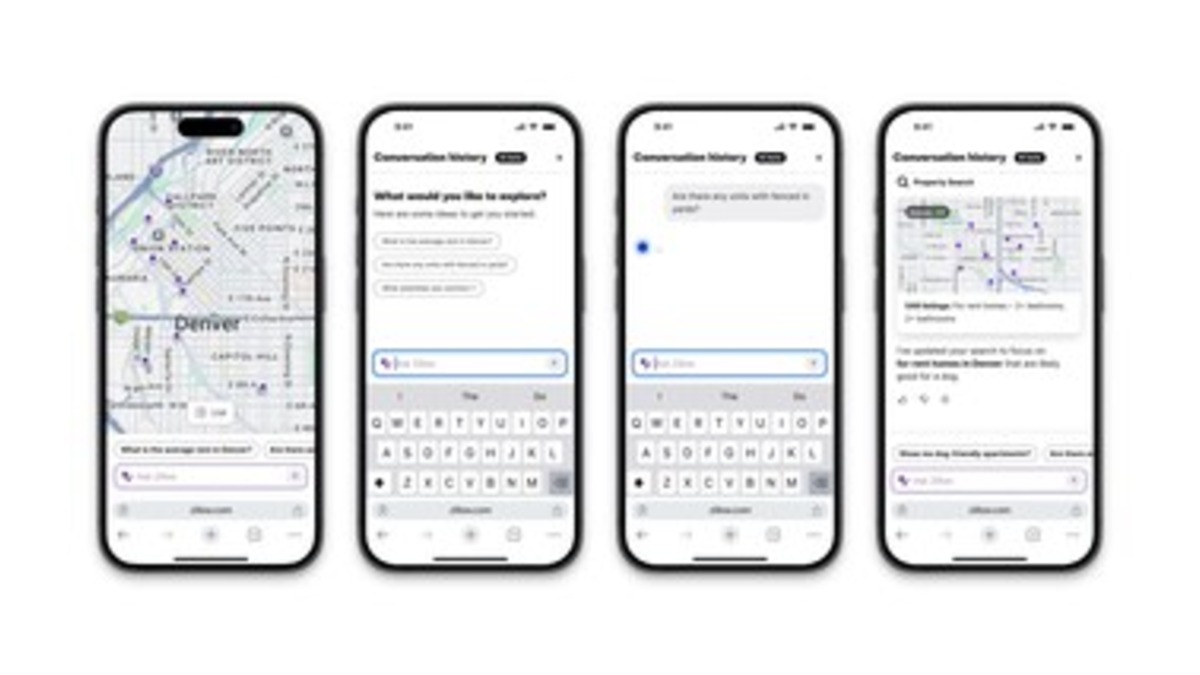 Zillow AI Mode lets buyers search through conversation instead of filters - a beta feature rolling out through 2026.
Source: prnewswire.com
Zillow AI Mode lets buyers search through conversation instead of filters - a beta feature rolling out through 2026.
Source: prnewswire.com
Both are still in limited beta as of this writing. If you don't have access yet, the same conversational search style works in ChatGPT or Claude - you just won't get live listing data. Instead, use general AI assistants to build your criteria before you start searching. Try prompts like:
"I'm buying my first home. I have a $400k budget, I want a 2-3 bedroom, and I care most about school quality, walkability, and staying within 30 minutes of [city center]. Help me figure out what to prioritize and what tradeoffs I should expect."
That kind of framing session before you open Zillow or Realtor.com saves hours of scrolling.
For a look at dedicated AI tools built for real estate professionals, our best AI tools for real estate comparison covers platforms like HouseCanary, Lofty, and Zillow's agent-facing features.
Step 2 - Research neighborhoods without leaving your couch
This is where general AI assistants like ChatGPT, Claude, and Gemini are most useful. Give one of them a neighborhood name and ask it to walk you through what to consider. A prompt like:
"I'm considering buying in [neighborhood name], [city]. What should I research about this area before making an offer? I care about school quality, crime trends, walkability, and long-term property value."
The AI will pull together a research checklist tailored to your priorities. It won't have hyperlocal real-time data, but it'll tell you what to look for and where to look. From there you can cross-check with:
- GreatSchools.org for school ratings
- Walk Score for walkability, transit, and bike scores
- City-Data.com for crime trends by neighborhood
- Redfin or Zillow market reports for price trends
The AI's job here is to structure your research, not replace the data sources. It's asking the right questions that's hard - the AI is good at that part.
AI's job is to structure your research, not replace the data sources. Asking the right questions is the hard part.
You can also use AI to compare two neighborhoods side by side. Paste in facts you've gathered - school ratings, median prices, commute distances - and ask: "Based on these numbers and my priorities, which neighborhood fits me better and why?" That synthesis is where AI earns its keep.
Step 3 - Run the numbers on your mortgage
Mortgage math is one place where AI saves genuine time. The three levers - home price, down payment, and interest rate - interact in ways that aren't obvious at a glance. Before you talk to a lender, use AI to model different scenarios.
A useful prompt for Claude or ChatGPT:
"I'm looking at homes between $380k and $430k. I can put down 10% or 20%. Walk me through the monthly payment difference, the total interest paid over 30 years, and whether PMI [Private Mortgage Insurance] would apply. Assume a 7% interest rate."
The AI will walk through the math step by step in plain language. For more interactive comparisons, Zillow's Loan Comparison Calculator lets you input three different loan scenarios side by side. EquiForge is another tool that combines mortgage math with property comparison and closing cost estimates in one interface.
The NerdWallet survey found that 27% of prospective buyers plan to use AI specifically for cost estimation - meaning housing expenses beyond just the mortgage payment. This is smart. Ask AI to calculate the "true cost of ownership" including property taxes (usually 1-2% of home value annually), homeowner's insurance, maintenance (a common rule of thumb is 1% per year), and HOA fees if applicable. Sticker price and monthly cost are two very different numbers.
For broader financial planning around a home purchase, our guide to AI for personal finance covers budgeting tools and debt management strategies worth reading before you commit.
Step 4 - Decode inspection reports and disclosures
This is where AI becomes truly powerful for home buyers. Inspection reports and seller disclosure forms are dense, jargon-heavy, and often 30-50 pages long. Most buyers don't have the background to quickly sort "needs attention this week" from "note it for next year" from "completely fine."
Both ChatGPT (paid plan) and Claude (free and paid) can accept PDF uploads. Upload your inspection report and try:
"Summarize the top 5 issues from this inspection report that a buyer should care about. Categorize each one by severity: safety, structural, cosmetic, or deferred maintenance."
Or dig deeper with:
"What questions should I ask the inspector about this report? Focus on items that are unclear, hedged, or seem to need more investigation."
 AI can help you make sense of dense inspection reports and disclosure documents before your review deadline expires.
Source: unsplash.com
AI can help you make sense of dense inspection reports and disclosure documents before your review deadline expires.
Source: unsplash.com
For disclosure documents specifically, DisclosureDuo is a tool built for exactly this purpose - upload the PDFs and get a breakdown categorized by severity (high/medium/low) with estimated repair costs and references back to the source document.
One important warning: AI cost estimates for repairs can be significantly off. The numbers it pulls are often based on older data and won't reflect current contractor rates in your area. Use AI-produced repair estimates as a rough order of magnitude, then verify with a local contractor before you negotiate credits or ask for fixes.
AI can also help with contract language. When you get a purchase agreement or addendum you don't understand, paste the relevant clause and ask: "Explain this in plain English. What am I agreeing to here, and are there any risks I should flag for my lawyer?" For a deeper guide on using AI with legal documents, see our legal documents guide.
Step 5 - Prepare for negotiation
After an inspection, buyers often need to request repairs or credits from the seller. This is a negotiation, and tone matters. AI is a solid drafting partner here.
Give it the list of issues from the inspector and try:
"Help me draft a repair request letter for these items: [paste list]. Tone: firm but reasonable. I want to keep the deal alive but get meaningful fixes or credits. Keep it under 300 words."
The AI will produce a draft you can adjust. The goal isn't to send the AI's output unchanged - it's to have a starting point that's better than staring at a blank page under deadline.
Before making or countering an offer, you can also use AI to understand comparable sales. Copy in the price history and recent sale prices from Zillow or Redfin for similar homes in the area and ask: "Based on these comparables, does the asking price seem fair? What might a reasonable opening offer look like?" AI can't access real-time MLS data, but it can reason through the numbers you provide and flag whether something looks overpriced or underpriced relative to comps.
A widely covered 2026 case study involved a seller who used ChatGPT to price, market, and negotiate the sale of his home - closing in 5 days and beating agent estimates by $100,000. It's an extreme example, but it shows how useful AI can be when you're armed with the right data and prompts.
What to watch out for
AI hallucinates listings. Never ask a general AI chatbot for homes currently for sale. It will give you plausible-sounding addresses that don't exist. Always use Zillow, Realtor.com, Redfin, or your agent's MLS access for actual listings.
Repair cost estimates are often stale. AI-created contractor estimates reflect older pricing data. Get at least two local contractor quotes before factoring repair credits into your negotiation.
Always have a lawyer review your contract. AI can explain what a clause means, but it shouldn't be your final check. Real estate contracts vary by state, and a licensed real estate attorney catches things a language model won't.
AI doesn't know the seller. Human negotiation depends on reading motivation, urgency, and emotion. AI can help you prepare your arguments, but your agent's judgment about what the seller actually wants is irreplaceable.
A Cotality survey from April 2026 found that 75% of buyers expect AI to be part of the homebuying process - but also that 55% still prefer working with a human for the mortgage itself. That combination makes sense. AI and a good agent aren't in competition. The best outcome is using both.
Sources:
- NerdWallet 2026 Home Buyer Report
- Zillow debuts AI Mode - March 2026
- Realtor.com RealAssist AI launch - June 2026
- 11 Clever Ways to Use ChatGPT for Real Estate in 2026 - HousingWire
- 75% of Homebuyers Expect AI in Process - Cotality/HousingWire
- AI for Real Estate Buying - Jenova AI
- How AI Is Transforming Home Inspections for Buyers - Charles & Hudson
- Best AI Tools for Analyzing Home Disclosures 2026 - DisclosureDuo
- ChatGPT Real Estate Prompts - AI Academy
✓ Last verified June 23, 2026

