
How to Use AI for Academic Research and Writing
A practical guide to AI research tools that help you find papers, summarize findings, and write better academic work in less time.
 10 min read
If you've ever spent a full weekend scrolling through Google Scholar, opening 47 tabs, and still feeling like you missed something important - you're not alone. Academic research has always been time-consuming. But in 2026, a new generation of AI tools is changing how students, researchers, and professionals find, read, and write about scholarly work.
This guide walks you through the best AI tools for each stage of the research process, from discovering relevant papers to drafting your manuscript. No coding required, no PhD in computer science needed.
TL;DR
- AI research tools like Elicit, Consensus, and Semantic Scholar can cut literature review time by up to 80%
- Each tool excels at a different stage: discovery, summarization, synthesis, or writing
- You still need to verify AI outputs and cite properly - these tools assist, they don't replace critical thinking
- Most offer free tiers that are sufficient for student-level research
Finding Relevant Papers
The first challenge in any research project is finding the right papers. Traditional keyword searches in Google Scholar or PubMed return thousands of results, and relevance ranking is often poor. AI-powered discovery tools solve this by understanding what you actually mean when you type a question.
Semantic Scholar
Semantic Scholar is a free search engine built by the Allen Institute for AI. It indexes over 220 million papers across all academic disciplines and uses machine learning to rank results by relevance rather than just citation count. Each paper gets an AI-generated "TLDR" summary - a one-sentence plain-language description of what the paper found.
The real power is in its recommendation engine. When you find one good paper, Semantic Scholar suggests related work based on citation patterns and content similarity. It also tracks "highly influential citations" - papers that actually build on a work's findings, not just mention it in passing.
Research Rabbit and Connected Papers
Two free tools take visual approaches to literature discovery. Research Rabbit works like a recommendation engine for papers. You add a few "seed" papers to a collection, and it suggests related work, similar authors, and connected research threads. It updates recommendations as you add more papers, making it useful for ongoing projects.
Connected Papers takes a single seed paper and produces a visual graph showing how related papers cluster together. Larger bubbles represent more-cited papers, and darker colors indicate more recent publications. Papers positioned close together are conceptually similar, even if they don't directly cite each other.
 Connected Papers generates a visual graph from a single seed paper, clustering related work by similarity rather than direct citation.
Source: academiainsider.com
Connected Papers generates a visual graph from a single seed paper, clustering related work by similarity rather than direct citation.
Source: academiainsider.com
If you want to go deeper on AI-powered research workflows, our guide to AI deep research tools covers more advanced options.
Reading and Summarizing Papers
Finding papers is only half the battle. Reading them is where most researchers lose hours. AI summarization tools can compress a 30-page paper into a structured summary in seconds, helping you decide which papers deserve a full read.
Elicit
Elicit is built specifically for research workflows. You type a research question - something like "Does spaced repetition improve long-term memory retention?" - and Elicit searches its database of 138 million papers plus 545,000 clinical trials. It returns structured results with key findings extracted from each paper.
What makes Elicit stand out is its data extraction feature. You can define custom columns (sample size, methodology, effect size, population studied) and Elicit automatically populates a table across dozens of papers. This turns weeks of manual data extraction into minutes. The free tier includes unlimited search, unlimited summaries, and two automated reports per month. Paid plans start at $7/month for more advanced features like systematic review support.
SciSpace
SciSpace takes a different approach. Rather than searching across papers, it focuses on helping you understand individual papers deeply. Upload a PDF or paste a link, and SciSpace's AI copilot lets you highlight any passage and ask questions about it. "What does this equation mean?" or "Explain this methodology in simple terms" - it responds in plain language.
SciSpace indexes over 280 million papers and offers a "Deep Review" feature that automates literature research by searching for relevant papers, filtering out weak matches, and extracting key findings. The basic plan is free. Premium starts at $20/month.
Synthesizing Evidence Across Studies
Once you've found and read your papers, you need to synthesize what they collectively say. This is where AI tools for evidence aggregation shine.
Consensus
Consensus is an AI search engine designed specifically for answering research questions with evidence from peer-reviewed literature. Ask it "Is intermittent fasting effective for weight loss?" and it searches over 200 million academic papers, then synthesizes the findings into a clear answer backed by specific studies.
Its signature feature is the Consensus Meter - a visual indicator showing how strongly the research agrees or disagrees on a yes/no question. The meter displays proportions for "Yes," "No," "Possibly," and "Mixed" based on the papers it analyzed. This gives you a quick sense of where the scientific consensus stands before you read individual studies.
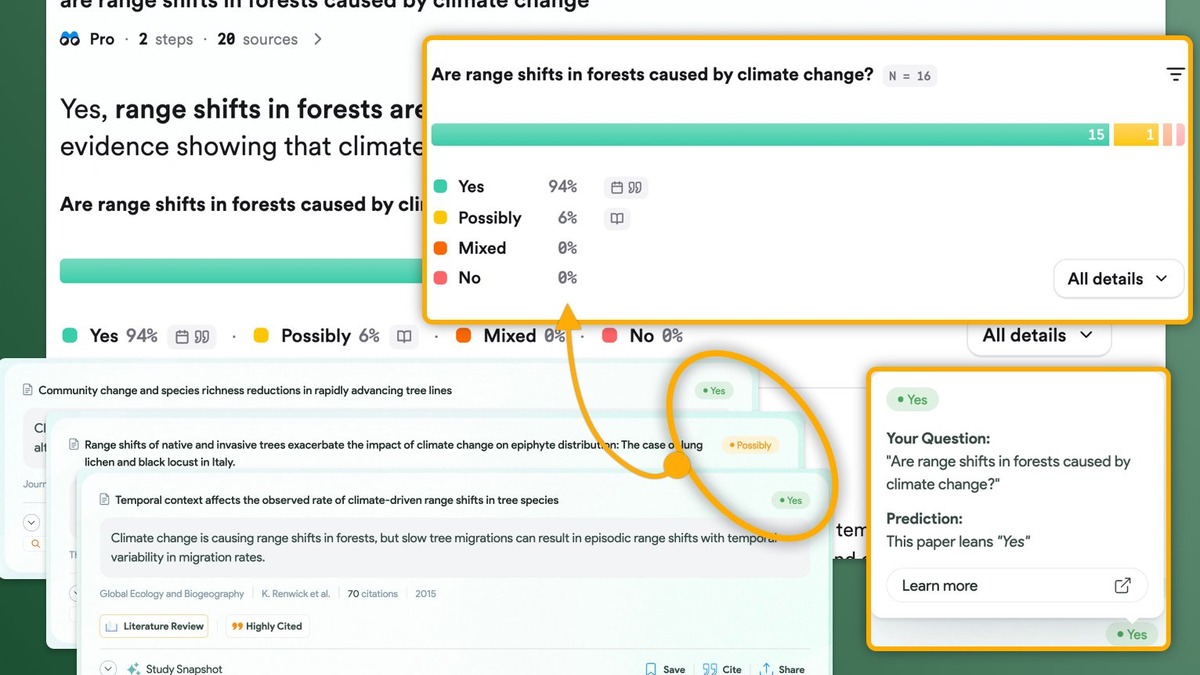 The Consensus Meter visually summarizes how research papers agree or disagree on a yes/no question.
Source: effortlessacademic.com
The Consensus Meter visually summarizes how research papers agree or disagree on a yes/no question.
Source: effortlessacademic.com
Consensus also offers a Medical Mode that restricts results to high-quality clinical sources - useful for anyone doing health-related research. The free tier covers basic searches. Premium unlocks Deep Search, which builds comprehensive search strategies and explores citation graphs automatically.
Writing With AI Assistance
AI can also help at the writing stage, though this is where academic integrity considerations become most important (more on that below).
Drafting and Editing Tools
Paperpal provides real-time editorial feedback on academic writing. It checks grammar, suggests discipline-appropriate vocabulary, and flags issues with academic tone. It's especially useful for non-native English speakers preparing manuscripts for publication.
Jenni AI is built for students and researchers who need help organizing their thoughts. It offers real-time citation suggestions as you write, structural recommendations, and an AI writing assistant that can expand outlines into full paragraphs. It doesn't write the paper for you - it helps you write it faster.
QuillBot focuses on paraphrasing and summarization. Its grammar checker and citation generator handle the mechanical parts of academic writing, letting you focus on the ideas. If you want to strengthen your prompting skills for any of these tools, our prompt engineering basics guide covers the fundamentals.
For quantitative research, AI can also help with the analysis stage. Our guide to AI for data analysis walks through tools that handle statistics, visualization, and interpretation.
Tools Comparison
| Tool | Best For | Papers Indexed | Free Tier | Paid Price |
|---|---|---|---|---|
| Semantic Scholar | Paper discovery, TLDR summaries | 220M+ | Full access (free) | N/A |
| Elicit | Systematic reviews, data extraction | 138M+ | Unlimited search, 2 reports/mo | From $7/mo |
| Consensus | Evidence synthesis, yes/no questions | 200M+ | Basic search | Premium available |
| SciSpace | Reading and understanding papers | 280M+ | Limited credits | From $20/mo |
| Research Rabbit | Visual discovery, ongoing collections | Via Semantic Scholar | Full access (free) | N/A |
| Connected Papers | Citation graph visualization | Via Semantic Scholar | 5 graphs/mo free | From $3/mo |
| Paperpal | Academic writing feedback | N/A | Basic editing | Premium available |
Academic Integrity - The Rules You Need to Know
AI tools for research raise legitimate questions about academic honesty. Most universities have updated their policies to address AI use, and the rules vary widely. Some allow AI tools for discovery and summarization but prohibit AI-generated text in submissions. Others require explicit disclosure of any AI assistance.
Three principles apply almost everywhere:
Disclose AI use. If your institution requires it (and increasingly they do), state which tools you used and how. "I used Elicit for literature search and data extraction" is usually acceptable. Submitting AI-created text as your own writing without disclosure isn't.
Verify everything. AI tools sometimes hallucinate - they produce plausible-sounding claims that aren't actually supported by the cited paper. Always read the original source before citing it. Our guide to AI hallucinations explains why this happens and how to catch it.
The thinking is yours. Use AI to find papers faster, extract data more efficiently, and polish your prose. The analysis, argumentation, and original contribution must come from you. A tool that helps you discover 50 relevant papers in an hour isn't cheating - it's efficient. A tool that writes your literature review for you crosses the line at most institutions.
Research published in 2026 by scholars studying AI and academic integrity found that students' own ethical beliefs - not institutional policies - are the strongest predictor of whether they use AI responsibly. The technology is moving faster than university policy can follow, so developing your own ethical framework matters more than memorizing rules.
A Practical Workflow
If you're starting a research project today, a solid AI-assisted workflow looks like this:
- Define your question clearly. AI tools work best with specific, well-formed research questions.
- Discover papers using Semantic Scholar or Research Rabbit. Start with 3-5 seed papers you already know are relevant.
- Map the field with Connected Papers to see how your seed papers relate to the broader literature.
- Extract data using Elicit. Set up custom columns for the variables that matter to your research question.
- Check the consensus on key claims using Consensus, especially for yes/no empirical questions.
- Read deeply with SciSpace for the 10-15 papers most central to your argument.
- Write and edit using Paperpal or your preferred writing tool, citing as you go.
- Verify all citations by checking that each cited paper actually says what you claim it says.
This workflow combines free tools (Semantic Scholar, Research Rabbit) with affordable paid ones (Elicit at $7/month). Total cost for a student: $0 to $29/month depending on which paid features you need. If you're also using AI to accelerate your learning process, our guide to using AI as a personal tutor pairs well with these research tools.
FAQ
What is the best free AI tool for academic research?
Semantic Scholar offers the most complete free experience - 220M+ papers, AI summaries, citation analysis, and recommendations at no cost. Research Rabbit is also entirely free for paper discovery.
Can I use AI tools for my thesis or dissertation?
Check your institution's specific policy first. Most universities allow AI for literature discovery and data extraction but require disclosure. Using AI to generate text that you submit as your own typically violates academic integrity policies.
Do AI research tools replace Google Scholar?
Not completely. Google Scholar still has broader coverage of books, patents, and legal documents. AI tools like Elicit and Consensus are better for structured evidence synthesis from peer-reviewed papers. Many researchers use both.
How accurate are AI paper summaries?
Generally reliable for main findings, but they can miss nuances or misrepresent limitations. Always read the abstract and methodology sections of papers you plan to cite. Treat AI summaries as a screening tool, not a substitute for reading.
Are these tools safe to use for medical or legal research?
For preliminary research, yes. For clinical decisions or legal advice, no. Consensus offers a Medical Mode with filtered sources, but AI-generated summaries should never replace consultation with qualified professionals or systematic review methodology.
How do I cite AI tools in my paper?
APA 7th edition recommends citing AI tools as software. For example: "Elicit (Version 2026) [AI research assistant]. https://elicit.com". Check your style guide and institution's requirements, as citation formats for AI tools are still evolving.
Sources:
- Semantic Scholar - AI-Powered Research Tool
- Elicit: The AI Research Assistant - Pricing
- Consensus: AI for Research
- SciSpace AI Research Agent
- ResearchRabbit: AI Tool for Smarter Literature Reviews
- Connected Papers - Find and Explore Academic Papers
- 12 Best AI Research Tools in 2026 - PapersFlow
- Reassessing Academic Integrity in the Age of AI - ScienceDirect
- Consensus AI: 2025 Review for Researchers - The Effortless Academic
✓ Last verified March 26, 2026

