
How to Make Music with AI - A Beginner's Guide
A practical guide to creating your first AI-generated song using Suno and Udio - no musical training or instruments required.
 9 min read
You don't need a piano, a recording studio, or years of music theory to create a real song in 2026. AI music tools have reached the point where you can go from a text description to a finished, vocals-and-all track in under a minute. I've spent the past few weeks experimenting with these tools, and this guide covers everything you need to get started - including the parts other guides skip, like who actually owns what you make.
TL;DR
- Start with Suno - free tier gives you 10 songs per day, no credit card needed
- A clear, specific text prompt is the whole skill; better prompts equal better songs
- You don't own the copyright to free-tier songs; commercial use requires a paid plan
- Takes about 15 minutes to create your first song, no musical skills needed
What These Tools Actually Do
AI music generators work like image generators, but for audio. You type a description - the genre, mood, tempo, instruments, and whether you want lyrics - and the model produces a complete audio file. No loops to arrange, no instruments to record.
The results in 2026 are genuinely impressive. Vocals hit the right rhythm. Chord progressions sound intentional. Genres translate accurately from text. A year ago you could reliably spot the artifacts; now you mostly can't.
Two platforms dominate the beginner space: Suno and Udio. We've done a full breakdown of both in our best AI music generators comparison if you want the detailed feature-by-feature analysis. This guide focuses on getting you from zero to your first song.
Tool 1: Suno - The Fastest Path to a Full Song
Suno is the right starting point for most people. It focuses on speed and simplicity: one prompt in, two song versions out, ready in under 60 seconds. We covered Suno in depth in our hands-on Suno review - the short version is it's the most beginner-friendly option available.
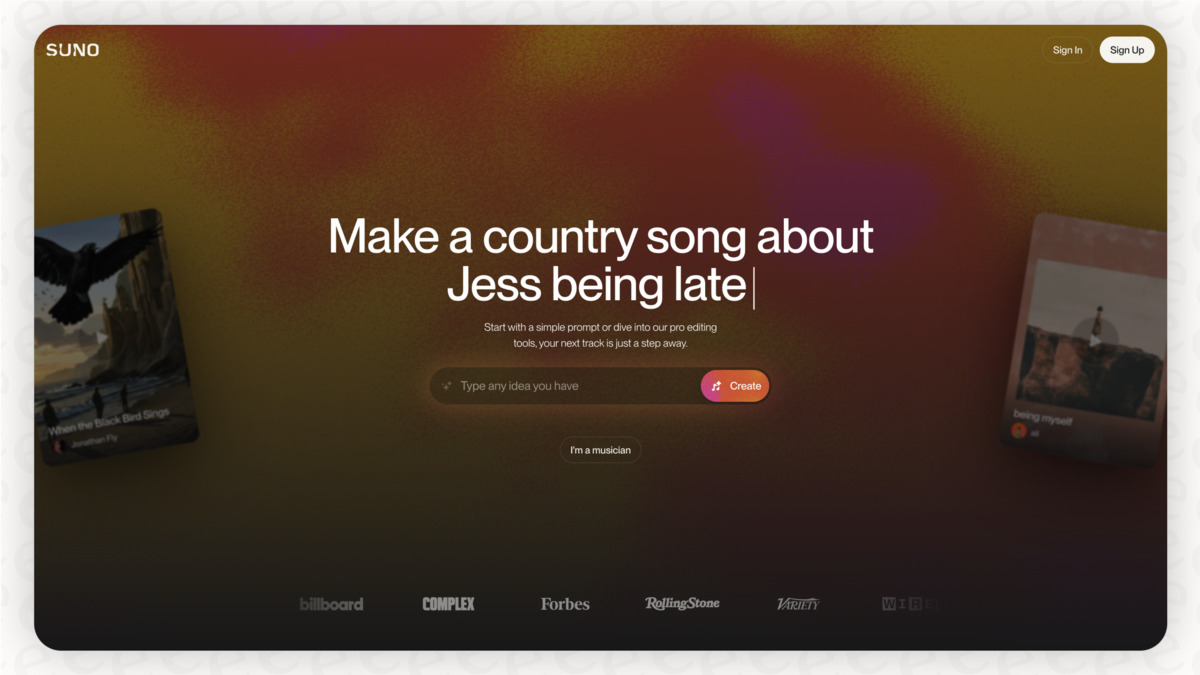 The Suno creation interface - genre, lyrics, and mood all in a single text prompt.
Source: eesel.ai
The Suno creation interface - genre, lyrics, and mood all in a single text prompt.
Source: eesel.ai
Creating Your Account
Go to suno.com and sign up with a Google, Apple, Microsoft, Discord, or phone number account. No credit card. The free plan gives you 50 credits per day, and each song generation costs 5 credits - that's 10 songs daily for free.
Understanding the Two Modes
Simple Mode is one text box, roughly 200 characters, and Suno does the rest. Pick genre, mood, and energy level. It'll write lyrics, choose instruments, and mix the track.
Custom Mode lets you write your own lyrics, specify a song title, and toggle instrumental vs. vocal. If you have a specific idea and want more control, this is where to go.
Writing a Good Prompt
The biggest difference between a mediocre result and a great one is your prompt. Vague prompts produce generic songs. Specific prompts produce songs that actually match what you imagined.
Bad prompt: "happy pop song"
Good prompt: "Upbeat pop-punk song about missing home, female vocals, driving guitar riff, mid-tempo, melodic chorus, bridge with key change, nostalgic and hopeful"
Think in layers: genre + mood + energy + instruments + vocal style. Each detail locks in something the model would otherwise guess.
In Custom Mode, use structure tags to organize your lyrics:
[Verse 1]
Your lyrics here...

[Chorus]
Hook line here...

[Bridge]
Emotional shift here...
Suno uses these tags to know where each section starts and ends. Without them, the model improvises the structure.
A Step-by-Step First Song
- Go to suno.com/create and make sure you're logged in
- Click Custom in the top right of the creation panel
- In the Style of Music field, type:
indie folk, acoustic guitar, warm, melancholic - In the Song Description field, type:
A quiet song about starting over, soft male vocals, fingerpicking guitar, verse-chorus-verse structure - Leave Instrumental unchecked unless you want no vocals
- Click Create and wait about 30-60 seconds
- You'll get two versions - listen to both and pick your favorite
If you don't love either version, click Retry with a tweaked prompt. Iteration is the normal workflow; most creators go through 3-5 generations before landing on something they want to keep.
Tool 2: Udio - More Control, More Depth
Udio is better suited for people who want to refine and edit. Its standout feature is Inpainting: if one section of a created track sounds wrong, you select just that section and regenerate it without touching the rest. That's closer to how audio editing actually works.
Udio also generates more emotionally convincing vocals on average. The tradeoff is a steeper learning curve than Suno.
Sign up at udio.com - it also uses Google or other social login. The free tier is limited but usable for testing the interface.
Basic Mode vs. Custom Mode
In Basic Mode, describe what you want - genre, mood, and any specific details - and Udio produces a track with lyrics and structure.
In Custom Mode, you define the lyrics yourself, specify a title, and describe the production style. Paid subscribers can also download separated stems (vocals, drums, bass, instrumentals) for use in a DAW like GarageBand or Ableton. As of early 2026, Udio was in a licensing transition period; check current download availability on their site before committing to a paid plan.
Genre Guide: Prompt Styles That Work
Different genres respond well to different prompt structures. These patterns produce consistent results across both platforms:
| Genre | Prompt Pattern |
|---|---|
| Hip-hop | boom bap beat, 90 BPM, male rapper, aggressive flow, dark piano sample |
| Lo-fi study | lo-fi hip-hop, slow, soft drums, vinyl crackle, mellow, no lyrics |
| Pop anthem | stadium pop, 120 BPM, big chorus, female vocals, synth-driven, uplifting |
| Cinematic | epic orchestral score, strings and brass, building tension, no lyrics |
| Indie folk | acoustic guitar fingerpicking, soft female vocals, intimate, storytelling |
| Electronic | hypnotic techno, 130 BPM, driving kick, minimal, dark atmosphere |
For instrumental tracks, always add "no lyrics" or "instrumental only" to the prompt. Otherwise, most models default to including vocals.
 Most people's entire AI music workflow fits in a browser tab and a pair of headphones.
Source: unsplash.com
Most people's entire AI music workflow fits in a browser tab and a pair of headphones.
Source: unsplash.com
Who Owns What You Create
This part trips up a lot of first-time users, so let's be direct about it.
On Suno's free tier: Suno retains ownership of the audio files. You can listen to them, share them, and use them for personal, non-commercial purposes. You can't legally sell them or use them in paid commercial projects.
On Suno's Pro or Premier plans: You're granted a commercial license to monetize your creations. Suno technically remains the author under their terms, but the practical effect is that you can sell your music or use it in paid work.
Copyright registration: The US Copyright Office doesn't grant copyright protection to AI-created audio without meaningful human creative input. If you write your own lyrics and structure the song using Custom Mode, you may have a stronger case for copyright on the lyric content - but the audio file itself is in a legal gray zone. Get proper legal advice before building a commercial music project on AI generation.
Suno v5 and licensed training data: In early 2026, Suno and Udio announced licensing agreements with major labels to train future models on properly licensed music. This resolves a long-running legal dispute and means newer model versions operate on cleaner legal ground.
Practical Use Cases for Beginners
You don't have to be an aspiring musician to get value from these tools. Here are the situations where beginners get the most out of AI music:
Background music for videos. If you make YouTube, TikTok, or any other kind of video content, you know the pain of finding royalty-free music that actually fits the vibe. Generating a custom track for each video takes two minutes and matches exactly what you need.
Podcast intro and outro music. Most podcast intros are generic library tracks. A custom AI-produced jingle that matches your show's tone takes one generation and a couple of retries.
Personal creative projects. Songwriting for fun, creating personalized gifts, making music for tabletop game sessions or D&D campaigns. No commercial stakes, no copyright concerns, just making something you enjoy.
Prototyping ideas. If you have musical ideas but can't play an instrument well enough to demo them, AI generation lets you hear rough versions quickly before you invest time in proper production.
The AI music space even reached the mainstream press in 2026 when an AI-produced metal band called Neon Oni racked up 80,000 Spotify followers before doing live performances. It's a sign of how fast the culture around this technology is moving.
Tips for Better Results
Describe the feeling, not just the genre. "Melancholic jazz" is fine. "Late-night jazz that feels like watching rain through a coffee shop window" gives the model more emotional texture to work with.
Specify what you don't want. "No electric guitar", "no auto-tune", "no drums" are all valid prompt elements and often matter as much as what you do want.
Use references sparingly. Prompts like "in the style of Radiohead" can work, but results vary. You're usually better off describing the sonic characteristics you associate with a reference rather than naming it directly.
Iterate fast. Each generation costs 5 Suno credits, which gives you 10 attempts per day on the free tier. Don't agonize over the first result - try a few variations with tweaked prompts and pick the best.
Keep a prompt log. When you find a combination that works well, save it. Genre + mood + instrument combos that produce reliably good results are worth documenting.
FAQ
Do I need any musical knowledge to use these tools?
No. You need to be able to describe what you want in plain language. If you can say "energetic hip-hop beat with heavy bass," you have everything required.
Can I use AI music in YouTube videos without getting flagged?
On Suno's paid plans, yes - you have a commercial license. On the free tier, stick to non-monetized personal use. Always check the platform's current terms, as these have been evolving.
How do I get longer songs?
Suno produces tracks of around 2-4 minutes by default. In Custom Mode on Pro plans, you can use the Song Editor to extend and rearrange sections. For even longer pieces, generate multiple sections separately and stitch them in a free editor like Audacity.
Is Udio better than Suno?
Depends what you need. Suno is faster and more beginner-friendly. Udio gives more control and generally better vocals. Our full comparison covers both in detail with sample outputs.
Can I mix AI music with my own recordings?
Yes. Export the AI track, import it into a DAW like GarageBand (free on Mac and iOS), and record on top of it. Many independent creators use this hybrid approach.
Sources:
- Suno: How to Make a Song
- The 2026 Suno AI Legal Guide: Do You Actually Own Your Songs?
- Udio AI Music Generator - Official Website
- Best AI Music Generators in 2026: Suno vs Udio vs ElevenLabs
- AI Music Copyright: Legal Risks Content Creators Must Know (2026)
- Suno enters the licensing era: Policy adjustments in 2026
✓ Last verified April 28, 2026

