
CUDA Programming - A Practical Guide for Software Engineers
A hands-on guide to CUDA programming for developers who know how to code but have never written a GPU kernel. Covers architecture, memory, real code examples, and Metal comparison.
 19 min read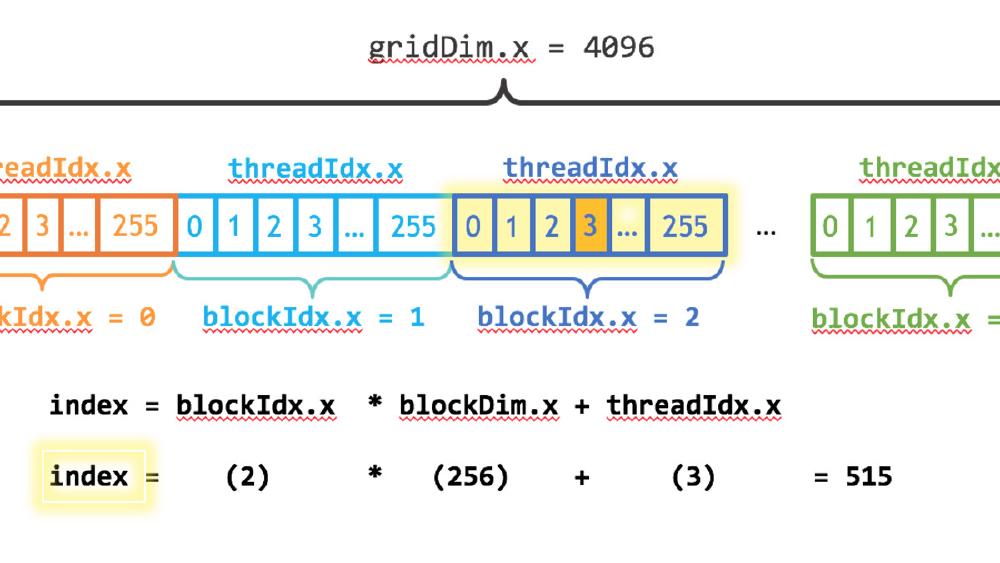
You know how to code. Maybe you've used PyTorch on a GPU. But you've never written a CUDA kernel, and the gap between "my training job uses a GPU" and "I understand what the GPU is actually doing" feels wide. This guide closes that gap with real, compilable code examples that build from hello-world to truly useful optimizations.
By the end, you'll understand why GPUs are fast, how CUDA exposes that speed, and how to write kernels that actually take advantage of the hardware. We'll also cover how Apple's Metal compares for macOS developers. If you develop on Apple Silicon, check out our companion Metal GPU programming guide for the full treatment.
Why GPUs Are Fast (and When They're Not)
A CPU is optimized for latency - making one thread run as fast as possible. A modern CPU has 8-32 large cores with deep pipelines, branch prediction, out-of-order execution, and big caches. Each core is a Swiss Army knife.
A GPU is optimized for throughput - running thousands of simple threads simultaneously. A NVIDIA RTX 4090 has 16,384 CUDA cores. A H100 has 16,896. Each core is simple compared to a CPU core, but the aggregate throughput is enormous.
The key insight: GPUs win when the same operation applies to many data elements independently. Matrix multiplication, convolutions, image processing, physics simulations - anything where you can say "do this same thing to every element" is a GPU workload.
GPUs lose when:
- Work is sequential (each step depends on the previous one)
- There's heavy branching (if/else that differs per thread)
- Data is small (the overhead of launching a kernel tops the compute time)
- Memory access is irregular (random reads scatter across DRAM)
The CUDA Programming Model
CUDA extends C/C++ with a few keywords. You write a function called a kernel, mark it with __global__, and launch it with a special <<<grid, block>>> syntax. The GPU executes that function across thousands of threads simultaneously.
Three concepts define the execution hierarchy:
- Thread: The smallest unit of execution. Each thread has a unique ID.
- Block: A group of threads (up to 1024) that can share memory and synchronize with each other.
- Grid: A collection of blocks that together execute one kernel launch.
Threads within a block execute on the same Streaming Multiprocessor (SM) and can cooperate via shared memory - fast on-chip SRAM. Threads in different blocks can't directly communicate.
Under the hood, threads are grouped into warps of 32. All 32 threads in a warp execute the same instruction at the same time (SIMT - Single Instruction, Multiple Threads). This is why branch divergence matters: if 16 threads in a warp take the if path and 16 take the else path, the warp executes both paths sequentially, wasting half its throughput.
Memory Hierarchy
Understanding GPU memory is more important than understanding compute. Most CUDA performance problems are memory problems.
| Memory Type | Size (H100) | Bandwidth | Latency | Scope |
|---|---|---|---|---|
| Registers | 256 KB per SM | Fastest | 0 cycles | Per thread |
| Shared memory | Up to 228 KB per SM | ~19 TB/s aggregate | ~20-30 cycles | Per block |
| L1 cache | Configurable w/ shared | High | ~30 cycles | Per SM |
| L2 cache | 50 MB | ~12 TB/s | ~200 cycles | All SMs |
| Global (HBM) | 80 GB | 3.35 TB/s | ~400-600 cycles | All threads |
The gap between registers and global memory is roughly 1000x in latency. Every optimization technique in CUDA - tiling, coalescing, shared memory usage - exists to keep data close to the compute units and avoid hitting global memory.
Example 1: Vector Addition (Hello World)
This is the simplest possible CUDA program. It adds two arrays element-by-element.
// vector_add.cu
// Compile: nvcc -o vector_add vector_add.cu
// Run:     ./vector_add

#include <stdio.h>
#include <stdlib.h>
#include <cuda_runtime.h>

__global__ void vectorAdd(const float *a, const float *b, float *c, int n) {
    int idx = blockIdx.x * blockDim.x + threadIdx.x;
    if (idx < n) {
        c[idx] = a[idx] + b[idx];
    }
}

int main() {
    int n = 1 << 20;  // ~1 million elements
    size_t bytes = n * sizeof(float);

    // Allocate host memory
    float *h_a = (float *)malloc(bytes);
    float *h_b = (float *)malloc(bytes);
    float *h_c = (float *)malloc(bytes);

    // Initialize
    for (int i = 0; i < n; i++) {
        h_a[i] = sinf(i) * sinf(i);
        h_b[i] = cosf(i) * cosf(i);
    }

    // Allocate device memory
    float *d_a, *d_b, *d_c;
    cudaMalloc(&d_a, bytes);
    cudaMalloc(&d_b, bytes);
    cudaMalloc(&d_c, bytes);

    // Copy host -> device
    cudaMemcpy(d_a, h_a, bytes, cudaMemcpyHostToDevice);
    cudaMemcpy(d_b, h_b, bytes, cudaMemcpyHostToDevice);

    // Launch kernel
    int blockSize = 256;
    int gridSize = (n + blockSize - 1) / blockSize;
    vectorAdd<<<gridSize, blockSize>>>(d_a, d_b, d_c, n);

    // Copy result device -> host
    cudaMemcpy(h_c, d_a, bytes, cudaMemcpyDeviceToHost);

    // Verify
    for (int i = 0; i < n; i++) {
        if (fabs(h_a[i] + h_b[i] - h_c[i]) > 1e-5) {
            printf("Mismatch at %d!\n", i);
            break;
        }
    }
    printf("Success! Added %d elements.\n", n);

    // Cleanup
    cudaFree(d_a); cudaFree(d_b); cudaFree(d_c);
    free(h_a); free(h_b); free(h_c);
    return 0;
}
What this teaches:
__global__marks a function as a kernel (runs on GPU, called from CPU)blockIdx.x * blockDim.x + threadIdx.xgives each thread a unique global index- The
if (idx < n)guard handles the case where the total threads launched tops the array size cudaMalloc/cudaMemcpy/cudaFreemanage GPU memory explicitly<<<gridSize, blockSize>>>launches the kernel with a specific grid and block configuration
For a million-element addition, the GPU won't be much faster than a CPU because this is memory-bound (one add per two loads). The GPU starts winning at tens of millions of elements and when the operation per element is more compute-intensive. Vector addition exists to teach the mechanics, not to demonstrate speedup.
Example 2: Matrix Multiplication (Naive vs Tiled)
Matrix multiplication is where GPUs truly shine. A naive implementation is simple but slow. A tiled implementation using shared memory demonstrates the most important CUDA optimization technique.
Naive version
// matmul_naive.cu
// Compile: nvcc -o matmul_naive matmul_naive.cu

#include <stdio.h>
#include <stdlib.h>
#include <cuda_runtime.h>

__global__ void matmulNaive(const float *A, const float *B, float *C,
                            int M, int N, int K) {
    int row = blockIdx.y * blockDim.y + threadIdx.y;
    int col = blockIdx.x * blockDim.x + threadIdx.x;

    if (row < M && col < N) {
        float sum = 0.0f;
        for (int k = 0; k < K; k++) {
            sum += A[row * K + k] * B[k * N + col];
        }
        C[row * N + col] = sum;
    }
}

int main() {
    int M = 1024, N = 1024, K = 1024;
    size_t bytesA = M * K * sizeof(float);
    size_t bytesB = K * N * sizeof(float);
    size_t bytesC = M * N * sizeof(float);

    float *h_A = (float *)malloc(bytesA);
    float *h_B = (float *)malloc(bytesB);
    float *h_C = (float *)malloc(bytesC);

    for (int i = 0; i < M * K; i++) h_A[i] = (float)(rand()) / RAND_MAX;
    for (int i = 0; i < K * N; i++) h_B[i] = (float)(rand()) / RAND_MAX;

    float *d_A, *d_B, *d_C;
    cudaMalloc(&d_A, bytesA);
    cudaMalloc(&d_B, bytesB);
    cudaMalloc(&d_C, bytesC);

    cudaMemcpy(d_A, h_A, bytesA, cudaMemcpyHostToDevice);
    cudaMemcpy(d_B, h_B, bytesB, cudaMemcpyHostToDevice);

    dim3 blockDim(16, 16);
    dim3 gridDim((N + 15) / 16, (M + 15) / 16);

    // Warm up
    matmulNaive<<<gridDim, blockDim>>>(d_A, d_B, d_C, M, N, K);
    cudaDeviceSynchronize();

    // Time it
    cudaEvent_t start, stop;
    cudaEventCreate(&start);
    cudaEventCreate(&stop);
    cudaEventRecord(start);

    matmulNaive<<<gridDim, blockDim>>>(d_A, d_B, d_C, M, N, K);

    cudaEventRecord(stop);
    cudaEventSynchronize(stop);
    float ms = 0;
    cudaEventElapsedTime(&ms, start, stop);

    float gflops = 2.0f * M * N * K / (ms * 1e6);
    printf("Naive matmul: %.2f ms, %.1f GFLOPS\n", ms, gflops);

    cudaFree(d_A); cudaFree(d_B); cudaFree(d_C);
    free(h_A); free(h_B); free(h_C);
    return 0;
}
The naive version works but wastes memory bandwidth. Each thread loads an entire row of A and column of B from global memory. For a 1024x1024 multiply, each element of A and B gets loaded from global memory 1024 times across different threads.
Tiled version with shared memory
// matmul_tiled.cu
// Compile: nvcc -o matmul_tiled matmul_tiled.cu

#include <stdio.h>
#include <stdlib.h>
#include <cuda_runtime.h>

#define TILE_SIZE 16

__global__ void matmulTiled(const float *A, const float *B, float *C,
                            int M, int N, int K) {
    __shared__ float tileA[TILE_SIZE][TILE_SIZE];
    __shared__ float tileB[TILE_SIZE][TILE_SIZE];

    int row = blockIdx.y * TILE_SIZE + threadIdx.y;
    int col = blockIdx.x * TILE_SIZE + threadIdx.x;
    float sum = 0.0f;

    for (int t = 0; t < (K + TILE_SIZE - 1) / TILE_SIZE; t++) {
        // Load tiles into shared memory
        if (row < M && t * TILE_SIZE + threadIdx.x < K)
            tileA[threadIdx.y][threadIdx.x] = A[row * K + t * TILE_SIZE + threadIdx.x];
        else
            tileA[threadIdx.y][threadIdx.x] = 0.0f;

        if (t * TILE_SIZE + threadIdx.y < K && col < N)
            tileB[threadIdx.y][threadIdx.x] = B[(t * TILE_SIZE + threadIdx.y) * N + col];
        else
            tileB[threadIdx.y][threadIdx.x] = 0.0f;

        __syncthreads();  // Wait for all threads to finish loading

        // Compute partial dot product from this tile
        for (int k = 0; k < TILE_SIZE; k++) {
            sum += tileA[threadIdx.y][k] * tileB[k][threadIdx.x];
        }

        __syncthreads();  // Wait before loading next tile
    }

    if (row < M && col < N) {
        C[row * N + col] = sum;
    }
}

int main() {
    int M = 1024, N = 1024, K = 1024;
    size_t bytesA = M * K * sizeof(float);
    size_t bytesB = K * N * sizeof(float);
    size_t bytesC = M * N * sizeof(float);

    float *h_A = (float *)malloc(bytesA);
    float *h_B = (float *)malloc(bytesB);
    float *h_C = (float *)malloc(bytesC);

    for (int i = 0; i < M * K; i++) h_A[i] = (float)(rand()) / RAND_MAX;
    for (int i = 0; i < K * N; i++) h_B[i] = (float)(rand()) / RAND_MAX;

    float *d_A, *d_B, *d_C;
    cudaMalloc(&d_A, bytesA);
    cudaMalloc(&d_B, bytesB);
    cudaMalloc(&d_C, bytesC);

    cudaMemcpy(d_A, h_A, bytesA, cudaMemcpyHostToDevice);
    cudaMemcpy(d_B, h_B, bytesB, cudaMemcpyHostToDevice);

    dim3 blockDim(TILE_SIZE, TILE_SIZE);
    dim3 gridDim((N + TILE_SIZE - 1) / TILE_SIZE, (M + TILE_SIZE - 1) / TILE_SIZE);

    // Warm up
    matmulTiled<<<gridDim, blockDim>>>(d_A, d_B, d_C, M, N, K);
    cudaDeviceSynchronize();

    // Time it
    cudaEvent_t start, stop;
    cudaEventCreate(&start);
    cudaEventCreate(&stop);
    cudaEventRecord(start);

    matmulTiled<<<gridDim, blockDim>>>(d_A, d_B, d_C, M, N, K);

    cudaEventRecord(stop);
    cudaEventSynchronize(stop);
    float ms = 0;
    cudaEventElapsedTime(&ms, start, stop);

    float gflops = 2.0f * M * N * K / (ms * 1e6);
    printf("Tiled matmul: %.2f ms, %.1f GFLOPS\n", ms, gflops);

    cudaFree(d_A); cudaFree(d_B); cudaFree(d_C);
    free(h_A); free(h_B); free(h_C);
    return 0;
}
What the tiled version teaches:
__shared__declares memory shared within a block - fast on-chip SRAM (~20-30 cycle latency vs ~400-600 for global memory)- The algorithm loads 16x16 tiles of A and B into shared memory, computes partial results, then moves to the next tile
__syncthreads()ensures all threads have finished loading before any thread starts computing - without this, threads would read partially-loaded tiles- Each element of A and B gets loaded from global memory once per tile, then reused 16 times from shared memory
- On a 1024x1024 multiply, the tiled version is normally 3-5x faster than naive on modern GPUs
The tiled approach reduces global memory traffic by a factor of TILE_SIZE. At TILE_SIZE=16, that's a 16x reduction in global memory loads. In practice, the speedup is less than 16x because of other bottlenecks, but it's still dramatic.
For comparison: cuBLAS reaches close to theoretical peak throughput because it uses much larger tile sizes, double buffering, register blocking, and tensor cores. Matching cuBLAS in a hand-written kernel is an extremely hard optimization problem - the wikiGPU GEMM guide documents 10+ stages of optimization to reach 93% of cuBLAS performance.
Example 3: Parallel Reduction (Sum)
Reduction - computing a single value from an array (sum, max, min) - is a fundamental parallel primitive. It demonstrates warp-level cooperation and why naive parallelism doesn't work.
// reduction.cu
// Compile: nvcc -o reduction reduction.cu

#include <stdio.h>
#include <stdlib.h>
#include <cuda_runtime.h>

// Warp-level reduction using shuffle instructions
__device__ float warpReduce(float val) {
    for (int offset = 16; offset > 0; offset >>= 1) {
        val += __shfl_down_sync(0xffffffff, val, offset);
    }
    return val;
}

// Block-level reduction: warp reduce then shared memory
__global__ void blockReduce(const float *input, float *output, int n) {
    __shared__ float shared[32];  // One slot per warp

    int idx = blockIdx.x * blockDim.x + threadIdx.x;
    int lane = threadIdx.x % 32;        // Thread index within warp
    int warpId = threadIdx.x / 32;      // Warp index within block

    // Each thread loads one element (or 0 if out of bounds)
    float val = (idx < n) ? input[idx] : 0.0f;

    // Reduce within each warp
    val = warpReduce(val);

    // First thread in each warp writes to shared memory
    if (lane == 0) {
        shared[warpId] = val;
    }
    __syncthreads();

    // First warp reduces the per-warp results
    if (warpId == 0) {
        val = (threadIdx.x < blockDim.x / 32) ? shared[lane] : 0.0f;
        val = warpReduce(val);
    }

    // Block result written by thread 0
    if (threadIdx.x == 0) {
        atomicAdd(output, val);
    }
}

int main() {
    int n = 1 << 24;  // ~16 million elements
    size_t bytes = n * sizeof(float);

    float *h_input = (float *)malloc(bytes);
    float h_output = 0.0f;

    // Fill with 1.0 so expected sum = n
    for (int i = 0; i < n; i++) h_input[i] = 1.0f;

    float *d_input, *d_output;
    cudaMalloc(&d_input, bytes);
    cudaMalloc(&d_output, sizeof(float));
    cudaMemcpy(d_input, h_input, bytes, cudaMemcpyHostToDevice);
    cudaMemset(d_output, 0, sizeof(float));

    int blockSize = 256;
    int gridSize = (n + blockSize - 1) / blockSize;

    cudaEvent_t start, stop;
    cudaEventCreate(&start);
    cudaEventCreate(&stop);
    cudaEventRecord(start);

    blockReduce<<<gridSize, blockSize>>>(d_input, d_output, n);

    cudaEventRecord(stop);
    cudaEventSynchronize(stop);
    float ms = 0;
    cudaEventElapsedTime(&ms, start, stop);

    cudaMemcpy(&h_output, d_output, sizeof(float), cudaMemcpyDeviceToHost);
    printf("Sum: %.0f (expected: %d)\n", h_output, n);
    printf("Time: %.3f ms, Bandwidth: %.1f GB/s\n",
           ms, n * sizeof(float) / (ms * 1e6));

    cudaFree(d_input); cudaFree(d_output);
    free(h_input);
    return 0;
}
What this teaches:
__shfl_down_sync(0xffffffff, val, offset)is a warp shuffle instruction. It lets threads within a warp read each other's registers directly - no shared memory needed, no synchronization overhead. The0xffffffffmask means all 32 threads participate.- The reduction proceeds in two phases: first within each warp (using shuffles), then across warps (using shared memory)
atomicAddlets multiple blocks contribute to a single output safely, but at a serialization cost- For 16 million FP32 elements, this kernel should approach the memory bandwidth limit of the GPU (~1 TB/s on a RTX 4090) because reduction is memory-bound: you read each element once and do almost no compute
A CPU reduction of 16M floats takes about 5-10ms. The GPU version runs in under 0.5ms on modern hardware - a 10-20x speedup. The speedup is entirely from memory bandwidth: HBM can deliver data faster than DRAM.
Example 4: Image Brightness (Practical Kernel)
A practical example: adjusting the brightness of a 8-bit RGB image on the GPU.
// brightness.cu
// Compile: nvcc -o brightness brightness.cu

#include <stdio.h>
#include <stdlib.h>
#include <cuda_runtime.h>

__global__ void adjustBrightness(unsigned char *image, int width, int height,
                                  int channels, float factor) {
    int x = blockIdx.x * blockDim.x + threadIdx.x;
    int y = blockIdx.y * blockDim.y + threadIdx.y;

    if (x < width && y < height) {
        int pixelIdx = (y * width + x) * channels;
        for (int c = 0; c < channels; c++) {
            float val = image[pixelIdx + c] * factor;
            // Clamp to [0, 255]
            image[pixelIdx + c] = (unsigned char)fminf(fmaxf(val, 0.0f), 255.0f);
        }
    }
}

int main() {
    int width = 3840, height = 2160, channels = 3;  // 4K RGB image
    size_t imageBytes = width * height * channels * sizeof(unsigned char);

    unsigned char *h_image = (unsigned char *)malloc(imageBytes);
    for (size_t i = 0; i < width * height * channels; i++) {
        h_image[i] = rand() % 256;
    }

    unsigned char *d_image;
    cudaMalloc(&d_image, imageBytes);
    cudaMemcpy(d_image, h_image, imageBytes, cudaMemcpyHostToDevice);

    dim3 blockDim(16, 16);
    dim3 gridDim((width + 15) / 16, (height + 15) / 16);

    cudaEvent_t start, stop;
    cudaEventCreate(&start);
    cudaEventCreate(&stop);
    cudaEventRecord(start);

    adjustBrightness<<<gridDim, blockDim>>>(d_image, width, height, channels, 1.5f);

    cudaEventRecord(stop);
    cudaEventSynchronize(stop);
    float ms = 0;
    cudaEventElapsedTime(&ms, start, stop);

    cudaMemcpy(h_image, d_image, imageBytes, cudaMemcpyDeviceToHost);
    printf("Processed 4K image (%dx%d, %d channels) in %.3f ms\n",
           width, height, channels, ms);

    cudaFree(d_image);
    free(h_image);
    return 0;
}
What this teaches:
- 2D grid/block dimensions with
dim3for spatial problems - Per-pixel independent operations are ideal GPU workloads
fminf/fmaxffor branchless clamping (avoids warp divergence that if/else would cause)- A 4K image has ~24 million bytes - large enough for the GPU to be substantially faster than CPU
On a modern GPU, this processes a 4K image in under 0.1ms. The same operation on a CPU takes 2-5ms. For video processing at 60fps (16.6ms per frame), having individual operations take 0.1ms instead of 5ms is the difference between real-time and impossible.
Error Handling
Every CUDA call can fail. In production code, you should check every return value. A common pattern:
#define CUDA_CHECK(call) do {                                    \
    cudaError_t err = call;                                      \
    if (err != cudaSuccess) {                                    \
        fprintf(stderr, "CUDA error at %s:%d: %s\n",            \
                __FILE__, __LINE__, cudaGetErrorString(err));    \
        exit(EXIT_FAILURE);                                      \
    }                                                            \
} while(0)

// Usage:
CUDA_CHECK(cudaMalloc(&d_ptr, bytes));
CUDA_CHECK(cudaMemcpy(d_ptr, h_ptr, bytes, cudaMemcpyHostToDevice));

// For kernel launches (which don't return errors directly):
myKernel<<<grid, block>>>(args);
CUDA_CHECK(cudaGetLastError());       // Check launch errors
CUDA_CHECK(cudaDeviceSynchronize());  // Check execution errors
Kernel errors are asynchronous - they don't surface until you synchronize or make another CUDA call. cudaGetLastError() catches launch configuration errors (too many threads, too much shared memory). cudaDeviceSynchronize() catches runtime errors (out-of-bounds access, illegal instructions).
Common Pitfalls
Forgetting to synchronize. cudaMemcpy implicitly synchronizes, but if you're timing kernels or checking results without a copy, you need explicit cudaDeviceSynchronize(). Without it, the CPU races ahead while the GPU is still working.
Out-of-bounds memory access. Unlike CPU code, GPU out-of-bounds reads silently return garbage and out-of-bounds writes silently corrupt other data. Use compute-sanitizer ./your_program (included in the CUDA toolkit) to detect these.
Warp divergence. If threads within a warp take different branches, both paths execute sequentially. For performance-critical code, restructure your data so threads in the same warp take the same path.
Occupancy traps. Using too many registers or too much shared memory per block reduces the number of concurrent blocks per SM, leaving compute units idle. Use --ptxas-options=-v during compilation to check resource usage, and cudaOccupancyMaxPotentialBlockSize to find best block sizes.
Memory coalescing. Threads in a warp should access consecutive memory addresses. If thread 0 reads address 0, thread 1 should read address 4 (next float), thread 2 should read address 8, and so on. Strided access patterns (thread 0 reads address 0, thread 1 reads address 1024) waste bandwidth by loading full cache lines for single elements.
CUDA vs Metal: A Comparison for macOS Developers
If you develop on Apple Silicon, Metal is your GPU compute API. For a full hands-on guide with compilable Metal examples, see our Metal GPU programming guide. Here's how the concepts map from CUDA:
| CUDA | Metal | Notes |
|---|---|---|
__global__ kernel | kernel function | Same concept |
| Thread block | Threadgroup | Same concept |
| Warp (32 threads) | SIMD-group (32 threads) | Apple GPUs also use 32-wide groups |
| Grid | Grid | Same concept |
threadIdx.x | thread_position_in_threadgroup | Passed via [[...]] attributes |
blockIdx.x * blockDim.x + threadIdx.x | thread_position_in_grid | Metal provides this directly |
__shared__ memory | threadgroup memory | |
__syncthreads() | threadgroup_barrier(mem_flags::mem_threadgroup) | |
cudaMalloc / cudaFree | device.makeBuffer() | Metal uses reference-counted objects |
<<<grid, block>>> syntax | Command queue + pipeline + encoder | Metal requires more boilerplate |
Side by side: vector addition
CUDA:
__global__ void vectorAdd(const float *a, const float *b, float *c, int n) {
    int idx = blockIdx.x * blockDim.x + threadIdx.x;
    if (idx < n) c[idx] = a[idx] + b[idx];
}
// Launch: vectorAdd<<<gridSize, blockSize>>>(d_a, d_b, d_c, n);
Metal Shading Language (MSL):
#include <metal_stdlib>
using namespace metal;

kernel void vectorAdd(device const float *a [[buffer(0)]],
                      device const float *b [[buffer(1)]],
                      device float *c       [[buffer(2)]],
                      uint idx              [[thread_position_in_grid]]) {
    c[idx] = a[idx] + b[idx];
}
The kernel code is nearly identical. The difference is on the host side: CUDA's <<<>>> launch syntax is 2 lines. Metal requires creating a command queue, command buffer, compute command encoder, setting buffers, dispatching threads, ending encoding, committing, and waiting - roughly 30-50 lines of Swift or Objective-C versus 5 lines of CUDA.
Where Metal differs
Unified memory. Apple Silicon shares memory between CPU and GPU. No cudaMemcpy needed - you write to a Metal buffer from the CPU and it's visible to the GPU (after a barrier). This removes one of the biggest CUDA pain points but means you can't overlap CPU computation with GPU-to-CPU transfers the same way.
No FP64. Metal doesn't support double precision. CUDA does, though consumer GPU FP64 throughput is 1/64 of FP32 (datacenter H100 is 1/2).
Less ecosystem. There's no Metal equivalent of cuBLAS, cuDNN, or cuFFT as standalone C/C++ libraries. Apple has the Accelerate framework (CPU-focused) and Metal Performance Shaders (MPS), but MPS coverage is narrower. PyTorch's MPS backend works but is incomplete - PYTORCH_ENABLE_MPS_FALLBACK=1 is the recommended setting to fall back to CPU for unsupported ops.
No multi-GPU. Apple Silicon has one GPU per SoC. No NVLink, no multi-GPU scaling.
Metal 4 (announced WWDC 2025) adds unified command encoders, native tensor types in MSL, and the ability to embed ML inference directly inside shaders. It's closing the gap, but CUDA's 19-year head start in ecosystem, tooling, and library coverage remains substantial.
When to use which
Use CUDA if: you're targeting datacenter GPUs, need maximum performance, need FP64, need multi-GPU scaling, need the library ecosystem (cuBLAS, cuDNN, TensorRT, NCCL), or are doing production ML training.
Use Metal if: you're building Mac/iOS apps, want unified memory without explicit transfers, care about power efficiency, are doing inference on models that fit in unified memory, or are processing media (images, video, audio) on Apple devices.
The unique advantage of Apple Silicon: unified memory up to 512 GB on M4 Ultra means you can load models that would require multiple NVIDIA GPUs. Running a 70B parameter model from a single address space with no PCIe bottleneck is something no NVIDIA consumer GPU can match. For the full Metal treatment with code examples, see the Metal GPU programming guide.
The CUDA Ecosystem
Once you understand kernels, you'll usually reach for libraries instead of writing everything yourself:
| Library | Purpose |
|---|---|
| cuBLAS | Dense linear algebra (GEMM, vector ops). What PyTorch/TensorFlow use internally. |
| cuDNN | Neural network primitives (convolution, attention, normalization, pooling). |
| cuFFT | Fast Fourier Transform. Drop-in replacement for FFTW. |
| Thrust | C++ parallel algorithms (sort, reduce, scan, transform) on GPU. STL-like API. |
| NCCL | Multi-GPU collective communication (AllReduce, AllGather). Powers distributed training. |
| TensorRT | Inference optimization (layer fusion, quantization, kernel auto-tuning). |
For profiling:
nsys profile -o timeline ./my_app        # System-wide CPU/GPU timeline
ncu --set full -o kernel ./my_app        # Deep per-kernel analysis
compute-sanitizer ./my_app               # Memory error detection
Nsight Systems (nsys) gives you the big picture: which kernels run when, where transfers happen, where the CPU is idle waiting for the GPU. Nsight Compute (ncu) gives you the deep dive: memory throughput, occupancy, warp stall reasons, roofline analysis for a specific kernel.
Triton: the higher-level alternative
If writing raw CUDA feels too low-level, Triton (by OpenAI) lets you write GPU kernels in Python. It handles shared memory management, coalescing, and barrier insertion automatically. You think about tiles and blocks rather than individual threads.
Triton matrix multiply kernels achieve cuBLAS-level performance in roughly 25 lines of Python. It supports both NVIDIA and AMD GPUs. The tradeoff: you give up fine-grained control over warp-level optimizations.
Where to Go From Here
The examples in this guide cover the core patterns: element-wise operations, tiled matrix math, reduction, and 2D image processing. From here:
- Read the official CUDA C++ Programming Guide - it's the conclusive reference
- Profile before you optimize - use Nsight Systems to find the actual bottleneck before writing shared memory code
- Start with libraries - cuBLAS and cuDNN exist because writing high-performance GEMM and convolution kernels is genuinely hard
- Try Triton if you want GPU programming without managing thread-level details
- For a deep dive into matrix multiply optimization, the CUDA GEMM optimization guide walks through every stage from naive to near-cuBLAS performance
The gap between "I know what a GPU does" and "I can write a kernel" is smaller than it looks. The gap between "my kernel works" and "my kernel is fast" is where the real learning happens. Start with correct, then make it fast.
Sources:
- CUDA C++ Programming Guide - NVIDIA
- CUDA C++ Best Practices Guide - NVIDIA
- An Even Easier Introduction to CUDA - NVIDIA Developer Blog
- CUDA by Example (Book)
- CUDA GEMM Optimization - Simon Boehm
- Introduction to Compute Programming in Metal - Metal by Example
- Apple Metal Shading Language Specification
- Triton Language Documentation
- Nsight Compute Documentation - NVIDIA
